How to Learn AI Programming From Scratch (2026)
To learn AI programming, you need a clear order to learn things in. Without one, it's easy to jump from video to video and never build anything.
This guide gives you that order. You'll see five stages, what each one teaches, and a short code example from each one. By the end, you'll know what to learn first, what you'll be able to build at each step, and how much time to plan for.
You don't need any coding experience to read this guide. If you've already started learning, you can jump straight to the stage you're on.
Table of Contents
- What is AI programming?
- What do you need before you start?
- Where do the five stages come from?
- How do you learn AI programming, step by step?
- How should you practice so it sticks?
- How do you know you're ready for the next stage?
- Which way of learning fits you?
- How long does it take to learn AI programming?
- Your next steps
- Frequently asked questions
What is AI programming?
AI programming means writing code that uses artificial intelligence (AI) to get a job done. That job might be answering a question, sorting incoming messages, or finding the right document in a big pile.
There are two main ways to do it. In the first, you use a model that someone else has already trained. A model is a program that has learned patterns from a huge amount of data. Your code can send it some text and get a useful answer back.
In the second, you train a model yourself. You give it examples, it finds the patterns in them, and then it can make predictions about new data it hasn't seen before. This is called machine learning (ML).
Two terms come up again and again when you use models. A large language model (LLM) is the kind of model behind chat tools, trained on so much text that it can answer questions and write. An API (application programming interface) is a way for your code to talk to another program, often over the internet.
| Kind | What you write | Example | Tools you'll meet |
|---|---|---|---|
| Using models | Code that sends text to a model and uses the answer | A helper that sums up study notes | Python, a large language model API, FastAPI |
| Training models | Code that teaches a model from examples | A program that tags a note with its topic | Python, pandas, scikit-learn, PyTorch |
Our AI Engineer in Python path teaches you to use models first. Sending text to an LLM takes just a few lines of Python, so you can build a working app before you learn any statistics. From there, you move on to training your own models.
Some tools in the table, like PyTorch, are built for deep learning, which is a type of machine learning. If you're curious how the two differ, read our guide to the difference between deep learning and machine learning.
What do you need before you start?
You need less than you might think. You don't need a degree, and you don't need to be good at math to start. You'll pick up the math you need, like some statistics and other basics, when you get to training models.
You do need to learn Python, but you don't need to know it yet. Our AI Engineer in Python path starts from the basics, and nearly every tool in the table above is built for Python. Developers use it a lot, too. In the Stack Overflow 2025 Developer Survey, 57.9% of developers who answered said they'd done extensive work in Python over the past year.
You'll also need a little money for model calls once you reach Stage 2, because services like OpenAI charge for each call. They charge by the token, which is a small chunk of text, often a word or part of a word. OpenAI's pricing page lists prices per million tokens and doesn't have a free tier for its API.
Small practice projects use so few tokens that they usually cost very little. Still, it's worth setting a hard spending limit before you start, so a bug in your code can't run up a surprise bill.
| Need now | Can wait |
|---|---|
| A computer that can run Python. A normal laptop is enough for the early stages. | A powerful graphics card. You won't need one to start. |
| About 5 hours a week. Short, steady sessions are easier to keep up than long, rare ones. | Calculus and linear algebra. You'll meet them later, in small doses. |
| Time to learn Python first. Every later stage builds on it. | An API key. This is a private password that lets your code use a paid model. You'll need one in Stage 2. |
You might wonder if you need Python at all, now that AI tools can write code for you. You do, because someone still has to read that code, fix it, and connect it to real data. We cover what Python you need for AI in a separate guide.
Where do the five stages come from?
The five stages in this guide follow the order of our AI Engineer in Python path. A path is a set of courses you take in a fixed order, so you always know what to learn next. This one is split into 11 parts, and each part is made up of a few short, interactive courses that you take in your browser.
To make the big picture easier to see, we grouped those parts into five stages. The table below shows which parts belong to each stage.
| Stage | Parts of the path |
|---|---|
| 1. Learn Python basics | Part 1 Python Introduction, Part 2 Intermediate Python |
| 2. Talk to a model from your code | Part 3 LLM Fundamentals |
| 3. Turn it into an app | Part 4 AI Application Development |
| 4. Learn the data and ML underneath | Parts 5 to 9, from Data Analysis and Visualization to Deep Learning Foundations |
| 5. Give the model your own data | Part 10 Embeddings and Vector Databases, Part 11 RAG Systems |
How do you learn AI programming, step by step?
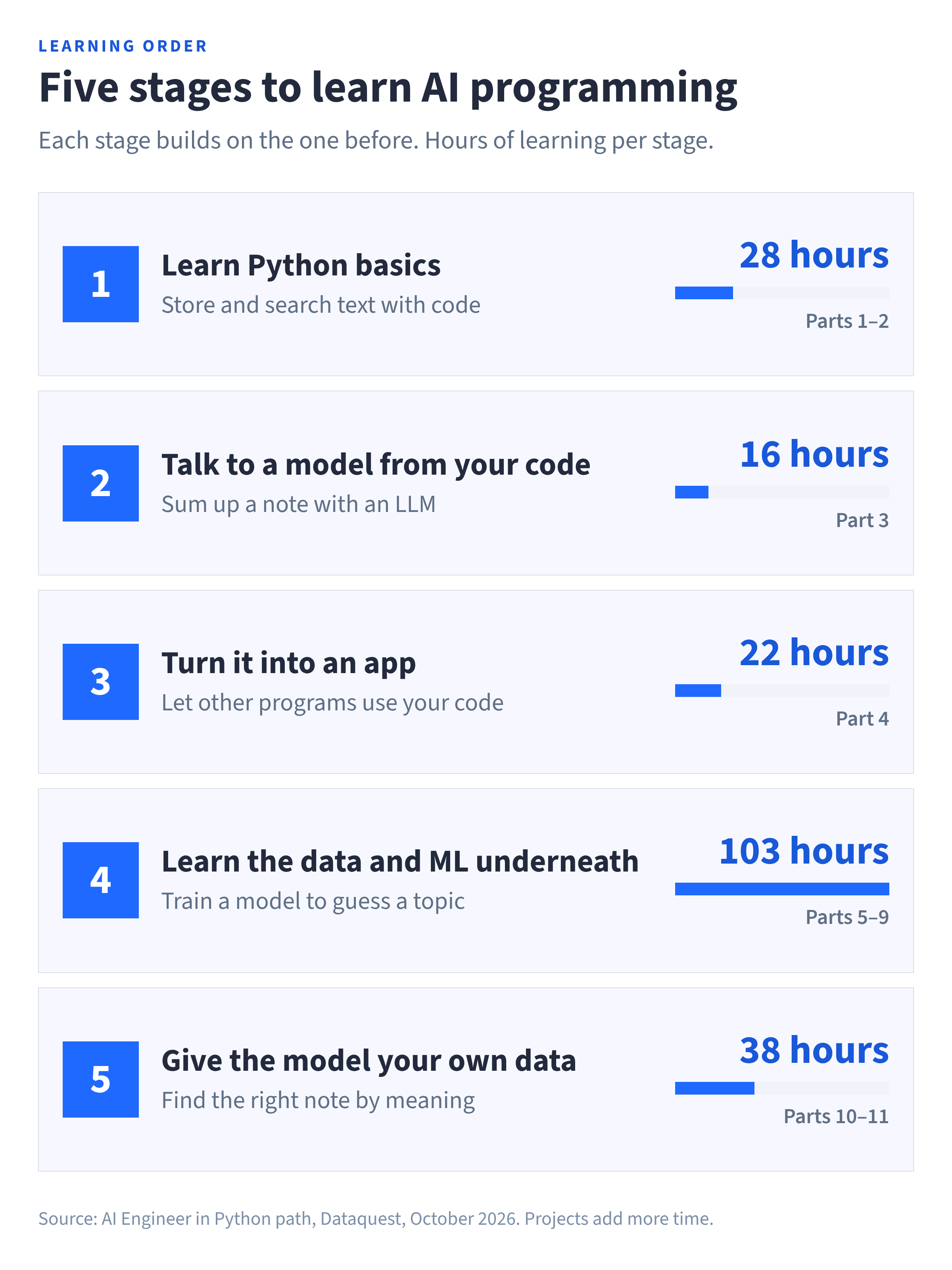
You learn AI programming in five stages, and each one builds on the stage before it. The graphic below shows the whole journey, with the hours of learning in each stage.
A preview of what you'll be able to write: a study notes helper
Each stage below previews code from one example, a study notes helper. It starts as a simple keyword search over a few sample notes and grows a little at every stage. By Stage 5, it can answer questions about the notes.
Don't worry if the code looks unfamiliar. Each example is a preview of what you'll be able to write after that stage of the path. A short explanation under each one tells you what the code does.
| After stage | The helper can… |
|---|---|
| 1 | Store your notes and find the ones that contain a word |
| 2 | Sum up a note in one sentence, using an LLM |
| 3 | Do that as a small web app other programs can use |
| 4 | Guess a new note's topic, using a model it trained itself |
| 5 | Find the note that answers your question, even if the words don't match, then answer from it |
Stage 1: Learn Python basics
Stage 1 covers Part 1 (Python Introduction) and Part 2 (Intermediate Python), which together take about 28 hours of learning.
You start with the building blocks that every program uses. Variables hold values, lists hold several values in order, and loops repeat a step for each item in a list. Then you learn dictionaries, which store pairs of things like a note's title and its text. Functions let you name a block of code and run it again whenever you need it.
You'll also set up the tools developers use every day, because you'll need them in every later stage. Tools like the command line let you run programs, and Git saves versions of your code so you can undo a mistake. Virtual environments keep each project's packages separate, so one project can't break another.
After this stage, you'll be able to write the first version of the notes helper.
notes = {
    "python lists": "A list stores items in order. You can add an item with append().",
    "photosynthesis": "Plants use sunlight, water, and carbon dioxide to make sugar.",
    "french revolution": "The French Revolution began in 1789 and changed how France was ruled.",
}

def search_notes(keyword):
    matches = []
    for title, text in notes.items():
        if keyword.lower() in text.lower():
            matches.append(title)
    return matches

print(search_notes("sunlight"))['photosynthesis']What this code does
The notes dictionary holds three sample notes, each with a title and some text. The search_notes() function checks every note for the word you give it, ignoring capital letters, and returns the titles of the notes that match. That's why searching for "sunlight" finds the photosynthesis note.
For more on this stage, read the best way to learn Python.
Stage 2: Talk to a model from your code
Stage 2 covers Part 3 (LLM Fundamentals), which takes about 16 hours of learning.
This is where your code starts working with AI. You learn to send text to an LLM and use the reply in your program. You also learn to write clear instructions, called prompts, because the way you ask changes the answer.
Two more skills make your programs work well. The first is keeping track of a conversation, so the model remembers what was said earlier in a chat. The second is tool use, which lets a model ask your code to run a task, like a search, and use the result.
After this stage, you'll be able to have the helper ask a model to sum up a note in one sentence. The example uses OpenAI's Chat Completions API, which is the same API the path teaches.
import os
from openai import OpenAI

client = OpenAI(api_key=os.environ["OPENAI_API_KEY"])

def summarize(note):
    response = client.chat.completions.create(
        model="gpt-6-luna",
        messages=[
            {"role": "system", "content": "Sum up the study note in one short sentence."},
            {"role": "user", "content": note},
        ],
    )
    return response.choices[0].message.content

print(summarize(notes["photosynthesis"]))
What this code does
First, it connects to OpenAI using your API key, which it reads from an environment variable. That's a setting stored on your computer, so the key never appears in your code where someone could copy it.
The summarize() function then sends the model two messages. One tells the model what job to do, and the other is the note itself. The model sends back a one-sentence summary.
With the same skills, you could build a chatbot, a summarizer, or a script that pulls key facts out of messy text.
Stage 3: Turn it into an app
Stage 3 covers Part 4 (AI Application Development), which takes about 22 hours of learning.
Up to this point, code like the helper only runs when you start it on your own computer. In this stage, you learn to turn code like it into a web app that other programs can use. You build a web API with FastAPI, a Python tool made for this job. Then a web page, a phone app, or another program can send it a note and get a summary back.
You'll also learn to package your app with Docker, so it runs the same way on other computers. After that, you'll try open models from Hugging Face, which are models you can download and run yourself instead of paying for each call.
After this stage, you'll be able to wrap the helper's summarizer in a small FastAPI app.
from fastapi import FastAPI
from pydantic import BaseModel

app = FastAPI()

class Note(BaseModel):
    text: str

@app.post("/summarize")
def summarize_note(note: Note):
    return {"summary": summarize(note.text)}
What this code does
It creates an app with one address, called an endpoint, at /summarize. The Note class describes what the app expects to receive, which is some text. When another program sends a note to that address, the app runs the summarize() function from Stage 2 and sends the summary back.
Stage 4: Learn the data and ML underneath
Stage 4 covers Parts 5 to 9 of the path, which take about 103 hours of learning. It's the longest stage, and it's worth the time.
Up to now, you've used a model someone else trained. This stage shows you how models learn, so you can tell when one is wrong and why.
You start with data, using pandas and NumPy, two Python libraries (ready-made code you can use) for cleaning and exploring it. Next come statistics and probability, which help you judge whether a result is real or just luck.
Then you train your own models with scikit-learn, a Python library for machine learning. You'll learn to test a model on data it hasn't seen yet, because that's a fair way to check whether it really works. The stage ends with deep learning in PyTorch, plus short courses on the calculus and linear algebra behind it all.
After this stage, you'll be able to train a small model that guesses a note's topic. Three notes are too few to learn from, so this example uses six short practice examples instead.
from sklearn.feature_extraction.text import CountVectorizer
from sklearn.naive_bayes import MultinomialNB

texts = [
    "A list stores items in order",
    "A dictionary maps keys to values",
    "A for loop repeats a block of code",
    "Plants use sunlight to make sugar",
    "Cells need water and energy to grow",
    "Leaves take in carbon dioxide from the air",
]
topics = ["coding", "coding", "coding", "science", "science", "science"]

vectorizer = CountVectorizer()
word_counts = vectorizer.fit_transform(texts)

model = MultinomialNB()
model.fit(word_counts, topics)

new_note = ["A function is a block of code you can reuse"]
print(model.predict(vectorizer.transform(new_note)))['coding']What this code does
Each of the six examples comes with a topic label, either "coding" or "science." CountVectorizer() turns each example into word counts, because a model works with numbers rather than words. The model then learns which words tend to appear with each topic, so when it sees a new note about functions and code, it guesses "coding."
Six examples are far too few for a real model, but they're enough to show the idea. To see where this stage can lead, read our machine learning roadmap.
Stage 5: Give the model your own data
Stage 5 covers Part 10 (Embeddings and Vector Databases) and Part 11 (RAG Systems), which together take about 38 hours of learning.
On its own, an LLM only knows what it learned during training, so it has never seen your notes. This stage teaches you how to hand it the right information at the moment it needs it.
First, you learn embeddings. An embedding turns a piece of text into a vector, which is a list of numbers that captures its meaning. Texts that mean similar things get similar vectors. You store these vectors in a vector database, which can quickly find the closest match to any text you provide.
Then you put it all together with retrieval-augmented generation (RAG). With RAG, your code first finds the most useful note, then gives it to the model along with the question. You'll also learn to measure whether your system found the right note, so you can tell whether a change made it better or worse.
After this stage, you'll be able to have the helper find the note that best matches a question. The example uses the sentence-transformers library and ChromaDB, which are tools the path uses.
import chromadb
from sentence_transformers import SentenceTransformer

embedder = SentenceTransformer("all-MiniLM-L6-v2")
collection = chromadb.Client().create_collection("notes")

collection.add(
    ids=list(notes.keys()),
    documents=list(notes.values()),
    embeddings=embedder.encode(list(notes.values())).tolist(),
)

question = "How do plants make food?"
result = collection.query(
    query_embeddings=embedder.encode([question]).tolist(),
    n_results=1,
)

found = result["ids"][0][0]
print(found)
print("Found the right note:", found == "photosynthesis")
photosynthesis
Found the right note: TrueWhat this code does
The embedder turns each note into numbers that capture its meaning, and ChromaDB stores them. Your question is turned into numbers the same way, and ChromaDB finds the note whose numbers are closest. The last line checks that it picked the note you expected.
Notice that the question never uses the word "photosynthesis," yet the helper still finds the right note. That's the difference between searching by meaning and the word search from Stage 1.
The final step is to hand that note and the question to the model, so it answers from your note instead of from memory.
best_note = result["documents"][0][0]

response = client.chat.completions.create(
    model="gpt-6-luna",
    messages=[
        {"role": "system", "content": "Answer using only the note you are given."},
        {"role": "user", "content": f"Note: {best_note}\n\nQuestion: {question}"},
    ],
)
print(response.choices[0].message.content)
What this code does
It sends the note that ChromaDB found to the model, along with your question. The first message tells the model to answer using only that note. That keeps the answer tied to the notes instead of whatever the model remembers.
By the end of Stage 5, you'll be able to build a helper that answers questions from your own documents and checks its search.
How should you practice so it sticks?
Watching someone code feels like learning, but it rarely sticks on its own. Skills stick when you use them, so try this routine each time you meet a new piece of code. The path's in-browser lessons give you new code to try it on every time you study.
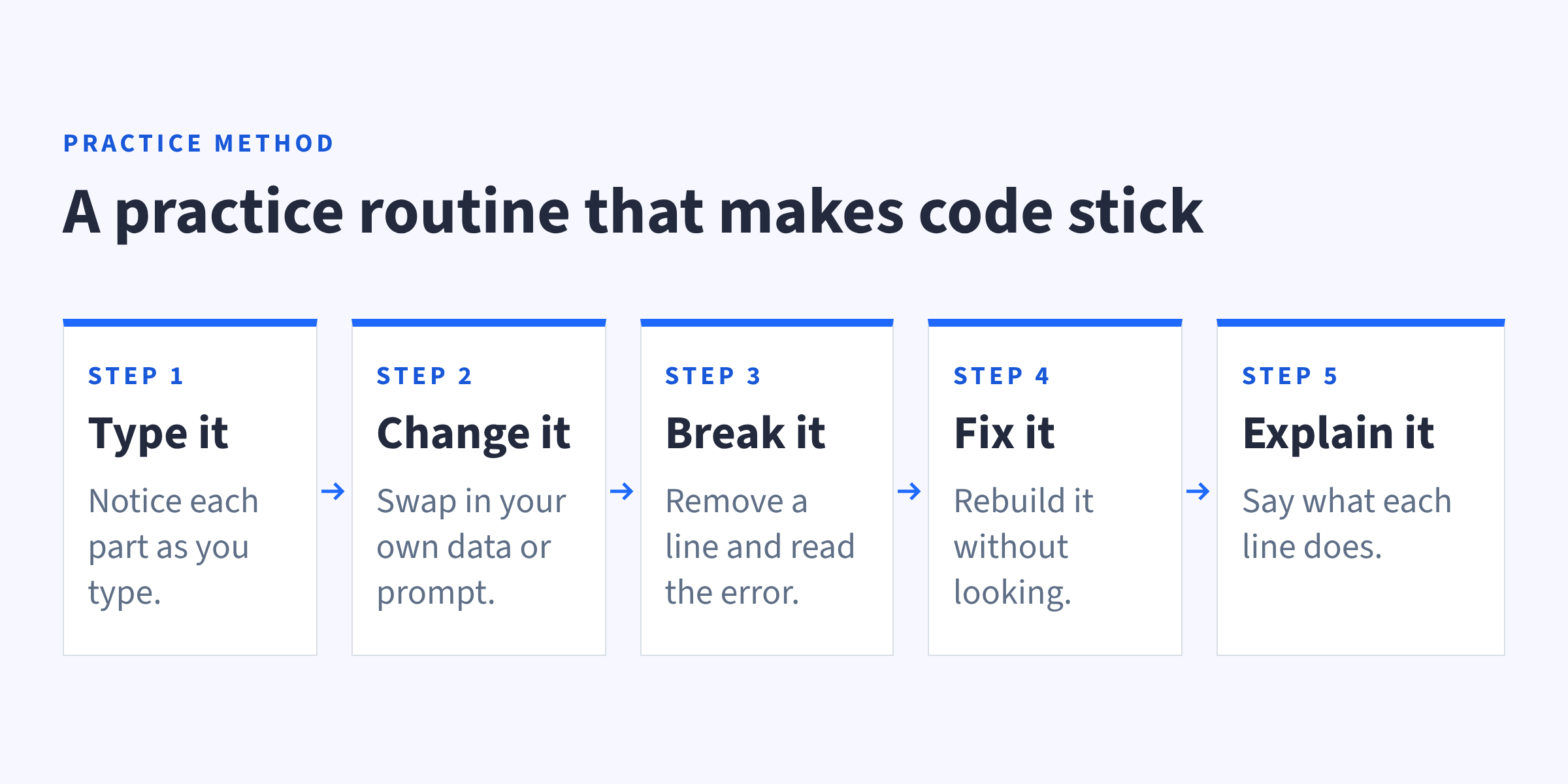
- Type it. Typing code by hand makes you notice each part, instead of skimming past it.
- Change it. Swap in your own data or a new prompt, and watch what changes. You'll quickly see which parts matter.
- Break it. Remove a line on purpose and read the error message. Once you've caused an error yourself, you'll recognize it when it happens by accident.
- Fix it. Put the code back together without looking at the answer. This shows you what you really know.
- Explain it. Say what each line does, out loud or in a comment. If you can't explain a line, that's the next thing for you to learn.
AI chat tools can help with this routine, as long as you use them like a tutor. Ask them why something works, not just for the answer. If you paste in code you can't explain, you've skipped the part that teaches you.
It also helps to pick one small project of your own and grow it as you learn, the way the notes helper grows. A small project you finish usually teaches you more than a big one you abandon halfway through. When you're ready for more, browse these machine learning project ideas.
How do you know you're ready for the next stage?
It's hard to tell when you've learned enough to move on. Finishing a course is one sign, but being able to build something on your own is a better one.
Use these checks. If you can do each one without copying from a tutorial, you're ready for the next stage.
| Stage | You're ready to move on when you can… |
|---|---|
| 1. Learn Python basics | Write a function that loops over a dictionary and returns what it finds |
| 2. Talk to a model from your code | Get a reply from a model, keep a short chat going, and explain what a token is |
| 3. Turn it into an app | Run your own API on your computer and send it a request from another program |
| 4. Learn the data and ML underneath | Train a model, test it on data it hasn't seen, and explain its mistakes |
| 5. Give the model your own data | Find the right document for a question and check if your system got it right |
If a check feels shaky, spend a day or two going back over that stage's lessons and projects, then try the check again. A gap is much easier to fix now than three stages later.
You don't need to be perfect at a stage before you move on. You'll keep using these skills in every later stage, and they'll get stronger as you go.
Which way of learning fits you?
There are a few ways to learn AI programming, and the right one depends on your time, your budget, and how much structure you want.
| Option | Good for | Watch for | Cost |
|---|---|---|---|
| Free docs and tutorials | Self-starters who like to explore | No set order, so it's easy to leave gaps | Free, but model API calls still cost money |
| A short skill path | Adding AI to the job you have now | It covers the basics, not every stage | Often a paid subscription |
| A full career path | Going from zero to building full AI apps | It takes months of steady work | Often a paid subscription |
| A degree | Research roles and deep theory | Takes years | Tuition and textbooks |
Free resources are a good way to try things out before you commit. The official Python tutorial is free and written by the people who make Python, although it assumes you know some basic programming.
If you mainly want to use AI in the job you have now, a short path may be all you need. Our Generative AI Fundamentals in Python path takes about 2 months at 5 hours a week. It covers Python basics, APIs, and working with LLMs, which lines up with most of Stages 1 and 2.
If you want to build full AI apps, a career path like our AI Engineer in Python path covers all five stages in one place. That way, you never have to guess what comes next.
How long does it take to learn AI programming?
The AI Engineer in Python path is built to take about 11 months at 5 hours a week, starting with no coding experience. That covers all five stages in this guide.
| Stage | Path parts | Hours of learning |
|---|---|---|
| 1. Learn Python basics | 1 and 2 | About 28 |
| 2. Talk to a model from your code | 3 | About 16 |
| 3. Turn it into an app | 4 | About 22 |
| 4. Learn the data and ML underneath | 5 to 9 | About 103 |
| 5. Give the model your own data | 10 and 11 | About 38 |
Hours come from the course times listed on the path page. Projects and review take extra time.
Two things change your own timeline. The first is how many hours you can give each week, and the second is what you already know. If you've done some Python, for example, Stage 1 will go faster. Whatever your pace, expect Stage 4 to take the longest, since it holds about half of all the hours of learning.
Five hours a week can be split up in many ways. Here's one example you can shift to fit your week.
| Day | Time | What to do |
|---|---|---|
| Monday | 1 hour | Work through new lessons |
| Wednesday | 1 hour | More lessons, then try the practice routine on one example |
| Friday | 1 hour | Finish the week's lessons |
| Weekend | 2 hours | Work on a small project of your own |
The longer weekend session matters a lot, because it's where you use the week's skills without step-by-step help. That's when they start to stick. If you're thinking about AI as a career, our guide on how to get into AI covers routes, roles, and the job market.
Your next steps
Learning AI programming comes down to five stages, taken in order.
- Learn Python basics so you can write and read code.
- Talk to a model from your code by sending it text through an API.
- Turn it into an app that other programs can use.
- Learn the data and ML underneath so you understand how models learn.
- Give the model your own data with embeddings and RAG.
Our AI Engineer in Python path follows this same order, so you always know what to learn next. It has 33 courses and 21 projects, and you learn by writing code in your browser. If you'd like to see this skill set as a job, read how to become an AI engineer.
Frequently asked questions
How long does it take to learn AI programming from scratch?
It depends on how much time you have each week and what you already know. The AI Engineer in Python path is built for about 11 months at 5 hours a week, starting with no coding experience. If you already know some Python or can study more each week, you can move faster.
Can I learn AI programming if I'm not good at math?
Yes, you can start without strong math skills. In the AI Engineer in Python path, statistics and probability don't start until later in the path, after you've already built AI apps.
Calculus and linear algebra each get one course of about 2 hours. They cover the math behind machine learning, like how a model improves step by step.
Should I learn machine learning before I build with LLMs?
Either order can work. The AI Engineer in Python path puts LLMs first because you can build something useful sooner, and that early win can keep you going.
Learning ML first gives you a deeper base before you build. Both orders end in the same place, as long as you learn both.
Do I need a powerful computer or a GPU?
Not to start. A GPU (graphics processing unit) is a chip that speeds up some kinds of math. Python, API calls, and small models run fine on a normal laptop, and a GPU only starts to help later, when you train bigger deep learning models or run large open models yourself.
When you get there, you don't need to buy one. Free tools like Google Colab let you use a GPU in your browser, though free GPU time is limited and not always available. For bigger jobs, cloud services let you rent more powerful GPUs by the hour.
Can I use a language other than Python?
You can, since some AI tools also work with JavaScript, Java, or C#. But many of the main AI libraries, like PyTorch, scikit-learn, and Hugging Face's tools, are built for Python first. That means you'll find tutorials, examples, and answers to your questions in Python more easily, which makes it a simple place to start.
You can pick up a second language later if your work needs it.
How much does it cost to call an AI model while I'm learning?
It depends on the model and how much text you send. OpenAI's models page lists GPT-6 Luna at $0.10 per million input tokens and $0.50 per million output tokens. Check your usage often while you're learning.
Is AI programming the same as using AI to help me code?
No, they're different skills. Using AI to help you code means asking a chat tool to write or fix code for you. AI programming means writing code that uses AI inside your own app, and learning it can also help you check the code an AI tool writes for you.