
10 Data Analysis Tools For Entry-Level Analysts
Search "data analysis tools" and you'll find lists of 15, 20, even 24 tools you're apparently supposed to know. It's a lot, and if you're trying to figure out where to actually start, those lists often make things more confusing, not less.
Here's what those lists don't tell you: a typical data analyst job posting looks nothing like the day-to-day reality of the role. You might see SQL, Python, Excel, Tableau, Power BI, and Snowflake listed under requirements, but working analysts across industries report that most requests come down to querying a database, cleaning up a spreadsheet, and putting a chart in front of a stakeholder.
That gap between what's listed and what's used is well-known among hiring managers. You don't need to master every tool on a job posting before you apply. You need to build the right foundation first, then layer on the tools that match your target industry and role.
This guide covers the 10 data analysis tools that actually matter for getting hired, organized by priority, with honest context from practitioners about what day-to-day work looks like. If you want a structured path through all of it, Dataquest's Data Analyst Career Path covers SQL, Python, and visualization in a sequence designed for exactly this kind of career entry.
Why tool choice matters less than you think
Before you go down the rabbit hole of comparing tools, it helps to understand what experienced analysts actually say about them.
A hiring manager in the r/analytics community described how they structure interviews: half the time is spent assessing SQL, Power BI, and Excel, including a live SQL coding exercise. They're not quizzing candidates on 12 different tools. They're evaluating depth in the fundamentals, and whether you can think through a data problem clearly. An analyst with five years of experience put it more plainly:

That doesn't mean tools don't matter at all. But it reframes the question. Instead of asking "which of these 20 tools should I learn?", ask "what foundation do I need, and which specific tools serve my target industry?" The answer to the second question is a much shorter list and a much more manageable learning plan.
Job descriptions also tend to overstate tool requirements. Multiple practitioners describe postings as "overinflated if anything," with companies listing every tool the team has ever touched rather than the ones a new analyst would actually use. Seeing Power BI, Tableau, and Looker Studio all on the same job posting doesn't mean you need to be fluent in all three before applying.
In this guide:
- Start with SQL + Excel
- Add Python
- Pick one BI tool
- Modern stack: recognize, don't master yet
- Tool stacks by industry
- Free tools to practice with
- Recommended learning sequence
- FAQs
SQL and Excel are your non-negotiable starting point
Ask any working data analyst what they use most, and you'll get some version of the same answer. SQL and Excel come up in nearly every response, across industries, experience levels, and company sizes. These aren't beginner tools you'll eventually grow out of. They're the daily drivers of the job.
Tool 1: SQL
SQL appears in roughly 53% of data analyst job postings, according to a 2025 analysis by 365 Data Science. The Stack Overflow Developer Survey 2025 found SQL used by 58.6% of respondents, making it the most widely used data tool across the profession. The reason is simple: every company with data has databases, and SQL is how you talk to them.
A healthcare analyst in the r/analytics community said it as clearly as anyone, "SQL is probably the most important skill. Your reports will be infinitely cleaner and more efficient if you can write a good query."
To make that concrete, here's what a practical SQL query looks like. This pulls the top 10 customers by revenue for the current month, the kind of request that lands in an analyst's inbox regularly:
SELECT
    customer_id,
    customer_name,
    SUM(order_total) AS monthly_revenue
FROM orders
JOIN customers USING (customer_id)
WHERE DATE_TRUNC('month', order_date) = DATE_TRUNC('month', CURRENT_DATE)
GROUP BY customer_id, customer_name
ORDER BY monthly_revenue DESC
LIMIT 10;
Six lines. A clear business answer from potentially millions of rows of data. That's the power SQL gives you, and it's why interviewers test it directly.
Note: SQL date functions and join syntax vary by database, so you may need small tweaks depending on the system you're using.
The core SQL syntax transfers across environments. Whether your employer uses PostgreSQL, MySQL, SQL Server, BigQuery, or Snowflake, the fundamentals stay largely consistent. Learn them once and you can adapt to whatever platform the job uses. Dataquest's SQL Skills Path takes you from the basics through window functions and complex joins in a browser-based environment, with no local setup required.
Tool 2: Excel
Excel appears in 41% of data analyst job postings. But its actual usage rate is higher. It's the universal format for sharing data with non-technical stakeholders, and it shows up even at companies running modern cloud infrastructure.
PivotTables, XLOOKUP (or VLOOKUP/INDEX-MATCH), data cleaning, and basic charting cover the vast majority of what entry-level analysts are asked to do in Excel. You don't need to learn VBA before your first role. Focus on the core analytical features first. Dataquest's Excel for Data Analysis Path builds exactly those skills in a structured sequence.
Python is the third pillar you should add next
Tool 3: Python
After SQL and Excel, Python is the next skill that consistently appears across practitioner recommendations. The Stack Overflow Developer Survey 2025 shows Python at 57.9% usage among developers, up seven percentage points in a single year. Among data analysts specifically, it's the tool that expands what you can do once the basics are solid.
The case for Python isn't that it replaces Excel or SQL. It's that some problems are too complex or too large to handle in either. When you're working with datasets too large for Excel, building reproducible analysis workflows, running statistical models, or preparing data for visualization, Python handles it more efficiently.
The libraries worth focusing on first are pandas for data manipulation and cleaning, NumPy for numerical operations, and Matplotlib or Seaborn for basic charting. You don't need to learn web development frameworks or anything outside the data analysis ecosystem to be job-ready.
One practitioner captured the common regret among analysts who came up through Excel and SQL alone:
"I wish I had gotten comfortable with SQL and Python at the very beginning." — Data analyst, r/analytics
That's motivation, not pressure. SQL first, Python second, but don't wait indefinitely to add it. Jupyter Notebooks make Python approachable for data work: you run code in cells, see output immediately, and can annotate your thinking alongside the analysis. Dataquest's Python for Data Analysis Path builds from the fundamentals up through pandas and real data projects.
Data visualization tools: choosing between Power BI, Tableau, and Looker Studio
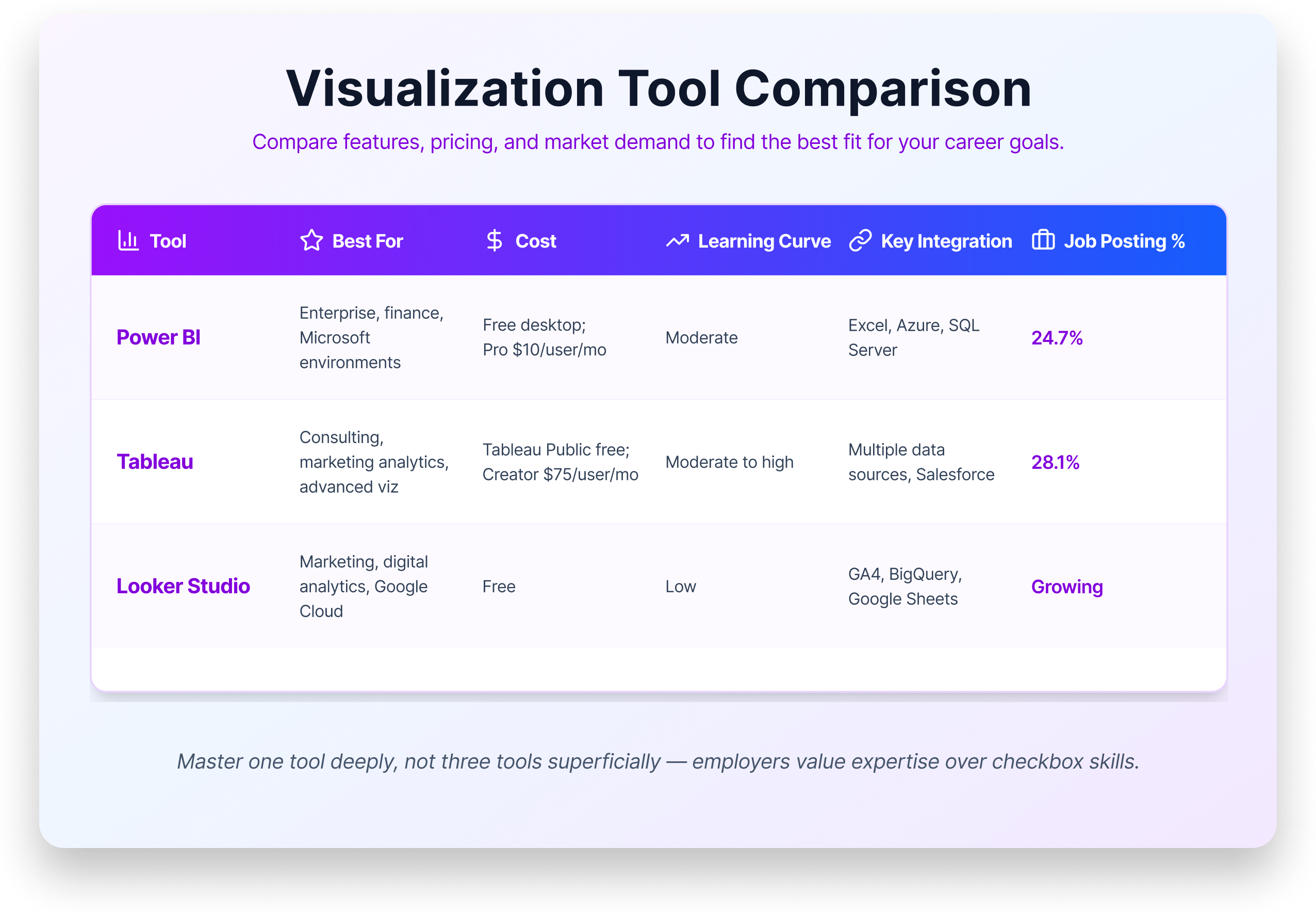
The visualization tool landscape doesn't have a single winner. Power BI, Tableau, and Looker Studio all have significant market share, all appear regularly on job postings, and all are rated highly by practitioners. Gartner rates both Power BI and Tableau as Leaders in their 2025 Analytics and Business Intelligence Platforms Magic Quadrant. The question isn't which one is best. It's which one is right for your target role.
Tool 4: Power BI
Microsoft Power BI is the broadest bet for entry-level analysts. It appears in 24.7% of data analyst job postings (365 Data Science, 2025), integrates tightly with Excel and the Microsoft ecosystem, and has a free desktop version for Windows. If you're targeting enterprise, corporate, finance, or healthcare administration roles or if you simply don't know your target industry yet — Power BI has the widest applicability.
Tool 5: Tableau
Tableau appears in 28.1% of job postings and is the visualization tool of choice in consulting, marketing analytics, and data journalism. Its visualization capabilities are widely considered the strongest of the three, and it has a large practitioner community. Tableau Public is free but limited; full access requires a paid Creator license at $75 per user per month, which many employers provide.
Tool 6: Looker Studio
Looker Studio (formerly Google Data Studio) is completely free and deeply integrated with the Google ecosystem, including GA4, BigQuery, Google Sheets, and Google Ads. If you're targeting marketing analytics, digital analytics, or startup roles using Google Cloud, it's the most natural fit. It's less common in enterprise environments.
The practical advice for all three: pick one and learn it well. The core concepts transfer between platforms — connecting to data sources, building calculated fields, designing dashboards for stakeholders. Use the industry table in the next section to guide your choice.
Dataquest's data visualization resources cover the fundamentals of building charts and communicating data clearly, a foundation that applies regardless of which platform you use.
Modern data stack tools and when entry-level analysts encounter them
If you've been reading job postings, you've likely come across terms like Snowflake, dbt, BigQuery, and Databricks. These belong to what practitioners call the "modern data stack": cloud-native tools for storing, transforming, and analyzing data at scale. They appear more frequently on postings at tech companies and startups, and they come up regularly in practitioner discussions.
The key message for entry-level analysts is this: you don't need these tools to land your first job. But knowing what they are helps you understand job postings, ask better questions in interviews, and show awareness of how modern analytics teams operate. All of them build on SQL, which means the foundation you're already building applies directly.
Tool 7: Snowflake
Snowflake is a cloud data warehouse, a place where companies store large volumes of data for analysis. You query it with SQL, which means if you already know SQL, you can query Snowflake. It appears frequently in healthcare, logistics, and fintech environments.
Tool 8: Google BigQuery
BigQuery is Google's cloud data warehouse, used heavily in marketing analytics and any company running Google Cloud. Like Snowflake, it's primarily SQL-based and has a generous free tier that lets you practice on real data.
Tool 9: dbt
dbt (data build tool) transforms data inside the warehouse using SQL. It's the "T" in the ELT pipeline that many modern analytics teams run. It's growing rapidly — several practitioners on Reddit mentioned picking it up on the job after being hired primarily for SQL skills.
Tool 10: Databricks
Databricks is a unified analytics platform built for big data and machine learning. It's more relevant to data engineers and data scientists than to entry-level analysts, though it appears in postings at larger tech organizations. If you see it on a job description, SQL and Python fluency will get you most of the way there.
Tool stacks differ by industry
One of the most useful things the r/analytics community reveals is that there's no universal data analyst tool stack. The right tools depend heavily on the industry you're entering, the company's existing infrastructure, and the data sources the team works with. The common thread across all of them is the same: SQL and Excel are always present.
The table below maps tool stacks to specific industries based on practitioner reports. Use it to align your learning with your target sector.
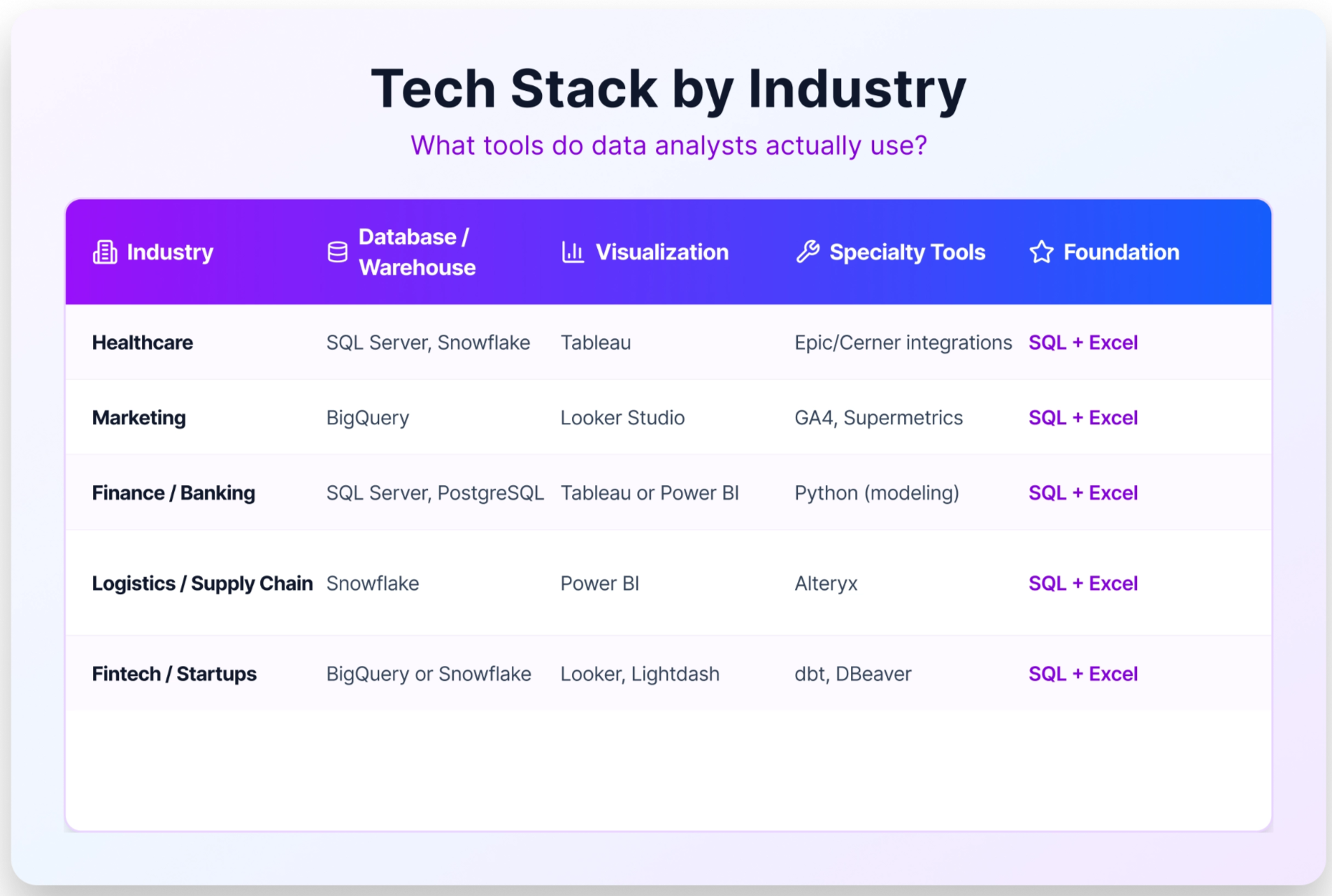
If you already know your target industry, use this table to guide your visualization and warehouse tool choices, after you've built the SQL and Excel foundation that appears in every row.
Free data analysis tools to start learning today
Cost is not a barrier to getting started with data analysis. Every tool in the foundation layer has a free version or a capable free alternative.
For SQL, you have several options that are completely free. PostgreSQL and MySQL are both open-source and widely used. Google BigQuery has a free tier that’s enough for practice that lets you run real queries on real data. SQLite runs locally with no setup. Or skip the installation entirely and practice directly in Dataquest's browser-based SQL environment.
For Python, the Anaconda distribution installs Python along with Jupyter Notebooks, pandas, and all the key libraries in one step — free, and available on Mac, Windows, and Linux. Google Colab is a fully browser-based alternative that requires no local installation, which makes it especially convenient if you're working on a laptop with limited permissions.
For Excel, Google Sheets covers the vast majority of what entry-level analysts need: PivotTables, XLOOKUP equivalents, charts, and data cleaning, all at no cost. Microsoft Excel is often available free through Microsoft 365 Education for students and through many public libraries.
For visualization, Power BI Desktop is free on Windows. Tableau Public is free with some export limitations. Looker Studio is fully free and browser-based.
For practice data, Kaggle hosts thousands of datasets across every domain, and Google Dataset Search indexes datasets from across the web. Building a portfolio project with publicly available data is one of the most effective ways to demonstrate your skills to a hiring manager. Dataquest's data analyst portfolio projects guide walks through how to scope and present that work.
A learning sequence for your first data analyst role
The mistake most people make when building data skills is trying to learn everything in parallel. A structured sequence is more effective and gets you to job-ready faster.
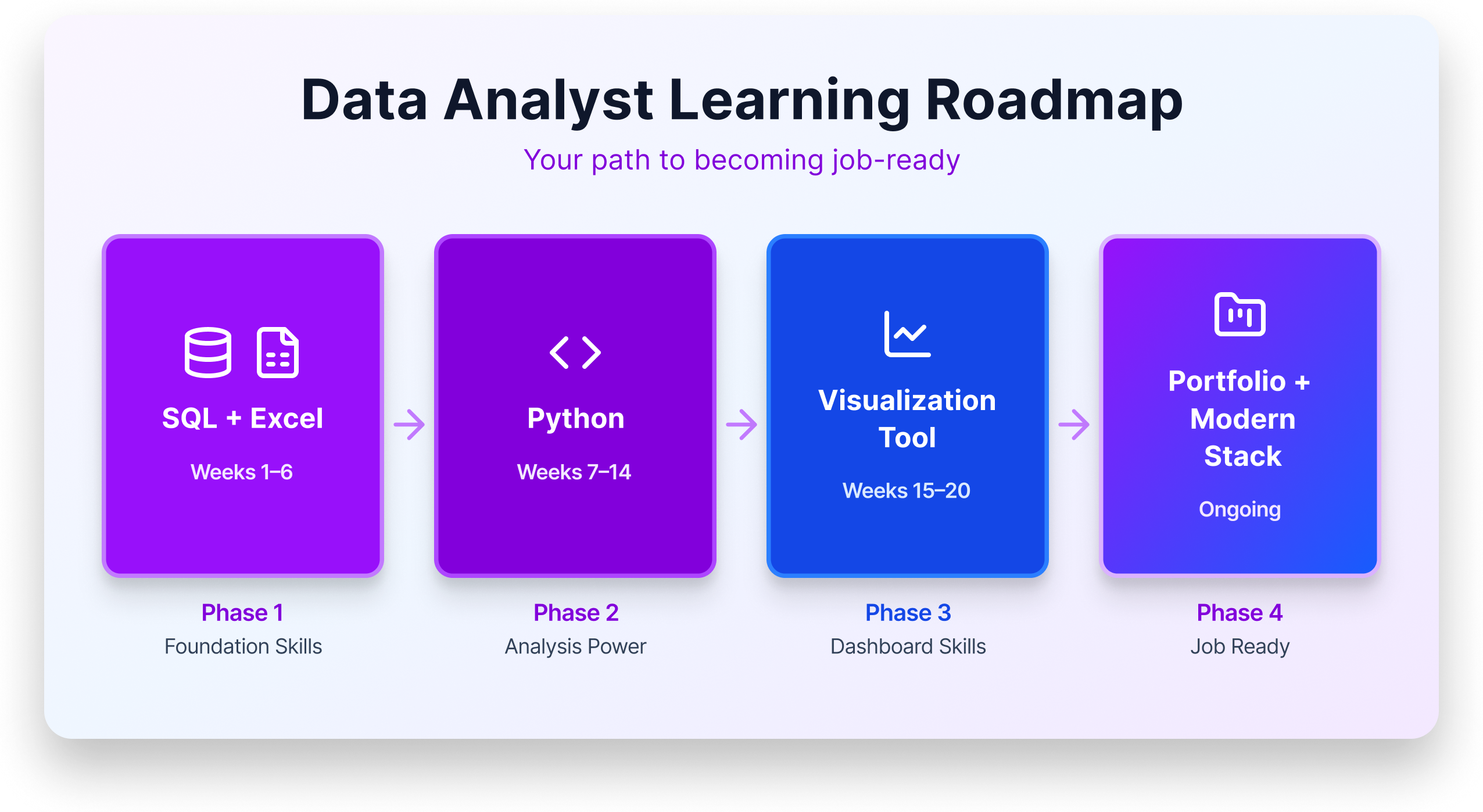
Phase 1: SQL + Excel (Weeks 1–6). These are the daily drivers of the job. In SQL, focus on SELECT, JOIN, WHERE, GROUP BY, aggregate functions, and basic subqueries. In Excel, focus on PivotTables, XLOOKUP, data cleaning, and basic charting. With strong SQL and Excel skills alone, you're competitive for many entry-level roles, particularly in healthcare, finance, and operations.
Phase 2: Python (Weeks 7–14). Once SQL is solid, add Python. Start with pandas for data manipulation: reading files, filtering rows, grouping, and merging DataFrames. Add basic visualization with Matplotlib or Seaborn. Work in Jupyter Notebooks to build the habit of documenting your analysis alongside your code. This expands the types of roles you can apply for and gives you the foundation for more complex analysis.
Phase 3: One visualization tool (Weeks 15–20). Choose based on your target industry and use the table in the previous section as your guide. Build two or three dashboard projects that answer real business questions. The portfolio matters more than the tool choice; showing that you can translate data into a clear, stakeholder-ready visual is the skill hiring managers want to see.
Phase 4: Portfolio and modern stack awareness (Ongoing). Continue building portfolio projects that combine SQL, Python, and visualization. Familiarize yourself with cloud platforms like Snowflake or BigQuery at a conceptual level. Learn what dbt does, even if you haven't used it yet. Apply for roles. The job search takes time, and starting earlier, even before you feel fully ready, accelerates the feedback loop.
For more detail on the full career path, Dataquest's how to become a data analyst guide covers timelines, portfolio expectations, and job search strategy alongside the technical curriculum.
Key takeaway
The 10 tools that matter most for entry-level analysts aren't a mystery: SQL and Excel first. Python next. One visualization tool. That's the sequence that gets you hired.
Job postings overstate tool requirements—depth in the fundamentals will carry you further than surface-level familiarity with a dozen platforms. And the modern stack tools like Snowflake, dbt, and BigQuery all build on SQL anyway, so the foundation you build now compounds over time.

Frequently Asked Questions
1. How long does it really take to learn data analysis tools well enough to get hired?
Most beginners can pick up SQL basics and spreadsheet fundamentals in a few weeks of consistent practice.
Becoming job-ready across a core set of tools typically takes six to twelve months at 10 to 15 hours per week.
The key is focusing on one tool at a time rather than trying to learn everything simultaneously, which builds momentum without burning you out.
2. Will AI tools like ChatGPT replace data analysts?
AI is changing how analysts work, not eliminating the role.
Tools like ChatGPT can generate SQL queries or speed up data cleaning, but they can't understand your company's business context, choose the right KPIs, or explain findings to skeptical stakeholders.
Think of AI as a powerful assistant in your toolkit—analysts who learn to work alongside it will have a real advantage over those who ignore it.
3. Should I learn Python or R for data analysis?
For most beginners, Python is the stronger starting choice because it appears in roughly twice as many job postings as R and is more versatile across industries.
R remains valuable in specific fields like academic research, healthcare, and biostatistics. Researchers at University of Michigan's QMSS program note it's particularly strong for publication-quality statistical graphics.
The best approach is to get comfortable with one language first, then add the other if your career path calls for it.
Check out this blog R vs Python for Data Analysis for an objective comparison.
4. Do data analysis certifications actually help you get hired?
Certifications are excellent for structured learning, but hiring managers rarely treat them as a deciding factor on their own.
The real value is in the projects you build during the certification process, which become portfolio pieces that demonstrate your skills to employers.
Treat a certification as a learning framework, and pair it with independent projects that show you can solve real problems with data.
Dataquest's guide to data science portfolio projects and data analytics certification overview are good places to start.
5. Do I need to know every tool listed in a job posting before I apply?
No.
Job postings often describe an ideal candidate, not a minimum requirement, and many long tool lists are aspirational wish lists compiled from every tool the team has ever touched.
If you meet roughly 60 to 70 percent of the requirements and feel confident in the core skills, go ahead and apply.
Employers hiring for entry-level roles generally value problem-solving ability and learning potential over perfect mastery of every named tool.
6. How can I prove I know data analysis tools without professional experience?
Build a portfolio of three to five projects using publicly available datasets from sources like Kaggle or Google Dataset Search.
Each project should walk through the full process:
- Defining a question
- Cleaning the data
- Creating visualizations
- Presenting actionable insights
Host your work on GitHub with clear documentation — a well-explained portfolio project often carries more weight with hiring managers than a resume line listing tool names.
Dataquest's data analyst projects guide walks through how to scope and present that work effectively.
7. Do startups and large enterprises use different data analysis tools?
Yes, and the differences can shape how you prioritize your learning.
Startups and small companies tend to lean on cost-effective options like Google Sheets, Looker Studio, and Python scripts, often expecting analysts to wear many hats.
Large enterprises are more likely to invest in Tableau or enterprise Looker, with Power BI dominating in Microsoft-heavy organizations.
Starting with SQL, Python, and one visualization tool gives you a foundation that transfers well across company sizes.