
SQL Triggers: Syntax, Examples, and Use Cases
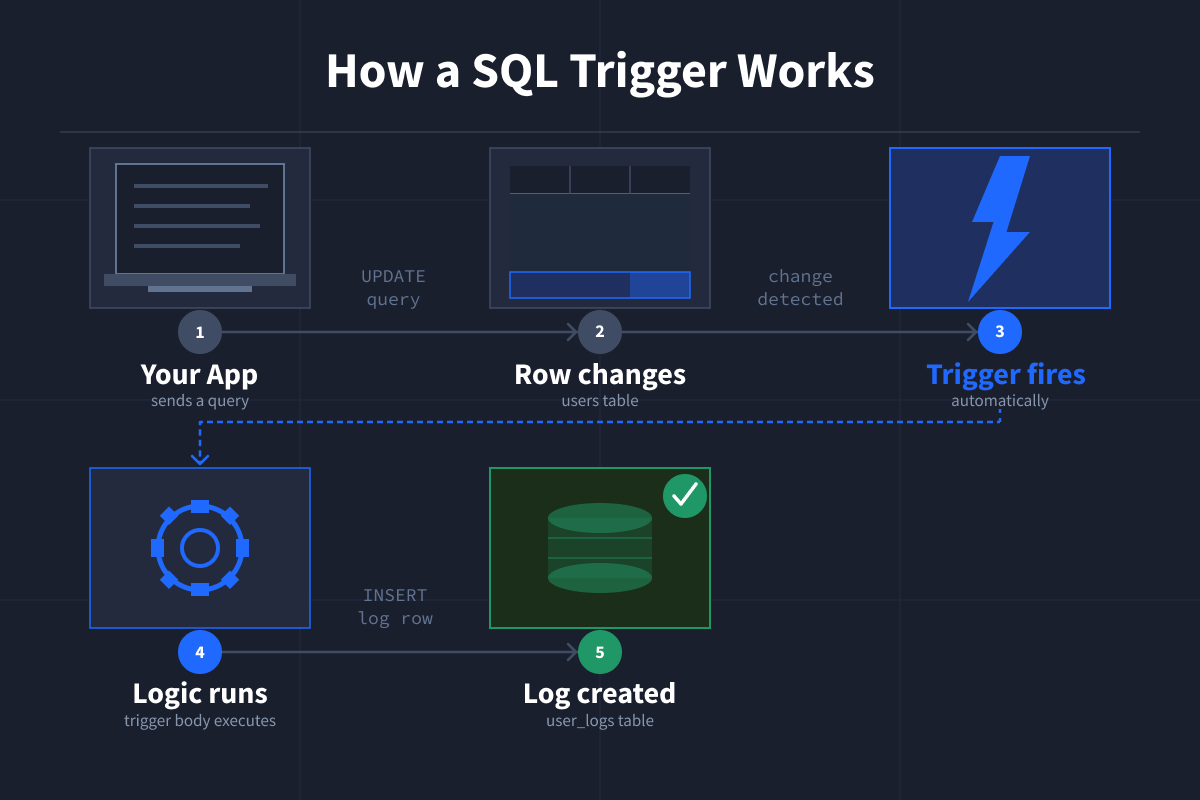
A SQL trigger is a piece of logic that runs automatically when data in a table changes. It fires on INSERT, UPDATE, or DELETE events.
Sometimes you need your database to react when data changes. A new row gets inserted, and you want to log it. A record gets updated, and you need a timestamp. A row gets deleted, and something else should happen automatically.
That's what a SQL trigger does. It runs automatically, without you having to call it.
If you are serious about mastering SQL, our interactive SQL courses are built around hands-on practice, not passive lessons. You will write real queries, work with real datasets, and learn how analysts and engineers actually use SQL on the job.
How SQL Triggers Work
Imagine you have a web app and a mobile app that both let users update their profiles, and both write to the same database. Now let's say you want to log every time a user updates their profile.
Without triggers, you'd have to write that logging code twice: once in your web app, once in your mobile app. And if you later add a third way to update the database, you'd have to remember to add it there too.
With triggers, you write the logic once, inside the database itself. It fires automatically, every single time, no matter where the change comes from. Your web app, your mobile app, a script, or anything else.
Every trigger follows the same pattern:
Event → Timing → Action
- Event: INSERT, UPDATE, or DELETE
- Timing: BEFORE (before the change is written) or AFTER (once it's done)
- Action: your SQL logic runs
SQL Trigger Syntax
Before we get into a full example, here's what the basic syntax looks like in MySQL. MySQL is one of the most widely used database systems and a great starting point for learning SQL. Think of this as a template you'll fill in with your own logic.
CREATE TRIGGER trigger_name
AFTER UPDATE
ON table_name
FOR EACH ROW
BEGIN
-- your logic here
END;
Each part has a job:
trigger_name: what you call itAFTER UPDATE: when and what fires it (the timing can beBEFOREorAFTER, and the event can beINSERT,UPDATE, orDELETE)ON table_name: which table to watchFOR EACH ROW: it runs once per affected rowBEGIN...END: wraps your logic
SQL Trigger Example (Step-by-Step)
Let's walk through a real example. We'll log every update made to a users table automatically.
Step 1: Create the Tables
CREATE TABLE users (
  id INT PRIMARY KEY AUTO_INCREMENT,
  name VARCHAR(100),
  email VARCHAR(100),
  updated_at DATETIME
);

CREATE TABLE user_logs (
  log_id INT PRIMARY KEY AUTO_INCREMENT,
  user_id INT,
  changed_at DATETIME
);
Step 2: Create the Trigger
Now we'll create the trigger that watches the users table and logs a record every time a row is updated.
CREATE TRIGGER log_user_update
AFTER UPDATE ON users
FOR EACH ROW
BEGIN
  INSERT INTO user_logs (user_id, changed_at)
  VALUES (OLD.id, NOW());
END;
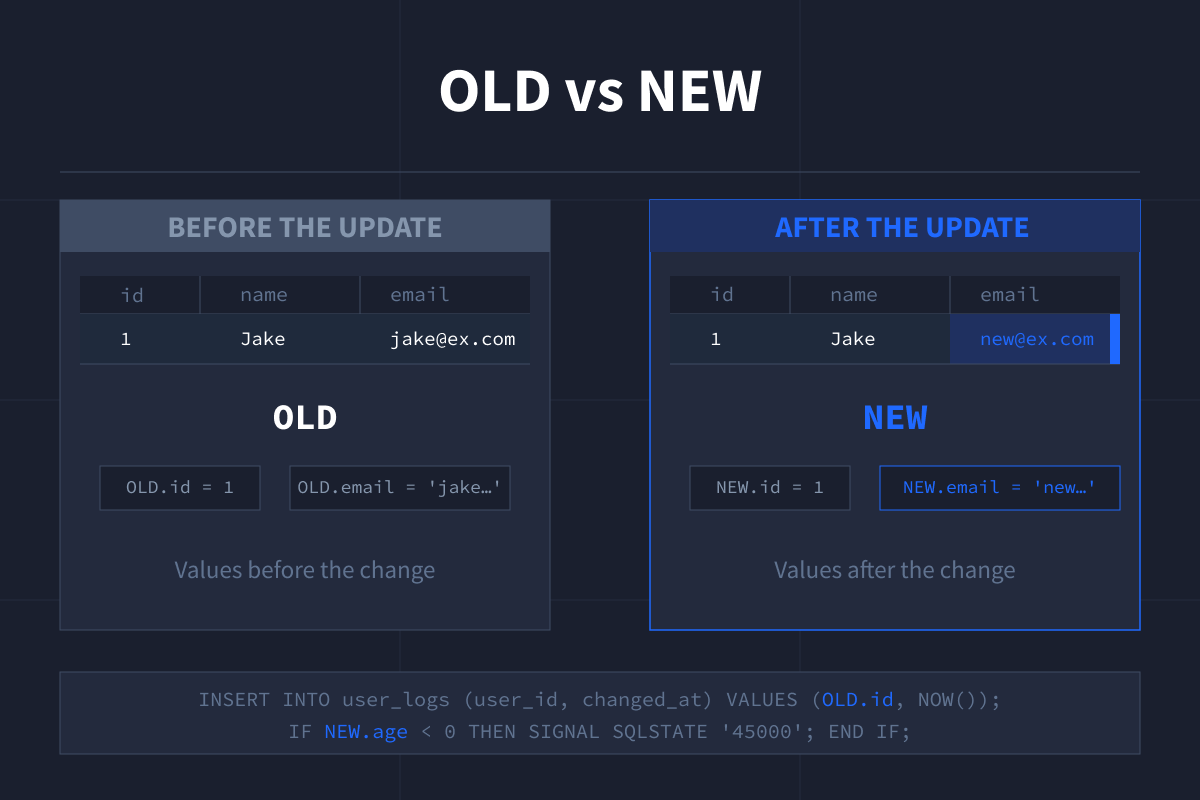
What are OLD and NEW?
When a row is updated, OLD refers to the row's values before the change, and NEW refers to the values after the change.
In this trigger example, we use OLD.id to grab the id of the row that was just updated. NOW() is unrelated to NEW. It's a built-in MySQL function that returns the current date and time. We'll see NEW in action in an upcoming example, where it's used to validate incoming data before it's saved.
Step 3: Insert Some Data
INSERT INTO users (name, email) VALUES ('Jake', 'jake@example.com');Step 4: Run an Update
This UPDATE is what fires the trigger.
UPDATE users SET email = 'newemail@example.com' WHERE id = 1;Step 5: Check the Result
SELECT * FROM user_logs;| log_id | user_id | changed_at |
|---|---|---|
| 1 | 1 | 2026-01-01 1:23:45 |
The trigger fired automatically. No extra application code needed.
Types of SQL Triggers
There are a few ways triggers can differ. You don't need to memorize all of these, but it helps to recognize them.
Syntax and behavior can vary slightly between database systems, but the core idea is the same.
DML vs DDL Triggers
DML (Data Manipulation Language) triggers fire on data changes (INSERT, UPDATE, DELETE). This is what you'll almost always use, and the only type MySQL supports.
DDL (Data Definition Language) triggers fire on structural changes like creating or modifying tables. These are available in other database systems like SQL Server but are not supported in MySQL.
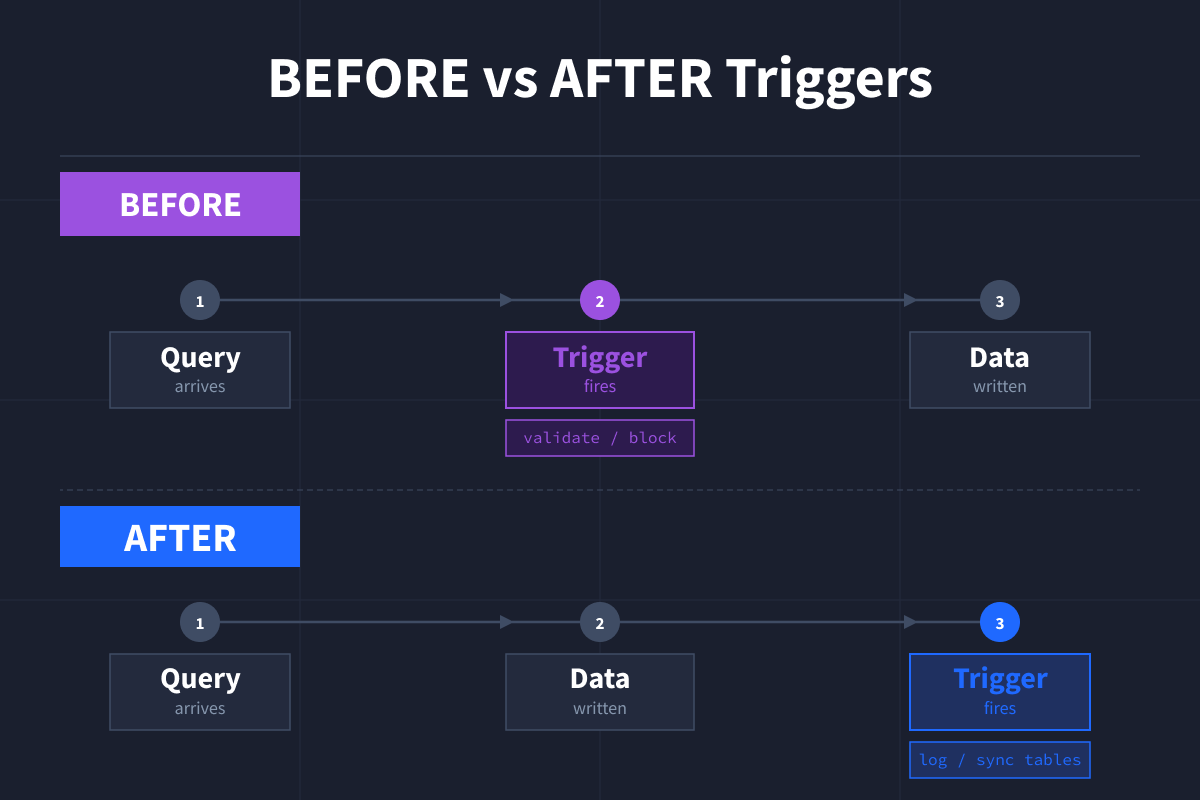
BEFORE vs AFTER Triggers
BEFORE triggers run before the change is written, which is useful for validation or modifying data before it lands. AFTER triggers run once the change is done, which is useful for logging or syncing related tables.
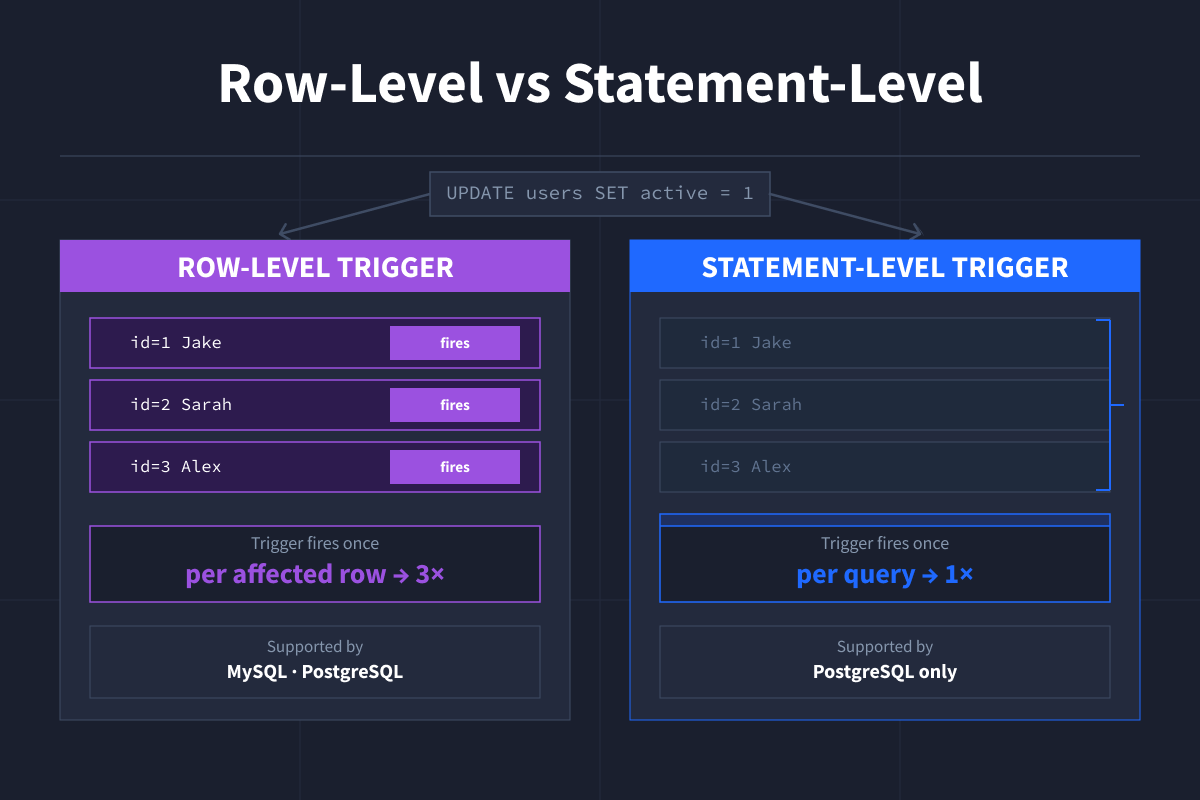
Row-level vs Statement-level Triggers
A row-level trigger runs once per affected row. Update 10 rows, and it fires 10 times. A statement-level trigger runs once per query, no matter how many rows were affected. MySQL only supports row-level. PostgreSQL (another popular database system, like MySQL) supports both.
Logon Triggers
Logon triggers fire when a user logs into the database. They are mainly used by database administrators to track logins, control access, or limit the number of active sessions. If you’re a beginner, you are unlikely to need these, but it is good to know they exist.
Here is a simple SQL Server example to illustrate the syntax:
CREATE TRIGGER track_logon
ON ALL SERVER
FOR LOGON
AS
BEGIN
    PRINT 'A new user has logged in.';
END;
Note that logon triggers are specific to SQL Server and are not available in MySQL.
Common Use Cases
These are abbreviated examples showing just the logic that would go inside the BEGIN...END block of a trigger. They're not meant to be run on their own.
Audit Logs
Save a record every time something changes, without relying on your app to do it.
-- inside a trigger
INSERT INTO audit_log (table_name, action, changed_at)
VALUES ('users', 'UPDATE', NOW());
Data Validation
Stop bad data before it gets saved. This example rejects any age below zero and sends back a custom error message.
-- inside a trigger
IF NEW.age < 0 THEN
  SIGNAL SQLSTATE '45000' SET MESSAGE_TEXT = 'Age cannot be negative';
END IF;
SIGNAL SQLSTATE '45000' is MySQL's way of throwing a custom error. The '45000' is a generic error code that means "user-defined error," and MESSAGE_TEXT is the message that gets returned.
Auto-updating Fields
Keep a field like updated_at current without writing extra logic in your application code (the code outside your database).
-- inside a BEFORE trigger
SET NEW.updated_at = NOW();
Syncing Related Tables
When a row changes in one table, automatically update another.
-- inside a trigger
UPDATE orders SET status = 'closed' WHERE user_id = OLD.id;
When to Use a Trigger (and When Not To)
Use a trigger when:
- You need something to happen automatically on INSERT, UPDATE, or DELETE, whether every time (like logging) or conditionally (like validation)
- Multiple applications or scripts write to the same database and you need the logic applied consistently regardless of the source
- You want to enforce data integrity rules at the database level rather than relying on application code
Avoid a trigger when:
- The logic is complex or likely to change often
- You need it to be easy to debug and trace
- The table has very high write volume and performance matters
- The logic needs to be visible to anyone reading your application code, since triggers are invisible to your app layer and teammates might not realize one exists
- You are worried about cascading updates, which can happen if triggers modify tables that have their own triggers
Managing SQL Triggers
Drop a Trigger
In SQL, "dropping" something means deleting it. To remove a trigger entirely:
DROP TRIGGER trigger_name;View All Triggers
SHOW TRIGGERS;To see triggers on a specific table:
SHOW TRIGGERS FROM database_name LIKE 'table_name';In MySQL, you can't disable a trigger without dropping it. If you need to temporarily stop one from firing, you have to drop it and recreate it when needed.
Wrapping Up
Triggers are the right tool when your database needs to react to changes automatically and consistently. Whether you're logging updates to a users table, validating data before it lands, or keeping related tables in sync, triggers let you handle that logic once at the database level instead of repeating it across your application code.
To keep building your SQL skills, you might explore these SQL courses:
Both courses focus on hands-on, interactive learning. You practice SQL directly in your browser, get guided feedback, and work through realistic scenarios.
You’ll apply what you learn to queries, joins, and database design in real scenarios, so SQL becomes an active skill rather than just memorizing syntax.
FAQs
What is a real life example of a trigger in SQL?
A common example is logging changes to a table, like tracking updates or deletions for auditing purposes.
Another example is automatically updating a timestamp when a record changes. When a user updates their profile, a trigger can set updated_at to the current time without requiring an extra query.
What is the purpose of a SQL trigger?
The purpose of a trigger is to run logic automatically when data changes.
Common use cases include logging changes, validating data, and keeping related tables in sync.
Do triggers slow down a database?
Yes, they can.
Triggers execute on every INSERT, UPDATE, or DELETE, so complex or inefficient triggers can impact performance, especially on high-traffic tables.
Can a SQL trigger fail?
Yes.
If a trigger contains an error, the original operation is usually canceled or rolled back, depending on the database system.
How do I get a list of triggers in SQL?
You can list triggers using the following commands depending on your database:
MySQL: SHOW TRIGGERS;
PostgreSQL: SELECT * FROM information_schema.triggers;
SQL Server: SELECT * FROM sys.triggers;
Can you have multiple triggers on the same table?
Yes.
Most database systems, including MySQL (since version 5.7.2) and SQL Server, allow multiple triggers on the same table and event.
In MySQL, if multiple triggers share the same timing and event, you can control the execution order using FOLLOWS and PRECEDES in the trigger definition.
Can you disable a trigger in SQL?
In SQL Server, yes.
In MySQL, there is no option to disable a trigger. You need to drop the trigger and recreate it when required.
Can a trigger call another trigger?
Yes. This is known as trigger chaining or cascading triggers.
For example, a trigger on one table can update another table, which then fires its own trigger automatically.
This can quickly become complex, so it's important to manage carefully when working with multiple triggers.
