
30+ Python Libraries for Data Science (Organized by Task)
Python has hundreds of data science libraries. Most working data scientists use about five of them on a regular basis, and only add more when a specific project calls for it. Your job with the list below is to find those five and leave the rest until a project asks for them.
The 31 libraries here are organized by task, not ranked. If you know what you need, jump straight there using the table of contents below.
Table of Contents
- How to Choose the Right Library
- Core Libraries for Data Foundations
- Working at Scale Libraries
- Visualization Libraries
- Machine Learning Libraries
- AutoML and Experiment Tracking Libraries
- Deep Learning Libraries
- NLP and LLM Libraries
- Statistical Analysis Libraries
- Next Steps
How to Choose the Right Library
Start with the task, not the library. It's tempting to want to learn all 31 at once. But spreading your attention across that many tools tends to leave you with a shaky grasp of each one, rather than real command of a few.
The table below summarizes how each library maps to a task type, so you can match your current goal to the right tool without getting distracted by everything else.
| Task | Library to Start With | When to Add More |
|---|---|---|
| Data cleaning and analysis | pandas | After your first real project |
| Numerical computation | NumPy | Alongside pandas |
| Data visualization | Matplotlib | Early in your learning |
| Machine learning | scikit-learn | After basic data analysis |
| Deep learning | PyTorch | After scikit-learn |
Want a set sequence instead of piecing one together yourself? The Dataquest Data Science career path teaches these libraries in this exact order, one project at a time, so you're never learning a tool before you have a reason to use it.
Core Libraries for Data Foundations
These two libraries form the foundation of almost every data science workflow. If you're new to data science, start here before anything else.
NumPy
NumPy handles numerical computations in Python using fast, multi-dimensional arrays. It's the base layer that pandas, scikit-learn, and most other data science libraries run on top of.
That speed comes from storing data in contiguous memory blocks and running compiled C code under the hood, instead of looping through standard Python lists.
Even when you don't call NumPy directly, it's usually doing the work underneath: averaging a column, multiplying values, reshaping rows into columns. The library provides:
- N-dimensional array objects (called ndarrays) for storing and working with large datasets
- Mathematical functions for linear algebra, statistics, and random number generation
- Broadcasting, which lets you apply operations across arrays of different shapes without writing loops
Start here if: you're working with numerical data, building models, or learning data science fundamentals
Wrong for you if: you need structured, labeled tabular data (use pandas instead)
Pandas
Pandas provides data structures and functions for loading, cleaning, transforming, and analyzing structured data in Python. Its primary structure, the DataFrame, works like a spreadsheet you can manipulate with code.
If you've ever worked in Excel and wished you could automate the cleaning steps, pandas is that automation.
A typical real-world use case: you receive a messy CSV with inconsistent date formats, missing values, and duplicate rows. Pandas reads the file in one line, lets you inspect the shape and column types immediately, and gives you clean methods for fixing each problem systematically.
Common things pandas handles well:
- Reading data from CSV, Excel, SQL, JSON, and other formats
- Filtering rows, selecting columns, and reshaping tables
- Handling missing values and duplicate records
- Merging and joining multiple datasets
- Group-by operations and summary statistics
Start here if: you're doing data analysis, data cleaning, or exploratory data analysis (EDA)
Wrong for you if: your dataset has hundreds of millions of rows (use Polars or Dask instead)
Working at Scale Libraries
Polars

Polars is a DataFrame library built for high-performance data processing, written in Rust with a Python API. It reads and manipulates large datasets significantly faster than pandas, often by a factor of 5 to 10 on common operations at scale.
Polars uses lazy evaluation, meaning it builds a query plan before executing anything. This lets it skip unnecessary work and apply query optimization automatically before touching the data.
Other things Polars does well:
- Handles datasets in the hundreds of millions of rows without running out of memory
- Supports parallel processing across CPU cores out of the box
- Uses a syntax similar enough to pandas that switching is not a major rewrite
Polars is not a replacement for pandas at the beginner level. The pandas API is more widely documented in tutorials, and most beginner courses still teach pandas first. But if you're working at scale, or if you notice pandas slowing down on your real-world datasets, Polars is worth adding.
Add this when: you're already comfortable with pandas and working with datasets that are slow to process
Wrong for you if: your data fits comfortably in memory and pandas isn't slowing you down
Dask
Dask is a parallel computing library that scales existing pandas, NumPy, and scikit-learn code from a laptop up to a cluster, without a rewrite. A Dask DataFrame is a collection of smaller pandas DataFrames, called partitions, processed across all available cores at once.
Like Polars, Dask uses lazy evaluation, building a task graph as you write and only executing when you call .compute(). But where Polars rewrites the DataFrame internals, Dask is a scheduling layer on top of the tools you already use, which is why its syntax stays close to pandas.
Where Dask actually helps:
- Handles datasets too large to fit in memory by processing partitions in chunks, and spilling them to disk when you run a distributed scheduler
- Scales the same code from a single machine to a distributed cluster with minimal changes
- Extends beyond DataFrames to parallel NumPy arrays and general-purpose task scheduling
Dask adds real overhead for coordination and scheduling, so it isn't a free speed boost. For anything that finishes in a few seconds on plain pandas, that overhead costs more than it saves.
Add this when: pandas is running out of memory on your dataset, or a script that used to finish quickly now takes long enough that parallelizing it is worth the added complexity
Wrong for you if: your dataset is small enough, or your operations fast enough, that pandas already finishes in a few seconds (the scheduling overhead will make Dask slower, not faster)
Visualization Libraries
Charts are how you communicate what the data says. The right library depends on whether you need static images for reports or interactive plots for web apps.
Matplotlib
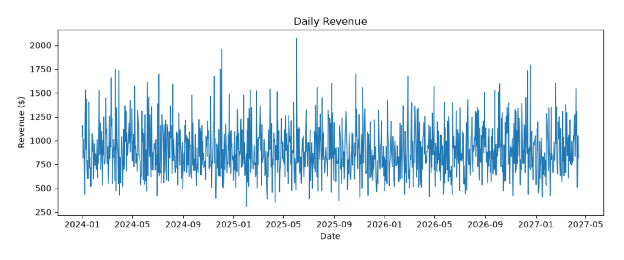
Matplotlib creates static, animated, and interactive visualizations in Python. It's the foundation Seaborn and pandas' built-in plotting are built on, which means learning it first gives you a real head start.
Matplotlib supports a wide variety of plot types, so you're not locked into one way of showing data:
- Line charts
- Bar charts
- Scatter plots
- Histograms
- Heatmaps
Matplotlib also gives you granular control over visual elements such as axis labels, tick marks, colors, font sizes, and grid lines. That level of customization sets you apart when preparing charts for a presentation or a portfolio project. Start with line and bar charts. They cover most data analysis use cases at the beginner level. Add the others (scatter plots, histograms, heatmaps) as your projects get more specific.
Start here if: you're learning how plotting works in Python or you need granular control over chart formatting
Wrong for you if: you need interactive, web-ready visualizations right away (use Plotly instead)
Seaborn
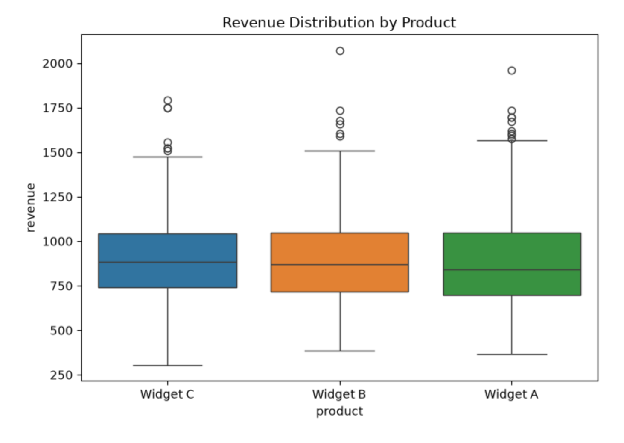
Seaborn builds on Matplotlib to create attractive statistical graphics with significantly less code. It gives you sensible defaults and built-in themes that make plots look clean without manual formatting, and because the output is still a Matplotlib chart, you can adjust anything you don't like.
Compared to Matplotlib, Seaborn also works more directly with pandas DataFrames. You pass a DataFrame and column names, and it handles the rest, with no need to extract arrays manually before plotting.
Seaborn is particularly good at:
- Distribution plots that show how data is spread (histograms, KDE plots, violin plots)
- Relationship plots that show how two variables interact (scatter plots with regression lines, pair plots)
- Categorical plots that compare groups (box plots, bar plots, strip plots)
Start here if: you're performing exploratory data analysis or you want presentation-ready charts without manual formatting
Wrong for you if: you need a chart type outside distributions, relationships, or categorical comparisons (build it in Matplotlib directly)
Plotly
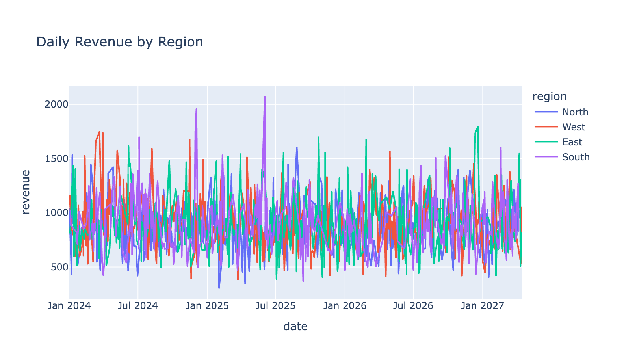
Plotly creates interactive, publication-quality charts that work in web browsers and Jupyter notebooks. Users can hover over data points, zoom in, filter categories, and export images directly from the chart.
Plotly supports over 40 unique chart types, including scatter plots, line charts, bar charts, heatmaps, 3D surface plots, and geographic maps, and the interactivity is built in by default, not something you add after the fact.
It also integrates with Dash, Plotly's companion framework for building full data dashboards in Python. If you want to turn a set of charts into a shareable web app, Dash uses Plotly charts as its core visual layer.
Start here if: you're building dashboards, presenting to non-technical stakeholders, or creating your portfolio of projects
Wrong for you if: you need simple static charts for reports or print (use Matplotlib or Seaborn instead)
Bokeh
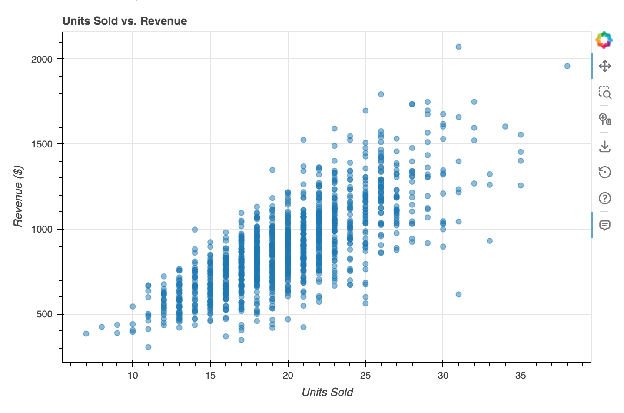
Bokeh creates interactive visualizations designed specifically for modern web browsers. Unlike Plotly, which renders via JavaScript under the hood but abstracts most of that away, Bokeh gives you more direct control over how interactivity is wired together.
Bokeh works well when you need:
- Custom interactive tools (sliders, dropdowns, linked brushing between charts)
- Streaming data visualizations that update in real time
- Embedding charts directly into web applications or custom HTML pages
Bokeh is less beginner-friendly than Plotly. The API requires more setup for basic charts, but it gives you more precise control when you need it.
Start here if: you're building a custom interactive dashboard or embedding visualizations into a web product
Wrong for you if: you're just learning to visualize data (start with Matplotlib, Seaborn, or Plotly first)
Altair
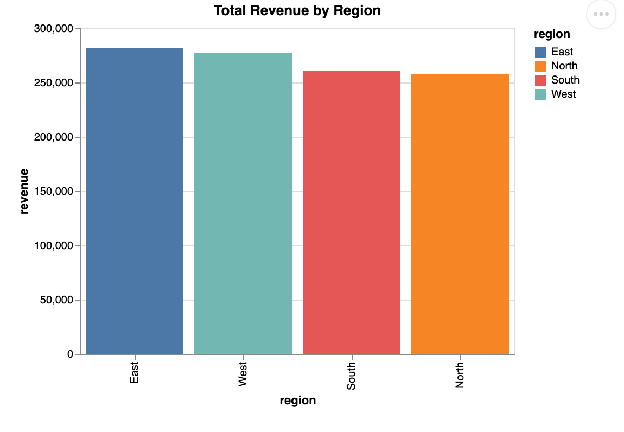
Altair is a declarative statistical visualization library built on the Vega-Lite grammar. Instead of telling Python how to draw a chart step by step, you tell it what the chart should represent, and Altair figures out the rendering.
This approach makes Altair code concise and readable: a scatter plot with color encoding by category might take 5 lines.
Altair works best for:
- Exploratory data analysis where you want to quickly try different chart types
- Statistical graphics that need to be built programmatically (faceted charts, layered charts)
- Situations where chart code needs to be readable by other team members
Add this when: you're comfortable with pandas and want cleaner, more expressive statistical visualizations
Wrong for you if: you need highly interactive dashboards with user input controls (use Plotly or Bokeh instead)
Machine Learning Libraries
These libraries handle the model-building side of data science. Scikit-learn is where most beginners start. The gradient boosting libraries (XGBoost, LightGBM, CatBoost) are what you reach for when you need more performance on structured data.
Scikit-learn
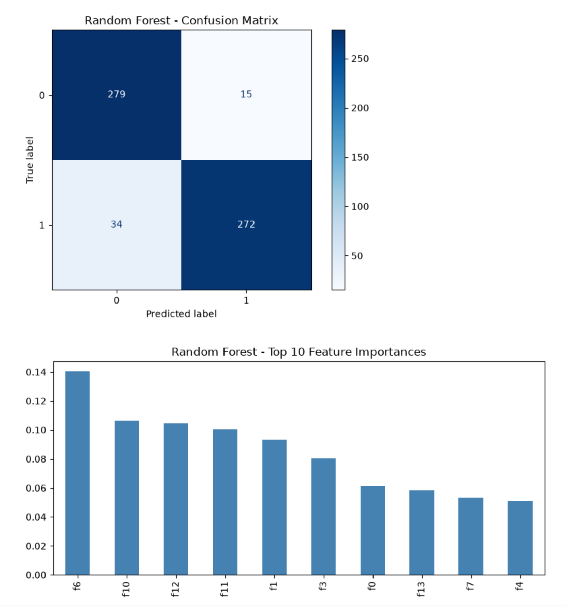
Scikit-learn provides a consistent, beginner-friendly interface for building and evaluating machine learning models in Python. It covers the full supervised and unsupervised learning workflow, from data preprocessing through model training and evaluation.
Learning one scikit-learn model teaches you the pattern for almost all of them, since the interface barely changes between them. You call .fit() to train, .predict() to generate outputs, and .score() to evaluate. Once you learn one model, you can switch to another without relearning the interface.
The library includes:
- Supervised learning algorithms: linear regression, logistic regression, decision trees, random forests, support vector machines, k-nearest neighbors
- Unsupervised learning algorithms: k-means clustering, principal component analysis (PCA), DBSCAN
- Tools for splitting data, scaling features, encoding categorical variables, and tuning hyperparameters
- Evaluation metrics for classification, regression, and clustering tasks
Start here if: you're studying machine learning for the first time, and working with structured tabular data
Wrong for you if: you're working with images, text, or sequential data at scale (you'll eventually need TensorFlow or PyTorch, though scikit-learn still helps with preprocessing and evaluation)
XGBoost
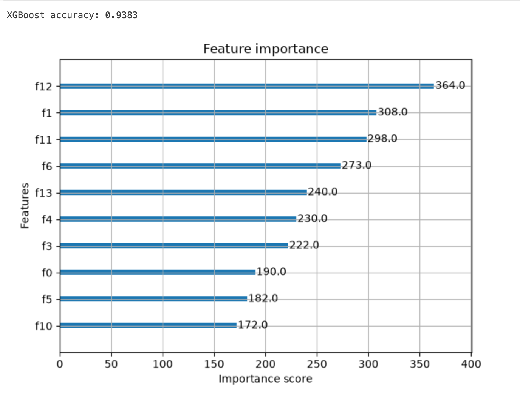
XGBoost is a gradient boosting library that builds sequential decision trees to produce highly accurate predictions on structured data. It consistently performs well in machine learning competitions and on real-world tabular datasets.
Gradient boosting works by training each new tree to correct the errors made by the previous trees. XGBoost adds regularization to prevent overfitting and uses parallel processing to speed up training compared to older boosting implementations.
XGBoost is a common choice for:
- Kaggle competitions with tabular data
- Credit scoring, fraud detection, and customer churn prediction
- Any regression or classification problem on structured data where accuracy matters more than interpretability
Add this when: you're already comfortable with scikit-learn and want better performance on tabular datasets
Wrong for you if: you're a complete beginner to machine learning (learn fundamentals with scikit-learn first)
LightGBM
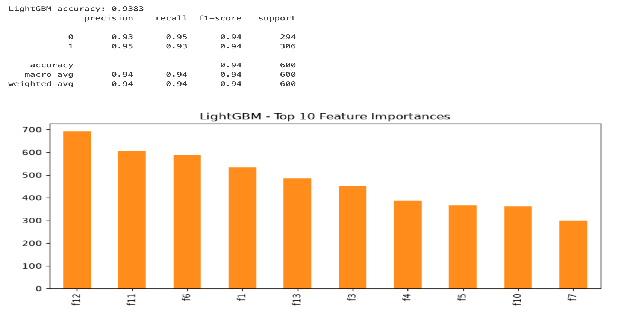
LightGBM is a gradient boosting framework developed by Microsoft that trains faster and uses less memory than XGBoost on large datasets. It achieves this through leaf-wise tree growth, a technique that always splits the leaf with the biggest expected gain instead of growing trees level by level. On datasets with millions of rows, LightGBM trains noticeably faster than XGBoost with comparable or better accuracy.
LightGBM works well for:
- Large datasets where training time is a bottleneck
- High-cardinality categorical features (it handles these natively with less preprocessing)
- Production pipelines where inference speed matters
Add this when: you've used XGBoost and find it too slow on your data volume
Wrong for you if: your dataset is small (the speed advantage disappears, and XGBoost or scikit-learn may be simpler to tune)
CatBoost
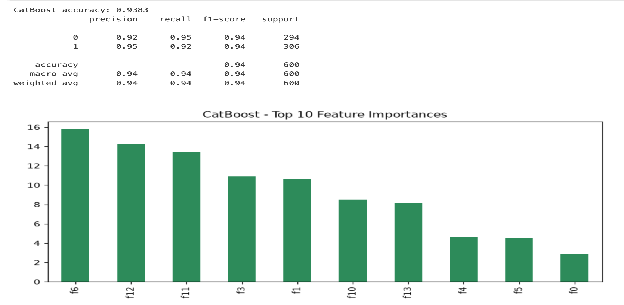
CatBoost is a gradient boosting library developed by Yandex that handles categorical features without manual encoding. Most other gradient boosting libraries require you to convert categorical columns to numbers before training.
CatBoost does that internally, which matters because real-world datasets often have many categorical columns, such as country codes, product categories, or customer segments. Preprocessing them manually adds time and introduces choices that can affect model performance.
CatBoost also performs well out of the box with default hyperparameters, reducing the amount of tuning required to achieve a solid baseline.
Start here if: your dataset has many categorical features and you want to reduce preprocessing time
Wrong for you if: your data is mostly numerical (XGBoost or LightGBM may train faster)
H2O
H2O is a machine learning platform that provides AutoML, distributed computing, and a large collection of algorithms through a Python API. It runs on clusters and can handle datasets that don't fit in a single machine's memory.
H2O's AutoML feature automatically trains and compares multiple model types, including gradient boosting, random forests, and neural networks, then ranks them by performance. This makes it useful for quickly finding a strong baseline model without manually testing each algorithm.
Start here if: you're working on a large-scale ML project, and you want AutoML alongside distributed processing
Wrong for you if: you're learning machine learning fundamentals (the abstraction hides too much; learn scikit-learn first)
AutoML and Experiment Tracking Libraries
These libraries reduce repetitive work in ML workflows. PyCaret automates model selection. Optuna handles hyperparameter search. MLflow tracks experiments so you can compare results across runs.
PyCaret
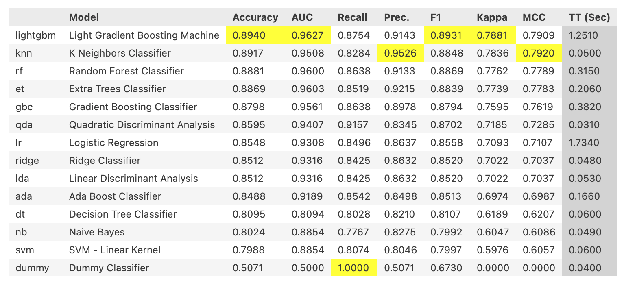
PyCaret automates machine learning workflows in Python with a low-code interface. A single compare_models() call trains and evaluates the whole model library, roughly 15 to 20 algorithms depending on task type.
It wraps scikit-learn, XGBoost, LightGBM, and other libraries into a unified pipeline that handles preprocessing, model training, evaluation, and deployment preparation with minimal code.
It's useful for:
- Rapidly establishing model baselines before committing to a specific algorithm
- Building prototypes or proof-of-concept models quickly
- Data analysts who want ML capabilities without deep framework knowledge
Add this when: you're comfortable with pandas and want to explore machine learning without implementation overhead
Wrong for you if: you're learning ML fundamentals (PyCaret hides the mechanics; work with scikit-learn directly first)
Optuna
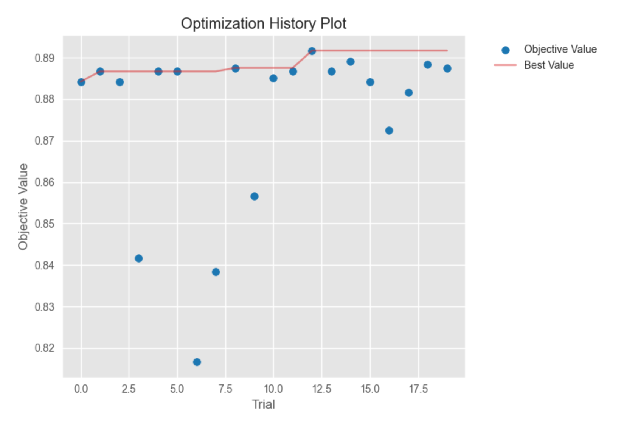
Optuna is a hyperparameter optimization framework that uses efficient search strategies to find the best parameter settings for any machine learning model.
It supports random search, grid search, and Tree-structured Parzen Estimator (TPE) optimization, and prunes unpromising trials early to save compute time.
Optuna plugs into whatever you're already using to build models. You define an objective function that trains a model and returns a score, and Optuna handles the search loop.
Add this when: you have a working model and want to improve it through systematic hyperparameter tuning
Wrong for you if: you're still building a baseline model (get something working first, then tune it)
MLflow
MLflow is a platform for tracking, comparing, and managing machine learning experiments. It logs parameters, metrics, and model artifacts from each training run so you can compare results across experiments and reproduce any previous result.
MLflow also handles model versioning and provides a model registry for tracking which model version is deployed where, using tags and aliases.
Core features:
- Experiment tracking with a web UI for comparing runs
- Model registry for versioning and stage management
- Integration with scikit-learn, XGBoost, PyTorch, TensorFlow, and Keras
Add this when: you're running multiple experiments and losing track of which parameters produced which results
Wrong for you if: you're training a single model for a one-off project (the overhead isn't worth it)
Deep Learning Libraries
Deep learning libraries handle neural networks. TensorFlow and PyTorch are the two most widely used. The others in this section either wrap one of them (Keras, FastAI, PyTorch Lightning) or extend them for specific use cases (JAX, TensorFlow Probability, PyTorch Geometric).
TensorFlow
TensorFlow is an open-source library for building and training deep learning models, developed by Google. It supports a wide range of neural network architectures and runs on CPUs, GPUs, and Google's TPU hardware.
TensorFlow's production story is one of its real strengths. TensorFlow Serving handles model deployment, TensorFlow LiteRT converts models for mobile and edge devices, and TensorFlow.js runs models in web browsers. If you need to deploy a model across multiple platforms, TensorFlow has tooling for each.
It's widely used for:
- Image classification and object detection
- Natural language processing (NLP) tasks
- Time series forecasting
- Production ML systems at scale
Start here if: you're interested in deep learning and you want strong production deployment options
Wrong for you if: you're new to machine learning entirely (start with scikit-learn first)
PyTorch
PyTorch is a deep learning library originally developed by Meta that uses dynamic computation graphs, making it easier to debug and experiment with model architectures. Researchers favor it because you can change a model's structure during runtime rather than defining the entire graph before training begins.
PyTorch has become the dominant tool in AI research, and that research dominance has a practical consequence: new techniques, architectures, and pretrained models tend to appear in PyTorch first.
It supports:
- GPU acceleration for training via CUDA
- A large ecosystem of extensions: Hugging Face Transformers, PyTorch Lightning, PyTorch Geometric
- Dynamic computation graphs that make custom architectures straightforward to write
Start here if: you're performing deep learning research, building NLP pipelines with Hugging Face models, or building computer vision projects with custom architectures
Wrong for you if: you need mature production deployment pipelines out of the box (TensorFlow's serving infrastructure is more established, though PyTorch's ONNX export and serving tools like vLLM and Ray Serve have narrowed the gap)
Keras
Keras is a high-level library for building neural networks. Keras 3 was a full rewrite that runs on JAX, TensorFlow, or PyTorch, so you can pick a backend with one environment variable and switch later without rewriting your model. It still ships with TensorFlow as tensorflow.keras.
Keras simplifies the most common deep learning patterns. Defining a neural network takes a few lines, and training calls .compile() then .fit(), following the same pattern as scikit-learn estimators.
It's well-suited for:
- Learning deep learning concepts without getting lost in low-level details
- Quickly prototyping standard architectures: feedforward networks, CNNs, RNNs, LSTMs
- Transfer learning with pretrained models from KerasHub, across any backend
Start here if: you want a neural network training with the least friction, on whichever backend you prefer
Wrong for you if: you want to work directly in one framework's native idioms rather than through an abstraction layer
FastAI
FastAI provides high-level components for deep learning built on top of PyTorch, designed to make state-of-the-art results accessible with minimal code.
It includes practical defaults and data augmentation strategies that reflect current best practices in the field. The FastAI course and library were built together, so the library reflects what actually works in practice. It's particularly good for:
- Computer vision tasks (image classification, segmentation, object detection)
- Tabular data with neural networks
- Text classification with pretrained language models
- Collaborative filtering for recommendation systems
Add this when: you've worked through PyTorch basics and want to build practical applications faster
Wrong for you if: you need to understand every detail of the training loop (FastAI abstracts heavily; use PyTorch directly for that visibility)
JAX
JAX is a numerical computing library developed by Google that combines NumPy-compatible operations with automatic differentiation and XLA compilation for GPU and TPU acceleration. It's designed for high-performance machine learning research.
JAX's key feature is JIT compilation: you write a function in NumPy-like syntax, decorate it with @jax.jit, and JAX compiles it to run on accelerated hardware automatically.
It also provides grad() for automatic differentiation of any Python function, vmap() for vectorizing functions across batches without writing loops, and shard_map() for parallelizing computations across multiple devices.
Start here if: you're working on ML research requiring custom gradient computation or hardware-efficient numerical experiments
Wrong for you if: you're building standard deep learning models (TensorFlow or PyTorch have more documentation and pretrained models)
PyTorch Lightning

PyTorch Lightning is a high-level interface for PyTorch that reduces boilerplate code in training loops while keeping full PyTorch flexibility. It organizes the training, validation, and testing logic into a structured LightningModule class.
The practical benefit: you write the model and loss function, and PyTorch Lightning handles logging, checkpointing, multi-GPU training, and mixed precision automatically.
Add this when: your PyTorch training scripts are getting long and repetitive, or you want to scale across multiple GPUs
Wrong for you if: you're learning PyTorch for the first time (understand the raw training loop before adding this layer)
TensorFlow Probability
TensorFlow Probability (TFP) is a library for probabilistic reasoning and statistical analysis built on TensorFlow. It provides tools for Bayesian modeling, variational inference, and Markov Chain Monte Carlo (MCMC) sampling.
TFP is used by researchers and practitioners who need to quantify uncertainty in model predictions, not just produce point estimates.
It's useful for:
- Bayesian neural networks
- Probabilistic forecasting (where you want a distribution over predictions, not just a single number)
- Statistical modeling that goes beyond what Statsmodels covers
Start here if: uncertainty quantification matters to you (medical diagnosis, financial forecasting, scientific modeling)
Wrong for you if: you need standard regression or classification (scikit-learn or XGBoost is simpler and more efficient)
Worth noting: TFP's stable releases have slowed considerably since late 2024, so if you're starting a new project, it's worth also looking at NumPyro or PyMC, which see more active development right now.
PyTorch Geometric
PyTorch Geometric (PyG) is a library for deep learning on graph-structured data built on PyTorch.
Standard neural networks expect inputs in fixed-size vectors or grids, but graphs have irregular structures: varying numbers of nodes, edges, and neighbor relationships. PyG provides the building blocks for graph neural networks (GNNs) that handle this structure.
It's used for:
- Molecular property prediction in chemistry and drug discovery
- Social network analysis
- Recommendation systems based on user-item interaction graphs
- Knowledge graph completion
Start here if: your data has a natural graph structure
Wrong for you if: your data is tabular or image-based (PyG solves a specific problem, not a general deep learning need)
NLP and LLM Libraries
These libraries handle text data, from basic tokenization to running large language models.
NLTK
NLTK (Natural Language Toolkit) is a Python library for working with human language data, covering tokenization, stemming, lemmatization, part-of-speech tagging, and parsing. It's one of the oldest NLP libraries in Python and was built primarily as an educational tool.
NLTK includes:
- Tokenizers for splitting text into words or sentences
- Stemming and lemmatization tools for reducing words to their root forms
- Part-of-speech taggers
- A large collection of sample text corpora for experimentation
Start here if: you're learning NLP fundamentals, and you want to understand text processing before using higher-level tools
Wrong for you if: you're building a production NLP pipeline (NLTK is slower than spaCy; use it to learn, then move on)
spaCy
Where NLTK gives you a toolbox of interchangeable algorithms for learning, spaCy gives you one fast, well-engineered pipeline for getting work done.
It processes text through a single pipeline that handles tokenization, part-of-speech tagging, dependency parsing, and named entity recognition in one pass, using a pretrained model.
It's used for:
- Named entity recognition (pulling names, dates, organizations, and locations out of raw text)
- Information extraction from documents at scale
- Preprocessing text before feeding it into a machine learning or deep learning model
- Building rule-based matching systems alongside statistical models
Add this when: you understand NLP basics and need to process real text in a production system
Wrong for you if: you're trying to learn how NLP concepts work from the ground up (start with NLTK first)
Hugging Face Transformers
Image source: Hugging Face
Hugging Face Transformers gives you access to millions of pretrained deep learning models for NLP, computer vision, and audio tasks, along with a consistent API for using and fine-tuning them. Instead of training a language model from scratch, which takes enormous compute and data, you download a pretrained one and adapt it to your task.
The library standardized how the field works with models like BERT, GPT-style architectures, and T5; a pipeline() call can do sentiment analysis, translation, summarization, or text generation in a few lines, using models other people already spent months training.
It's widely used for:
- Fine-tuning pretrained language models on custom text classification or generation tasks
- Running inference with open-source large language models
- Building search and retrieval systems on top of embedding models
- Prototyping NLP features before deciding whether a custom model is worth building
Add this when: you're comfortable with PyTorch already and want to use modern language models without training from scratch
Wrong for you if: you're brand new to deep learning (the library assumes you understand models, tokenizers, and fine-tuning)
LangChain

LangChain is a library for building applications powered by large language models, providing tools to chain together prompts, external data sources, and multi-step reasoning.
Instead of sending a single prompt to a model and getting a single response, LangChain helps you build workflows. It retrieves relevant documents, feeds them to a model, parses the output, and feeds that into the next step. Since version 1.0, the framework centers on a single agent abstraction built on LangGraph, its runtime for stateful, long-running workflows.
This matters because most real LLM applications aren't a single API call. A customer support bot that searches your documentation, a research assistant that queries multiple sources, an agent that decides which tool to use next, all of these need orchestration, which is what LangChain provides.
It's commonly used for:
- Retrieval-augmented generation (RAG), where a model answers questions using your own documents instead of just its training data
- Building chatbots and assistants that maintain conversation memory
- Connecting LLMs to external tools, APIs, and databases
- Multi-step agent workflows where a model decides which action to take next
Start here if: you're building an application on an LLM API that needs more than a single prompt-response exchange
Wrong for you if: your use case is a single, simple prompt (LangChain adds overhead you don't need; call the model's API directly)
Statistical Analysis Libraries
The libraries above optimize for prediction. This one optimizes for inference: understanding relationships in your data with the rigor a statistician would expect.
Statsmodels
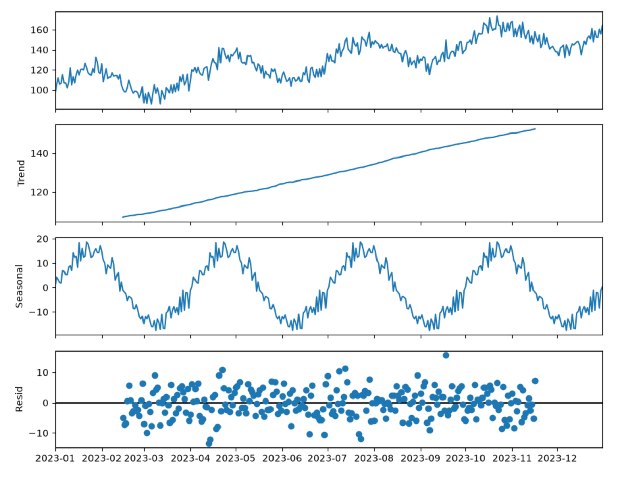
Statsmodels is a Python library for estimating and testing statistical models, with a focus on the kind of statistical inference that machine learning libraries like scikit-learn don't prioritize. Where scikit-learn optimizes for prediction accuracy, Statsmodels optimizes for understanding relationships: coefficients, confidence intervals, p-values, and model diagnostics.
If you've used R for statistics, Statsmodels will feel familiar; it reports results the way a statistician expects to see them, with detailed summary tables for every model you fit.
It's well-suited for:
- Linear and logistic regression where you need to interpret coefficients.
- Time series analysis and forecasting (ARIMA, seasonal decomposition)
- Hypothesis testing and statistical significance testing
- Econometric and scientific research where the model's interpretability matters as much as its accuracy
Start here if: you need to explain why a model makes its predictions, not just how accurate it is
Wrong for you if: your only goal is predictive accuracy on a large dataset (scikit-learn or gradient boosting will get you there faster)
SciPy
SciPy is a foundational Python library for scientific and technical computing, built directly on top of NumPy. While NumPy gives you arrays and basic linear algebra, SciPy layers on the algorithms scientists and analysts actually need, including optimization, integration, interpolation, signal processing, and a comprehensive statistics module called scipy.stats.
For data science work specifically, scipy.stats is often the first stop for statistical operations. It handles probability distributions, statistical tests, and descriptive statistics without requiring you to fit a full model.
It's used for:
- Hypothesis testing (t-tests, chi-square, ANOVA, normality tests)
- Working with probability distributions (PDFs, CDFs, random sampling)
- Numerical optimization, integration, and interpolation
- Signal processing and linear algebra beyond what NumPy covers
- Quick statistical checks that don't need a full model fit
Start here if: you need a fast statistical test or computing primitive that isn't tied to a specific model
Wrong for you if: you need to fit and interpret a full statistical model with coefficients and diagnostics. That's Statsmodels' job.
Next Steps
That's 31 libraries, organized by task so you can start with the two or three your current project actually needs instead of trying to absorb all of them at once.
If you're just getting oriented, the path most working data scientists actually took looks like this: pandas and NumPy first, then a visualization library, then scikit-learn, then a specialty (deep learning, NLP, or big data) once a real project calls for it.
A few more libraries are worth knowing, even though they didn't get their own section here: SQLAlchemy and Streamlit come up constantly once you're moving data in and out of databases or sharing results as a simple web app. Airflow shows up once you're scheduling a pipeline instead of running it by hand. Add them when a real project asks for them, not before.
Pick the library that matches your next project. Learn it well enough to finish something. Then add the next one.
If you want a structured path through the core stack instead of piecing it together library by library, our Data Science career path walks through pandas, NumPy, and visualization in sequence, with real datasets from the first lesson.
