
How to Use a Dictionary in Python (With Examples)
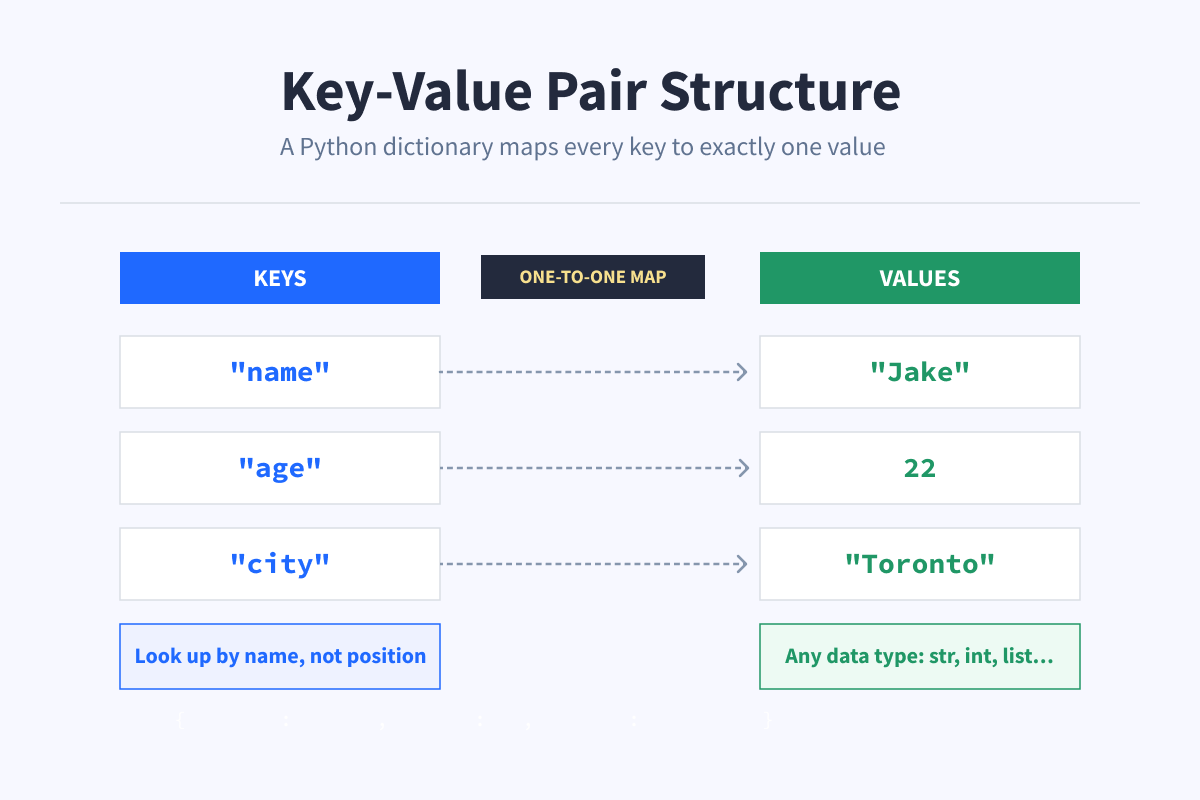
A dictionary in Python stores data as key-value pairs. You can think of it like a regular dictionary. You look up a word (the key) and get its definition (the value).
Instead of tracking positions like a list, you use names. That makes your code easier to read and your data easier to work with.
JSON responses, API data, and configuration files all use the same key-value structure as Python dictionaries, so you will run into this pattern constantly when working with Python code.
Want to get hands-on with Python basics like dictionaries, lists, and loops? Our Introduction to Python Programming course lets you write real code in your browser while following guided exercises. Perfect for beginners who want practice as they learn.
How to Create a Dictionary
The most common way to create a dictionary is with curly braces, with each entry written as a key and a value separated by a colon.
d1 = {"a": 1, "b": 2}For more readable code, especially with multiple entries, you can spread it across multiple lines.
user = {
    "name": "Jake",
    "age": 22
}
Here, "name" and "age" are the keys, and "Jake" and 22 are their values. You use the key to look up its value, the same way you'd look up a word in a real dictionary.
You can also use the dict() constructor.
d2 = dict(a=1, b=2)Both approaches produce the same result. The {} syntax is more common and what you'll see in most code.
The dict() constructor only works when keys are valid Python identifiers, so keys like "first-name" or "2fast" won't work with that approach.
How to Access Values
Given a dictionary like this:
d = {"name": "Jake", "age": 22}
print(d)  # {'name': 'Jake', 'age': 22}
There are two ways to access a value in a dictionary.
Using square brackets:
print(d["name"]) # JakeUsing .get():
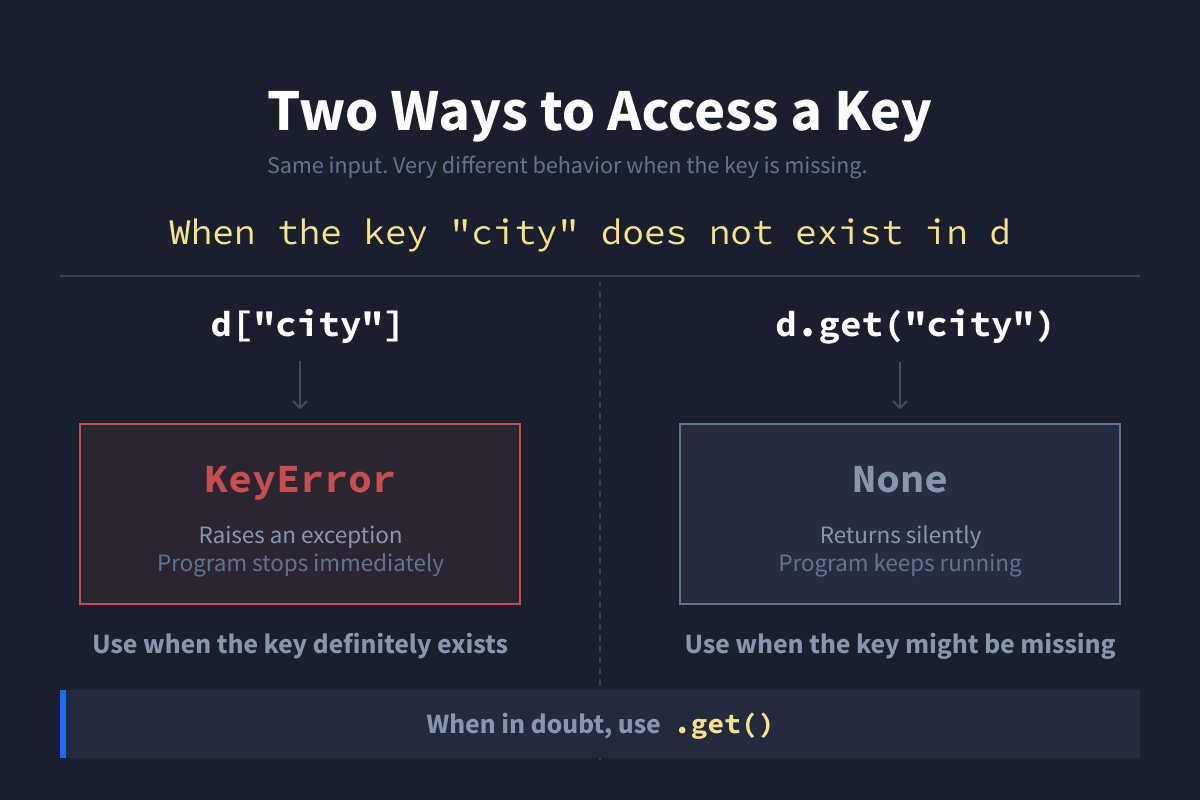
print(d.get("name")) # JakeThe difference matters when the key doesn't exist. Square brackets will raise a KeyError. .get() returns None instead, which is safer and avoids crashes.
print(d["city"])        # KeyError: 'city'
print(d.get("city"))    # None
Use [] when you're sure the key exists. Use .get() when you're not.
How to Add and Update Dictionary Items
To add a new item to a Python dictionary, assign a value to a new key.
d["eyes"] = "blue"
print(d)  # {'name': 'Jake', 'age': 25, 'eyes': 'blue'}
To update an existing one, do the same thing.
d["name"] = "John"
print(d)  # {'name': 'John', 'age': 25, 'eyes': 'blue'}
Python doesn't really distinguish between adding and updating. If the key exists, it gets overwritten. If it doesn't, it gets created.
How to Remove Items
There are a few ways to remove dictionary items from a dictionary.
del removes a key completely.
del d["name"]
print(d)  # {'age': 25, 'eyes': 'blue'}
If you delete it by mistake, you can always add it again.
d["name"] = "John"
print(d)  # {'age': 25, 'eyes': 'blue', 'name': 'John'}
.pop() removes a key and returns its value.
nm = d.pop("name")
print(nm)  # John
print(d)   # {'age': 25, 'eyes': 'blue'}
.clear() removes everything and leaves you with an empty dictionary.
d.clear()
print(d)  # {}
Use del for simple removal, .pop() when you need the value somewhere else in your code, and .clear() when you want to reset the whole thing.
Looping Through a Dictionary
You can loop through a dictionary in a few ways.
Given a dictionary like this:
d = {'name': 'Jake', 'age': 25, 'eyes': 'blue'}Loop through keys:
for key in d:
    print(key)

# name
# age
# eyes
Loop through values:
for value in d.values():
    print(value)

# Jake
# 25
# blue
Loop through both at once:
for key, value in d.items():
    print(key, value)

# name Jake
# age 25
# eyes blue
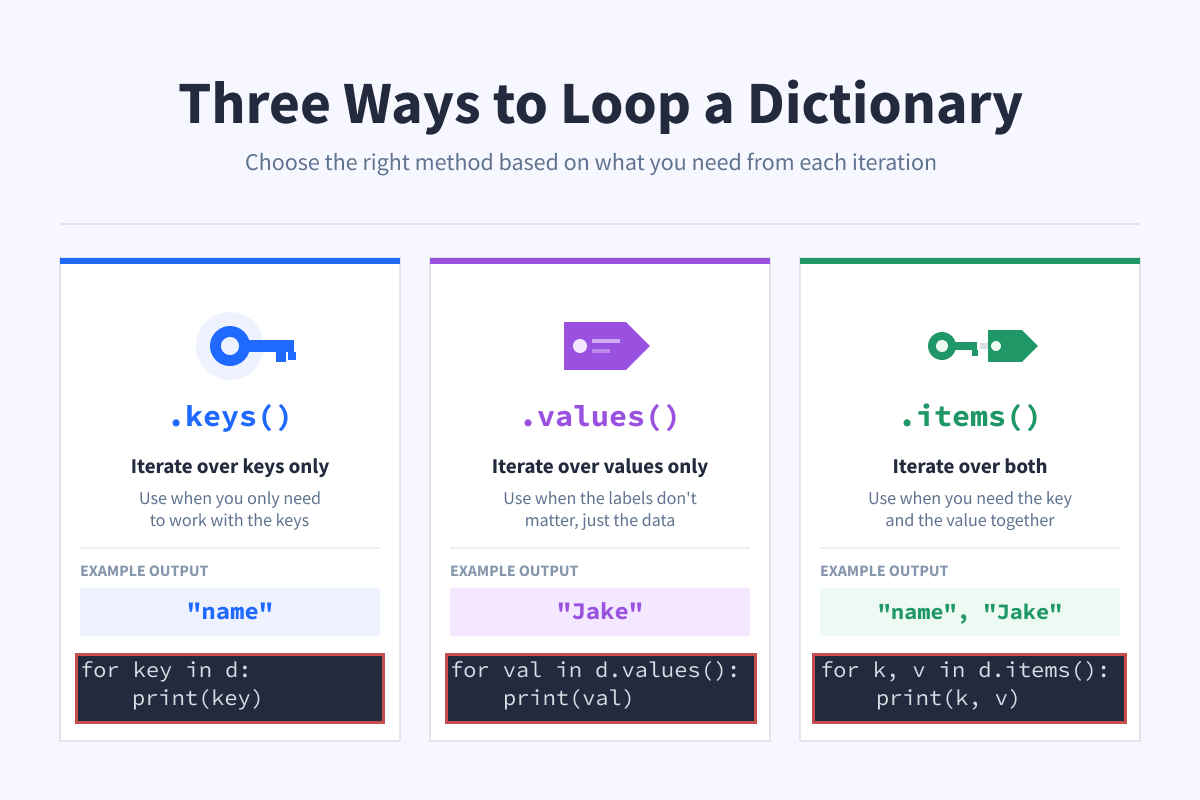
Use .keys() when you only need to work with the keys, .values() when you only need the values, and .items()when you need both at the same time.
Nested Dictionaries (Real-World Data)
A dictionary value can itself be a dictionary.
user = {
    "name": "Amanda",
    "address": {
        "city": "New York"
    }
}
print(user)  # {'name': 'Amanda', 'address': {'city': 'New York'}}
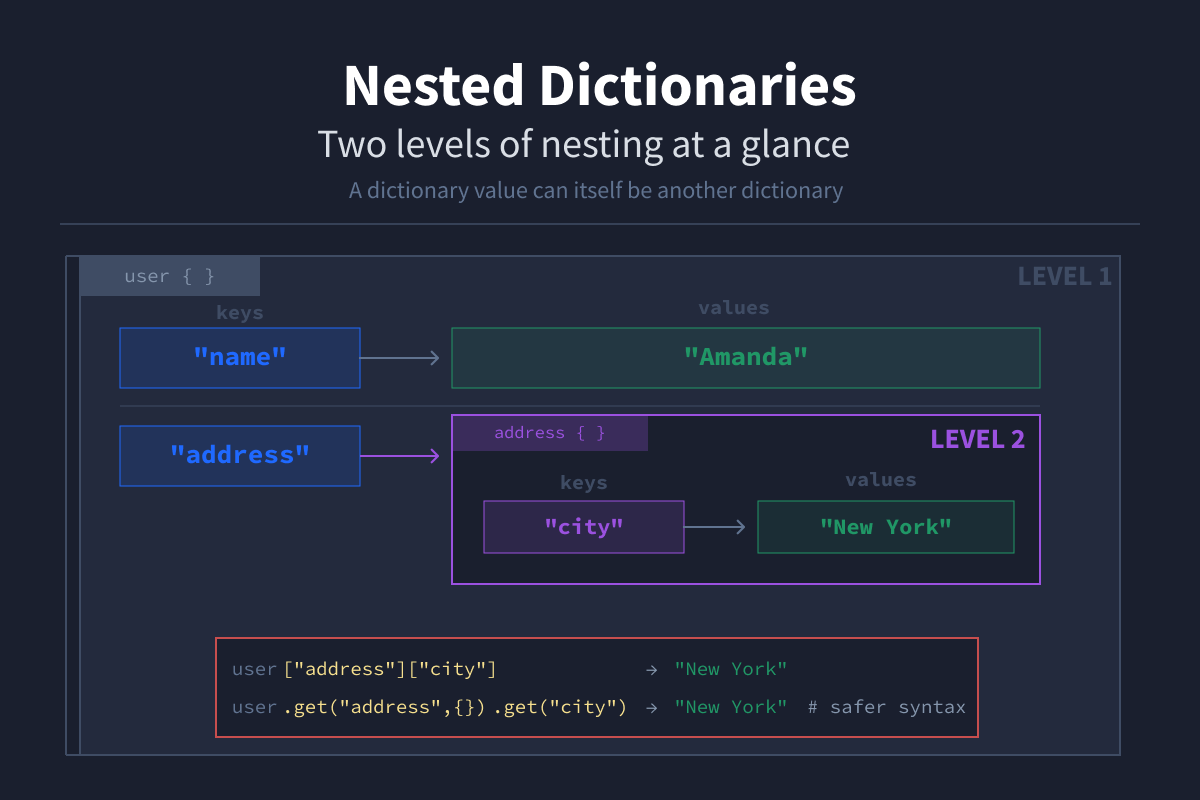
This is called a nested dictionary. To access nested data, you chain the keys.
user["address"]["city"] # "New York"It's safer to use .get() chaining to avoid a KeyError if a key is missing:
city = user.get("address", {}).get("city") # None if either key is missingThe empty dictionary {} acts as a safe fallback. If "address" doesn't exist, .get() returns {} instead of raising an error, giving the second .get() something to work with.
This pattern shows up constantly in real-world code. API responses and JSON data are almost always nested dictionaries. Once you're comfortable reading them, working with external data becomes a lot easier.
Common Python Dictionary Methods
.get() fetches a value by key without raising an error if the key doesn't exist. It also accepts an optional second argument that lets you specify a fallback value instead of returning None.
d.get("name")              # Returns "Jake", or None if "name" doesn't exist
d.get("name", "Unknown")   # Returns "Jake", or "Unknown" if "name" doesn't exist
.keys() returns all the keys.
d.keys() # dict_keys(["name", "age", "eyes"]).values() returns all the values.
d.values() # dict_values(["Jake", 25, "blue"]).items() returns all key-value pairs.
d.items() # dict_items([("name", "Jake"), ("age", 25), ("eyes", "blue"]).update() merges another dictionary into yours.
d.update({"age": 22}) # d is now {"name": "Jake", "age": 22, "eyes": "blue"}When Should You Use a Dictionary?
Use a dictionary when:
- Your data has labels and names mean more than positions
- You need fast lookups by key
- You're working with API responses or JSON data
- You're modeling a real-world object like a user, product, or config
If your data is just a simple sequence of items with no labels, a list is fine. But as soon as you start naming things, a dictionary is the better choice.
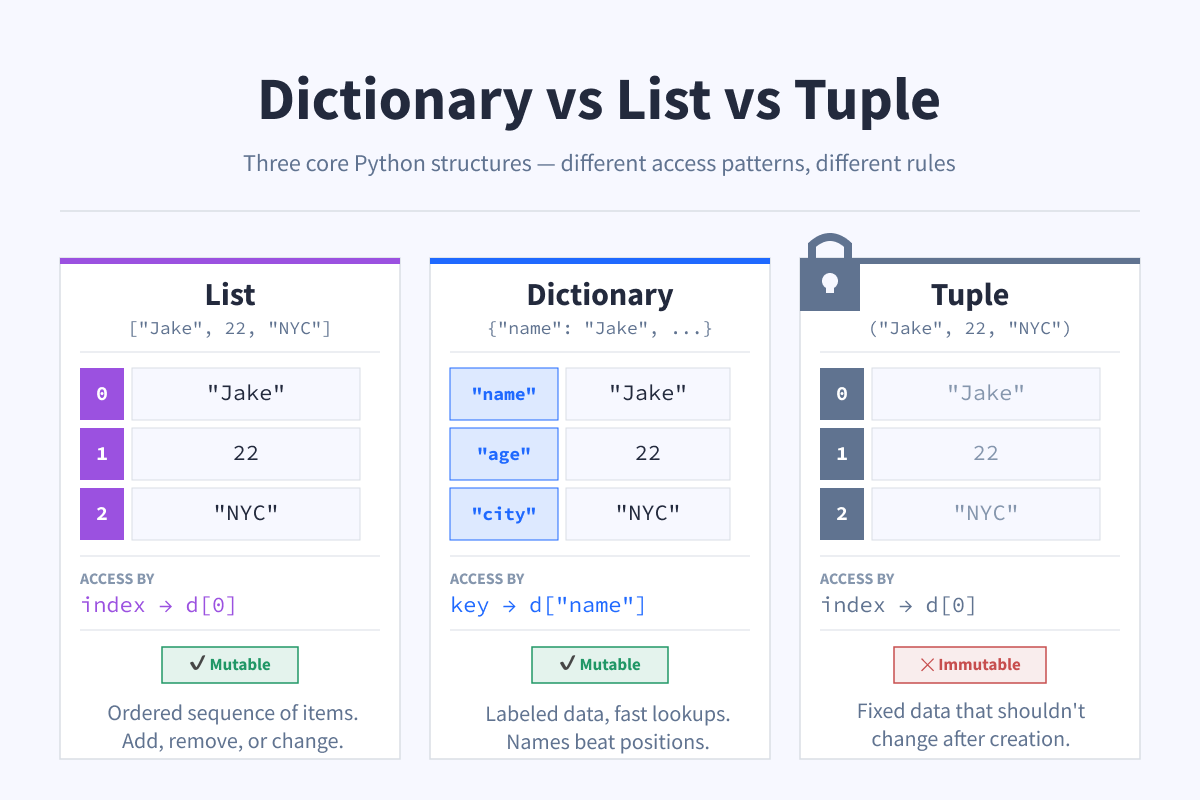
Dictionary vs List vs Tuple
| Structure | Ordered | Access By | Mutable | Use When |
|---|---|---|---|---|
| List | Yes | Index | Yes | Ordered sequence of items |
| Dictionary | Yes (Python 3.7+) | Key | Yes | Labeled data, fast lookups |
| Tuple | Yes | Index | No | Fixed data that shouldn't change |
Note: "Ordered" for dictionaries means insertion order (the order in which you added items) not alphabetical or sorted order.
Why Use a Dictionary Instead of a List?
Consider this list:
data = ["Jake", 22]To get the age, you write data[1]. That works, but it's not obvious. You have to remember what position holds what.
A dictionary makes it explicit:
data = {
    "name": "Jake",
    "age": 22
}
Now you write data["age"], and it's immediately clear what you're getting. No memorizing positions, no guessing.
Dictionaries are also fast. They use a hash table under the hood, which means looking up a value by key is O(1) on average. In practice, lookups stay nearly instant regardless of how large your dictionary grows.
Using Dictionaries in Data Science
Dictionaries are widely used in data science because they help organize structured data. In Python, they are one of the most important data types used across many libraries and workflows.
Most data from APIs is returned in JSON, which is typically parsed into Python dictionaries. This makes dictionaries essential when working with real-world datasets.
Dictionaries are also commonly used in Python libraries like pandas to create datasets:
import pandas as pd

data = {
    "name": ["Alice", "Bob"],
    "age": [25, 30]
}

df = pd.DataFrame(data)
In data science, dictionaries are often used for:
- Working with JSON schema and API data
- Organizing features and labels
- Storing model inputs and outputs
Wrapping Up
Dictionaries are the right choice when your data has labels and structure. Whether you're parsing an API response, organizing model inputs, or storing user details, they make your code easier to read and your data easier to work with.
Our Introduction to Python Programming course lets you practice Python fundamentals, including dictionaries, lists, and tuples, with real code in your browser. Start learning for free.
FAQs
What are dictionaries used for?
Dictionaries are great whenever your data has meaningful labels.
Instead of remembering that index 0 is a name and index 1 is an age, you can use user["name"], making your code more readable and self-documenting.
You’ll use them often when working with API responses, storing configuration settings, and organizing structured data before loading it into a DataFrame.
Why not always use a dictionary instead of a list?
It depends on whether your data has labels.
If you're storing similar items where order matters, like scores or filenames, a list is a better fit.
Dictionaries are more useful when each value has a distinct meaning and you need to access data by name instead of position.
Are Python dictionaries ordered?
Yes. Since Python 3.7, dictionaries preserve insertion order.
This means items are returned in the same order you added them, not sorted alphabetically.
d = {"name": "Jake", "age": 22, "city": "Toronto"}
for key in d:
    print(key)
# name
# age
# city
What's the difference between a dictionary and a set?
A set is like a dictionary that only keeps keys and ignores values.
It stores unique items and is useful for checking membership and removing duplicates.
If you only care whether something exists and don’t need extra data, a set is the right choice.
Are Python dictionaries fast?
Yes.
Dictionaries use a hash table, so looking up a value by key takes roughly the same time whether there are 10 items or 10 million.
This efficiency is one reason they’re widely used in Python.
What types of values can a dictionary store?
A dictionary can store any type of value, including strings, numbers, booleans, lists, and even other dictionaries.
user = {
    "name": "Alice",
    "age": 25,
    "active": True,
    "scores": [88, 92, 95],
    "address": {"city": "Vancouver"}
}
Can dictionary keys be duplicated?
No, keys must be unique.
If you assign a value to an existing key, Python will overwrite the old value without raising an error.
d = {"name": "Jake"}
d["name"] = "Alice"

print(d)  # {"name": "Alice"}
What types of keys are allowed in a dictionary?
Keys must be hashable, which usually means immutable.
Strings, numbers, and tuples (with only immutable elements) work as keys. Lists and dictionaries do not.
d = {}
d["name"] = "valid"       # string key
d[(1, 2)] = "valid"       # tuple key
d[[1, 2]] = "invalid"     # list key (TypeError)
What is a key-value pair in Python?
A key-value pair links a key (identifier) with a value (data).
In dictionaries, every entry follows this structure.
user = {"name": "Jake"}
# "name" is the key, "Jake" is the value
print(user["name"])  # Jake
Can you combine two dictionaries in Python?
Yes.
In Python 3.9+, you can use the | operator:
d1 = {"name": "Jake"}
d2 = {"age": 22}
merged = d1 | d2
print(merged)  # {'name': 'Jake', 'age': 22}
In earlier versions, use .update(), which modifies the original dictionary:
d1.update(d2)
print(d1)  # {'name': 'Jake', 'age': 22}
If both dictionaries share a key, the value from the second dictionary overwrites the first.
