
Project Tutorial: Predicting Employee Productivity with Decision Trees and Random Forests
In this project walkthrough, we'll build a machine learning model to predict whether a given workday in a garment factory will be productive or not. As a data scientist working with factory management, our goal is to analyze team-level productivity data and identify the key conditions that drive performance on the floor.
What makes this project especially rewarding is the end result: a visual decision tree you can actually show to non-technical stakeholders. Rather than presenting a black-box model, we'll be able to walk a factory manager through the exact questions the model asks to arrive at a prediction.
What You'll Learn
By the end of this tutorial, you'll know how to:
- Clean and prepare real-world operational data for machine learning
- Build and visualize a decision tree classifier using scikit-learn
- Evaluate model performance using accuracy, precision, recall, F1 score, and cross-validation
- Interpret a decision tree for a non-technical business audience
- Use a random forest to validate your single-tree results
Before You Start
To make the most of this project walkthrough, follow these preparatory steps:
- Review the Project Access the project and familiarize yourself with the goals and structure: Predicting Employee Productivity Project.
- Prepare Your Environment
- If you're using the Dataquest platform, everything is already set up for you.
- If you're working locally, ensure you have Python and Jupyter Notebook installed, along with
pandas,matplotlib, andsklearn. - Download the
garments_worker_productivity.csvdataset from the project.
- Prerequisites
- Comfortable with Python basics (loops, functions, data structures)
- Familiar with pandas DataFrames and basic data manipulation
- Some exposure to the machine learning workflow is helpful but not required
New to tree-based models? The Decision Tree and Random Forest Modeling in Python course covers the core concepts we'll apply here.
Setting Up Your Environment
Let's start by importing the libraries we'll need for exploration and visualization:
import pandas as pd
from matplotlib import pyplot as plt
We'll import scikit-learn modules later, closer to where we use them, which keeps things organized as the project grows.
Now let's load the dataset and take a first look:
df = pd.read_csv("garments_worker_productivity.csv")
df.head()
date quarter department day team targeted_productivity smv wip over_time incentive idle_time idle_men no_of_style_change no_of_workers actual_productivity
0 1/1/2015 Quarter1 sweing Thursday 8 0.80 26.16 1108.0 7080 98 0.0 0 0 59.0 0.940725
1 1/1/2015 Quarter1 finishing Thursday 1 0.75 3.94 NaN 960 0 0.0 0 0 8.0 0.886500
2 1/1/2015 Quarter1 sweing Thursday 11 0.80 11.41 968.0 3660 50 0.0 0 0 30.5 0.800570
3 1/1/2015 Quarter1 sweing Thursday 12 0.80 11.41 968.0 3660 50 0.0 0 0 30.5 0.800570
4 1/1/2015 Quarter1 sweing Thursday 6 0.80 25.90 1170.0 1920 50 0.0 0 0 56.0 0.800382Our dataset contains daily productivity records for teams across two departments of a garment factory. Here's what each column represents:
- date: The date of the record (January to March of a single year)
- quarter: A portion of the month (Quarter1 = Week 1, Quarter2 = Week 2, etc.)
- department: The factory department (sewing or finishing)
- day: Day of the week
- team: A numeric identifier for each team (1–12)
- targeted_productivity: The productivity target set for that day (0 to 1 scale)
- smv: Standard Minute Value — the allocated time for a task, in minutes
- wip: Work in Progress — tasks still pending
- over_time: Overtime worked, in minutes
- incentive: Financial incentive given to the team, in BDT
- idle_time: Time lost due to production issues
- idle_men: Number of workers who were idle
- no_of_style_change: Number of product style changes that day
- no_of_workers: Number of workers on the team
- actual_productivity: The actual productivity achieved (0 to 1 scale, our basis for the target variable)
Learning Insight: Notice that
quarterhere does NOT mean a calendar quarter. It refers to a week within a month. This is the kind of domain-specific detail that's easy to miss but important to get right before modeling.
Exploratory Data Analysis (EDA)
Before we touch a single model, we need to understand what we're working with. Let's check the structure of the dataset:
df.info()<class 'pandas.core.frame.DataFrame'>
RangeIndex: 1197 entries, 0 to 1196
Data columns (total 15 columns):
# Column Non-Null Count Dtype
--- ------ -------------- -----
0 date 1197 non-null object
1 quarter 1197 non-null object
2 department 1197 non-null object
3 day 1197 non-null object
4 team 1197 non-null int64
5 targeted_productivity 1197 non-null float64
6 smv 1197 non-null float64
7 wip 691 non-null float64
8 over_time 1197 non-null int64
9 incentive 1197 non-null int64
10 idle_time 1197 non-null float64
11 idle_men 1197 non-null int64
12 no_of_style_change 1197 non-null int64
13 no_of_workers 1197 non-null float64
14 actual_productivity 1197 non-null float64
dtypes: float64(6), int64(5), object(4)
memory usage: 140.4+ KBA few things stand out right away. The wip column has only 691 non-null values out of 1,197 rows, meaning roughly 42% of it is missing. We also have several object (string/categorical) columns that machine learning models can't use directly. We'll address both issues during cleaning.
Let's look at the categorical columns before diving into the numbers:
df["department"].value_counts()department
sweing 691
finishing 257
finishing 249
Name: count, dtype: int64Three rows for what should be two departments. Let's see why:
df["department"].unique()array(['sweing', 'finishing ', 'finishing'], dtype=object)Two data quality issues in one column: "sweing" is a typo for "sewing", and some "finishing" values have a hidden trailing space. Both need to be fixed.
df["quarter"].value_counts()quarter
Quarter1 360
Quarter2 335
Quarter4 248
Quarter3 210
Quarter5 44
Name: count, dtype: int64Quarter5 shows up with 44 entries. Since quarters represent weeks of a month, Quarter5 covers dates that fall on the 29th through 31st. With only 44 records, it's too sparse to stand on its own, so we'll merge it into Quarter4.
df["day"].value_counts()day
Wednesday 208
Sunday 203
Tuesday 201
Thursday 199
Monday 199
Saturday 187
Name: count, dtype: int64No Fridays in the dataset. The data spans January through March of a single year, so Friday may simply have been a non-working day. Either way, it won't significantly affect our model.
Now let's check the numeric distributions:
df.describe() team targeted_productivity smv wip over_time incentive idle_time idle_men no_of_style_change no_of_workers actual_productivity
count 1197.000000 1197.000000 1197.000000 691.000000 1197.000000 1197.000000 1197.000000 1197.000000 1197.000000 1197.000000 1197.000000
mean 6.426901 0.729632 15.062172 1190.465991 4567.460317 38.210526 0.730159 0.369256 0.150376 34.609858 0.735091
std 3.463963 0.097891 10.943219 1837.455001 3348.823563 160.182643 12.709757 3.268987 0.427848 22.197687 0.174488
min 1.000000 0.070000 2.900000 7.000000 0.000000 0.000000 0.000000 0.000000 0.000000 2.000000 0.233705
25% 3.000000 0.700000 3.940000 774.500000 1440.000000 0.000000 0.000000 0.000000 0.000000 9.000000 0.650307
50% 6.000000 0.750000 15.260000 1039.000000 3960.000000 0.000000 0.000000 0.000000 0.000000 34.000000 0.773333
75% 9.000000 0.800000 24.260000 1252.500000 6960.000000 50.000000 0.000000 0.000000 0.000000 57.000000 0.850253
max 12.000000 0.800000 54.560000 23122.000000 25920.000000 3600.000000 300.000000 45.000000 2.000000 89.000000 1.120437Two things worth noting: the actual_productivity column has a maximum value above 1.0, even though the dataset documentation describes it as a 0-to-1 scale. We'll handle this by converting the column into a binary classification target rather than a regression target. Also, the mean incentive is about 38, but the median is 0, which tells us most days have no incentive at all — a heavily skewed distribution that the model will need to handle.
Let's look at the distributions visually:
df.hist(figsize=(10, 10))
plt.show()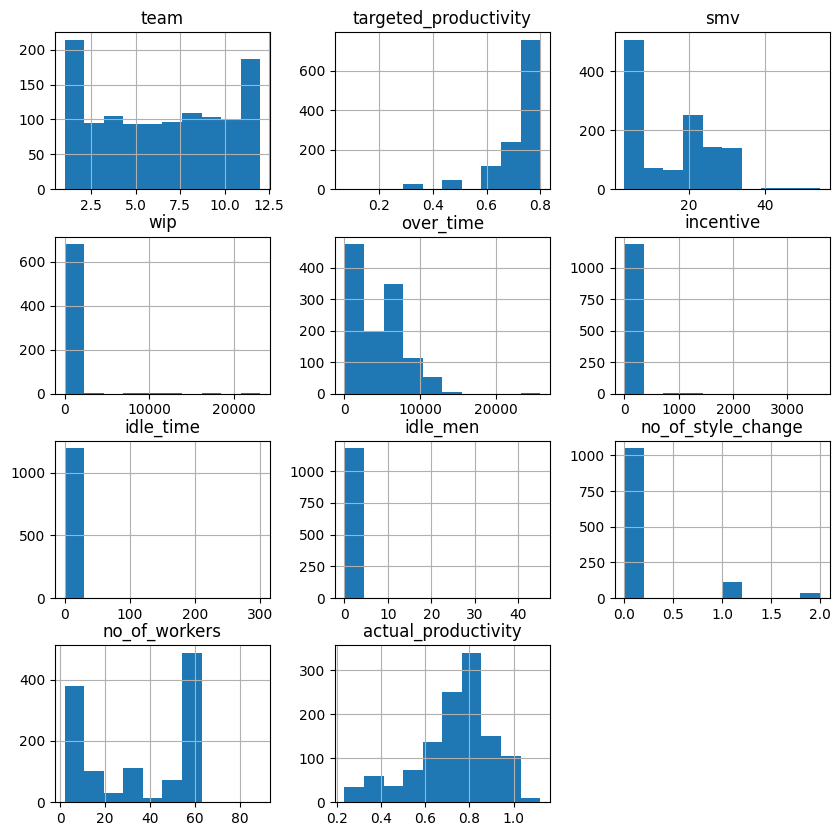
The histograms confirm a few things we suspected. idle_time and idle_men show virtually no variation, with bars only at zero. Let's count the non-zero values:
print(len(df[(df["idle_time"] > 0)]))
print(len(df[(df["idle_men"] > 0)]))
18
18Only 18 non-zero values out of 1,197 rows for each of these columns. They carry almost no information and can be dropped.
Learning Insight: Histograms are one of the fastest ways to spot low-variance or near-constant columns. If a column has almost all its values at zero with a tiny bar elsewhere, it's usually not going to help your model learn anything meaningful.
Data Cleaning
Now we'll address everything we found during exploration. Let's fix the department column first:
df.loc[df["department"] == "finishing ", "department"] = "finishing"
df.loc[df["department"] == "sweing", "department"] = "sewing"
df["department"].value_counts()
department
sewing 691
finishing 506
Name: count, dtype: int64Two clean departments. Now let's drop the columns we won't be using:
# removing date column (due to short time frame, probably not useful for our model)
# removing idle_time and idle_men due to few non-zero values
# removing wip due to many null values
# removing no_of_style_change due to few non-zero values
df = df.drop(["date", "idle_time", "idle_men", "wip", "no_of_style_change"], axis=1)
df.head(3)
quarter department day team targeted_productivity smv over_time incentive no_of_workers actual_productivity
0 Quarter1 sewing Thursday 8 0.80 26.16 7080 98 59 0.940725
1 Quarter1 finishing Thursday 1 0.75 3.94 960 0 8 0.886500
2 Quarter1 sewing Thursday 11 0.80 11.41 3660 50 30 0.800570Next, we'll merge Quarter5 into Quarter4 and convert the quarter labels to integers:
df.loc[df["quarter"] == "Quarter5", "quarter"] = "Quarter4"
df["quarter"].value_counts()
quarter
Quarter1 360
Quarter2 335
Quarter4 292
Quarter3 210
Name: count, dtype: int64df.loc[df["quarter"] == "Quarter1", "quarter"] = 1
df.loc[df["quarter"] == "Quarter2", "quarter"] = 2
df.loc[df["quarter"] == "Quarter3", "quarter"] = 3
df.loc[df["quarter"] == "Quarter4", "quarter"] = 4
df["quarter"] = df["quarter"].astype("int")Learning Insight: After doing a
.value_counts()on the quarter column, the output may appear to show integers, but the underlying dtype is still a string. Always follow up with.astype()to make sure the conversion actually took effect in the dataframe. It's an easy gotcha to miss.
Now let's fix the no_of_workers column, which is currently stored as a float:
# number of workers is currently a float, but can't have a fraction of a worker. convert to int
df["no_of_workers"] = df["no_of_workers"].astype("int")
And round actual_productivity to two decimal places, matching the precision of targeted_productivity:
df["actual_productivity"] = df["actual_productivity"].round(2)
df.head(2)
quarter department day team targeted_productivity smv over_time incentive no_of_workers actual_productivity
0 1 sewing Thursday 8 0.80 26.16 7080 98 59 0.94
1 1 finishing Thursday 1 0.75 3.94 960 0 8 0.89Now we can create our classification target. A day is productive if actual_productivity meets or exceeds targeted_productivity:
# setting new column for classifier based on whether targeted productivity was reached
df["productive"] = df["actual_productivity"] >= df["targeted_productivity"]
df.sample(10, random_state=14)
quarter dept_sewing day team targeted_productivity smv over_time incentive no_of_workers actual_productivity productive
959 4 0 Thursday 10 0.70 2.90 3360 0 8 0.41 False
464 4 0 Tuesday 8 0.65 3.94 960 0 8 0.85 True
672 2 1 Sunday 7 0.70 24.26 6960 0 58 0.36 False
...We can spot-check the logic: row 959 has actual_productivity of 0.41 against a target of 0.70, so productive is False. Looks correct.
Preparing Data for Machine Learning
Decision trees need numeric inputs only. We have three remaining categorical columns to address: department, quarter, and day. We'll also need to handle team, since it's a numeric identifier, not a meaningful number.
Let's start with department. Since it has only two values, we can convert it to a binary column:
# convert department column to boolean
df = df.rename(columns={"department": "dept_sewing"})
df["dept_sewing"] = df["dept_sewing"].map({"finishing": 0, "sewing": 1}).astype("int64")
df.head(10)
quarter dept_sewing day team targeted_productivity smv over_time incentive no_of_workers actual_productivity productive
0 1 1 Thursday 8 0.80 26.16 7080 98 59 0.94 True
1 1 0 Thursday 1 0.75 3.94 960 0 8 0.89 True
...For quarter, day, and team, the numeric values are labels, not quantities. Quarter 4 isn't four times Quarter 1, and Team 12 isn't "more" than Team 6. We'll convert each with pd.get_dummies() to create proper binary columns:
# make quarter column into dummies (numeric order is *not* actually part of these values so they should be categorical)
df = pd.concat([df, pd.get_dummies(df["quarter"], prefix="q")], axis=1).drop(["quarter"], axis=1)
# day column to dummies
df = pd.concat([df, pd.get_dummies(df["day"], prefix=None)], axis=1).drop(["day"], axis=1)# team column to dummies
df = pd.concat([df, pd.get_dummies(df["team"], prefix="team")], axis=1).drop(["team"], axis=1)
df.sample(10, random_state=14) dept_sewing targeted_productivity smv over_time incentive no_of_workers actual_productivity productive q_1 q_2 ... team_10 team_11 team_12
959 0 0.70 2.90 3360 0 8 0.41 False False False ... True False False
464 0 0.65 3.94 960 0 8 0.85 True False False ... False False False
...
10 rows × 30 columnsEverything is numeric now. True and False values are treated as 1 and 0 under the hood, so the model can work with them directly. We're ready to build.
Learning Insight: One of the most common mistakes when preparing data for decision trees is leaving numeric-looking identifiers (like team numbers) as raw integers. The model will treat them as continuous values with order and magnitude, which introduces false relationships. Always ask: does a higher value here actually mean "more" of something?
Building the Decision Tree
Let's import our modeling tools and split the data:
from sklearn.model_selection import train_test_split
from sklearn.tree import DecisionTreeClassifier
from sklearn.tree import plot_tree
# Feature and target columns
X = df.drop(["actual_productivity", "productive"], axis=1)
y = df["productive"]
X_train, X_test, y_train, y_test = train_test_split(X, y, test_size=0.2, shuffle=True, random_state=24)We drop both actual_productivity and productive from X — the model can't see the raw productivity numbers it used to calculate the target, or it would be cheating. We use shuffle=True because the data is sorted by date, and we don't want the training and test splits to come from different time periods.
Now let's instantiate and train the tree:
tree = DecisionTreeClassifier(max_depth=3, random_state=24)
tree.fit(X_train, y_train)
Two lines of code, and a trained decision tree. Let's get some predictions from it:
y_pred = tree.predict(X_test)Learning Insight: We set
max_depth=3, meaning the tree will ask at most 3 questions before reaching a prediction. This is intentional. A deeper tree will memorize the training data rather than learn patterns from it — this is called overfitting. Think of it like a student who memorizes exact exam answers instead of understanding the material. They'll do great on that test, but fail any question they haven't seen before. Keeping depth modest produces a model that generalizes well to new data.
Visualizing and Evaluating the Tree
Let's check accuracy on our held-out test data first:
from sklearn.metrics import accuracy_score
print("Accuracy:", round(accuracy_score(y_test, y_pred), 2))
Accuracy: 0.8585% accuracy. For a dataset this noisy and with this level of preprocessing, that's a strong result. Now let's see the tree itself:
plt.figure(figsize=[20.0, 8.0])
_ = plot_tree(tree,
              feature_names=X.columns,
              class_names=["Unproductive", "Productive"],
              filled=True,
              rounded=False,
              proportion=True,
              fontsize=11)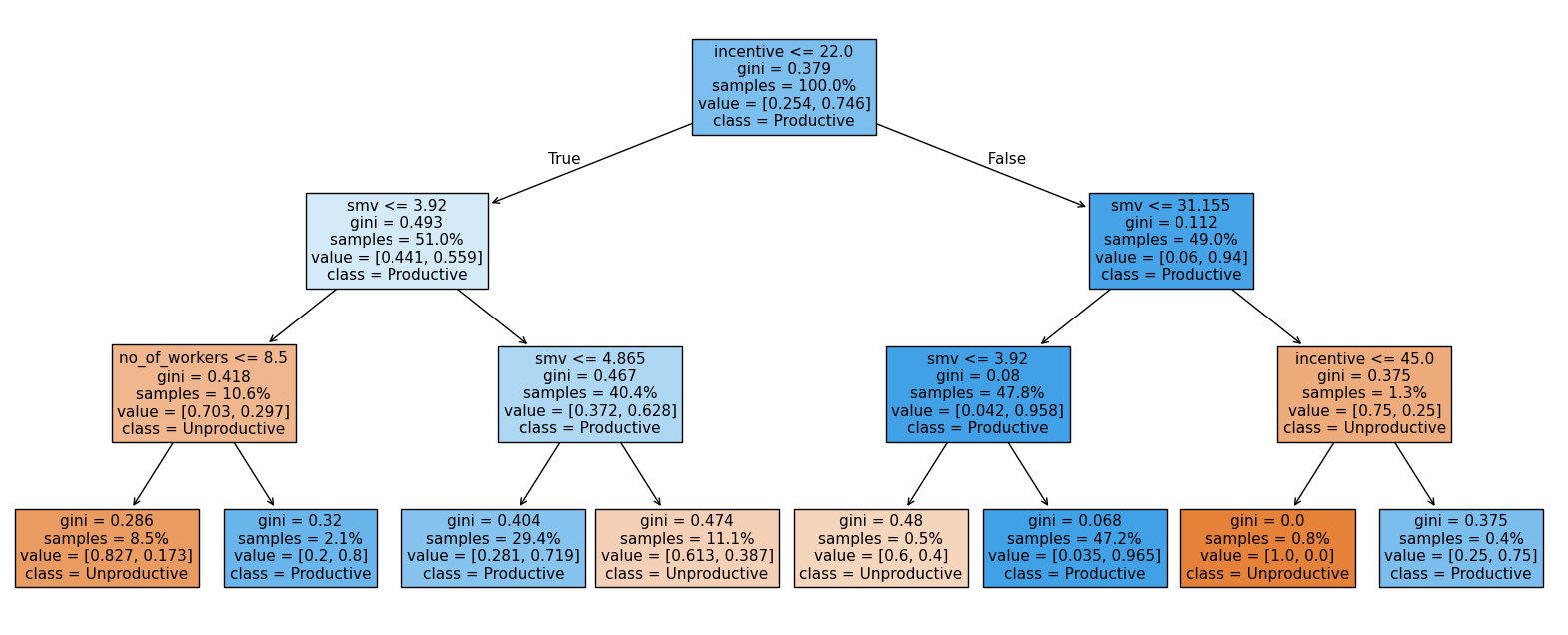
This is one of the best things about decision trees: the model is human-readable. Let's walk through what it's telling us.
Start at the root of the tree. The first question is whether incentive is greater than 22. If it is, we move to the right side of the tree, where the model already shows a strong lean toward Productive days.
Next, the tree asks whether smv is less than or equal to 31.155. Almost all of this group continues down the left branch, where the model then checks whether smv is greater than 3.92.
This final split leads to the largest leaf in the entire tree, covering 47.2% of the dataset. These days are classified as Productive, with a very low Gini impurity (0.068). That low impurity tells us the model is very confident in this prediction.
In practical terms, the clearest pattern in the data is this: when incentives are above 22 and task times fall in a moderate range (not extremely low), the day is very likely to be productive. This combination stands out as the strongest and most consistent signal in the model.
Learning Insight: The fact that
incentiveandsmv(Standard Minute Value) dominate the tree is a meaningful business finding. Incentive showing up as the root node suggests that whether or not a financial reward is offered is the single strongest driver of whether a day hits its productivity target. That's a direct, actionable insight for factory management.
Understanding the Node Information
Each box in the tree shows four pieces of information:
- The question being asked at that node
- Gini: a measure of impurity. Values closer to 0 mean the node contains mostly one class (more predictive). Values closer to 0.5 mean the classes are evenly mixed.
- Samples: the proportion of the dataset represented at that node
- Class: what the model would predict if it stopped here
Confusion Matrix
Accuracy alone doesn't tell the full story. Let's look at where the model makes mistakes:
from sklearn.metrics import confusion_matrix
confusion_matrix(y_test, y_pred)
array([[ 35, 24],
[ 13, 168]])Reading the confusion matrix:
- True Negatives (top-left, 35): Days correctly predicted as unproductive
- False Positives (top-right, 24): Days predicted as productive but were actually unproductive
- False Negatives (bottom-left, 13): Days predicted as unproductive but were actually productive
- True Positives (bottom-right, 168): Days correctly predicted as productive
The model is more likely to misclassify an unproductive day as productive (24 cases) than the reverse (13 cases). In a factory context, this means management might occasionally plan around an expected productive day that doesn't deliver. Worth flagging to stakeholders.
Precision, Recall, and F1
from sklearn.metrics import precision_score, recall_score, f1_score

print("Precision:", round(precision_score(y_test, y_pred), 2))
print("Recall:", round(recall_score(y_test, y_pred), 2))
print("F1 Score:", round(f1_score(y_test, y_pred), 2))
print("----")
print("Accuracy:", round(tree.score(X_test, y_test), 2))
Precision: 0.88
Recall: 0.93
F1 Score: 0.9
----
Accuracy: 0.85All metrics are clustering near 90%, which is a good sign that the model is performing consistently rather than excelling on one type of prediction while failing on another. Precision of 0.88 means that when the model predicts "productive," it's right 88% of the time. Recall of 0.93 means it catches 93% of the days that were actually productive.
Cross-Validation
To make sure our results hold up across different data splits and aren't just a lucky test set, let's run 10-fold cross-validation:
from sklearn.model_selection import cross_val_score

scores = cross_val_score(tree, X, y, cv=10)
print("Cross Validation Accuracy Scores:", scores.round(2))
print("Mean Cross Validation Score:", scores.mean().round(2))
Cross Validation Accuracy Scores: [0.85 0.88 0.81 0.87 0.87 0.82 0.72 0.76 0.84 0.79]
Mean Cross Validation Score: 0.82The mean drops slightly to 0.82, but that's expected since cross-validation is a more rigorous test. The lowest single fold scored 0.72 — still reasonable. We can also check precision, recall, and F1 across all 10 folds:
from sklearn.model_selection import cross_validate

multiple_cross_scores = cross_validate(tree, X, y, cv=10,
                                       scoring=("precision", "recall", "f1"))

print("Mean Cross Validated Precision:", round(multiple_cross_scores["test_precision"].mean(), 2))
print("Mean Cross Validated recall:", round(multiple_cross_scores["test_recall"].mean(), 2))
print("Mean Cross Validated F1:", round(multiple_cross_scores["test_f1"].mean(), 2))
Mean Cross Validated Precision: 0.85
Mean Cross Validated recall: 0.92
Mean Cross Validated F1: 0.88Solid and consistent across the board.
Learning Insight: Cross-validation is essentially running the same experiment 10 times with different data configurations. If your model only performs well on one specific split, that's a red flag. Seeing consistent performance across all 10 folds is what gives us confidence to present these results to stakeholders.
Validating with a Random Forest
One more check. A random forest builds 100 different decision trees, each on a slightly different sample of the data, and combines their predictions. If our single tree is genuinely learning good patterns, the forest should confirm it:
from sklearn.ensemble import RandomForestClassifier

forest = RandomForestClassifier(oob_score=True, random_state=24)
forest.fit(X_train, y_train)

y_pred_forest = forest.predict(X_test)
print("Accuracy:", round(accuracy_score(y_test, y_pred_forest), 2))
Accuracy: 0.85print("Out Of Bag Score:", round(forest.oob_score_, 2))Out Of Bag Score: 0.83The random forest matches our single tree at 85% accuracy on the test set, and scores 0.83 on the out-of-bag estimate (a built-in cross-validation method unique to random forests). This is strong corroboration that our depth-3 decision tree is capturing real patterns, not just memorizing the training data.
Learning Insight: The out-of-bag (OOB) score is a free cross-validation check you get with random forests. Each tree is trained on a different bootstrap sample, meaning some data points are left out of every individual tree's training. Those left-out points are used to evaluate that tree. The OOB score aggregates these evaluations across all 100 trees, giving you a reliable estimate of generalization performance without needing a separate validation split.
Key Takeaways
Walking through this project, a few things stand out:
Incentive and task time are the dominant drivers of productivity. The decision tree asks about incentive and smv at nearly every branch. For factory management, this is actionable: financial incentives and realistic task time allocation appear to be the levers most worth pulling.
Decision trees are powerful communication tools. Unlike most machine learning models, a shallow decision tree can be shown directly to non-technical stakeholders. You can walk a factory manager through the exact logic the model uses, question by question.
Multiple evaluation metrics matter. Our accuracy was 85%, but the confusion matrix showed us that the model's errors lean toward false positives — predicting productivity that doesn't materialize. That nuance matters for how the business uses the predictions.
A single tree backed by a random forest is a trustworthy result. When your 10-fold cross-validation and a 100-tree ensemble both confirm your single model's accuracy, you can present those findings with confidence.
Next Steps
There are several directions worth exploring from here:
Try a regression tree instead. Rather than predicting productive vs. unproductive, predict the actual productivity value directly. Most of the data preparation work is already done — the main change is your target variable and model type.
Add productivity tiers. Instead of a binary target, consider creating multi-class categories like "insufficient," "satisfactory," and "exceeds target." This gives stakeholders more granular predictions to act on.
Keep wip in the dataset. Work in Progress was dropped due to missing values, but it could be a meaningful predictor. Try imputing the missing values and see whether including wip improves performance.
Investigate the age bands in the data. The dataset covers only three months, and date was dropped early. It's worth exploring whether productivity patterns shift over time, or whether certain teams or quarters behave differently enough to warrant separate models.
Sharing Your Work
When you complete this project, consider sharing it on GitHub as a Jupyter notebook. Include Markdown cells that explain your reasoning at each step — especially why you dropped certain columns, how you handled the Quarter5 issue, and what the decision tree visualization means in plain language. A notebook with clear explanations is far more impressive to employers than one that's just code.
If you get stuck or want to discuss your results, tag @Anna_strahl in the Dataquest Community. And if you're looking to build a stronger foundation before tackling this project, the Decision Tree and Random Forest Modeling in Python course covers the core concepts we applied here.
Happy modeling!
