44 Kubernetes Interview Questions Interviewers Actually Ask
Preparing for Kubernetes interview questions means more than memorizing definitions. Interviewers want to see that you can work with clusters, troubleshoot real failures, and make sound architectural decisions.
A platform engineer recently shared their go-to screening question, "What's the difference between a Pod, a Service, and a Deployment?" Most candidates couldn't answer it clearly. The bar isn't impossibly high, but it requires hands-on understanding, not just surface-level familiarity.
This guide covers 44 questions organized the way real interviews actually flow, from foundational concepts through practical troubleshooting and open-ended design scenarios. At Dataquest, our Introduction to Kubernetes course teaches these fundamentals through hands-on practice with realistic scenarios, which is exactly the approach that works in interviews.
Table of Contents
- How Kubernetes Interviews Actually Work
- Basic Kubernetes Interview Questions
- Intermediate Kubernetes Interview Questions
- Advanced Kubernetes Interview Questions
- Scenario-Based Kubernetes Interview Questions
- How to Prepare for Your Kubernetes Interview
- FAQs
How Kubernetes Interviews Actually Work
Most Kubernetes interviews don't start with "explain the Raft consensus algorithm." They start simple, then go deeper based on how you respond.
The typical progression looks like this:
- Screening questions that test basic vocabulary
- Conceptual questions that test deeper understanding
- Scenario-based questions that test real-world problem solving.
A senior interviewer on a platform engineering team put it well:
You can teach someone Kubernetes concepts, but you can't teach someone how to think through problems.
That problem-solving ability is what most interviewers are really evaluating. The specific questions you'll face often depend on the role and the team.
What Makes a Strong Answer
A good Kubernetes interview answer does three things:
- Explains what something is
- Describes why it matters
- Acknowledges trade-offs
If someone asks about StatefulSets, don't just define the resource. Instead, explain when you'd choose one over a Deployment, and what complexity it adds.
If you don't know the answer, say so and walk through how you'd figure it out. Interviewers respect that far more than a confident-sounding guess.
Basic Kubernetes Interview Questions
These are the screening questions that come up first in almost every interview. They filter out candidates who list Kubernetes on their resume but haven't actually worked with it. Getting these right doesn't guarantee a job offer, but getting them wrong usually ends the conversation early.
1. What is Kubernetes, and what problem does it solve?
Kubernetes (K8s) is an open-source container orchestration platform that automates deploying, scaling, and managing containerized applications. Originally developed at Google (based on their internal system called Borg) and now maintained by the Cloud Native Computing Foundation (CNCF), it solves the problem of running containers at scale, something that becomes unmanageable quickly when you're coordinating dozens or hundreds of containers across multiple servers by hand.
You can verify your cluster is running with a single command:
kubectl cluster-infoThis returns the API server address and key cluster service endpoints, confirming that kubectl can reach the cluster and giving you a quick sanity check on connectivity.
2. What's the difference between a Pod, a Service, and a Deployment?
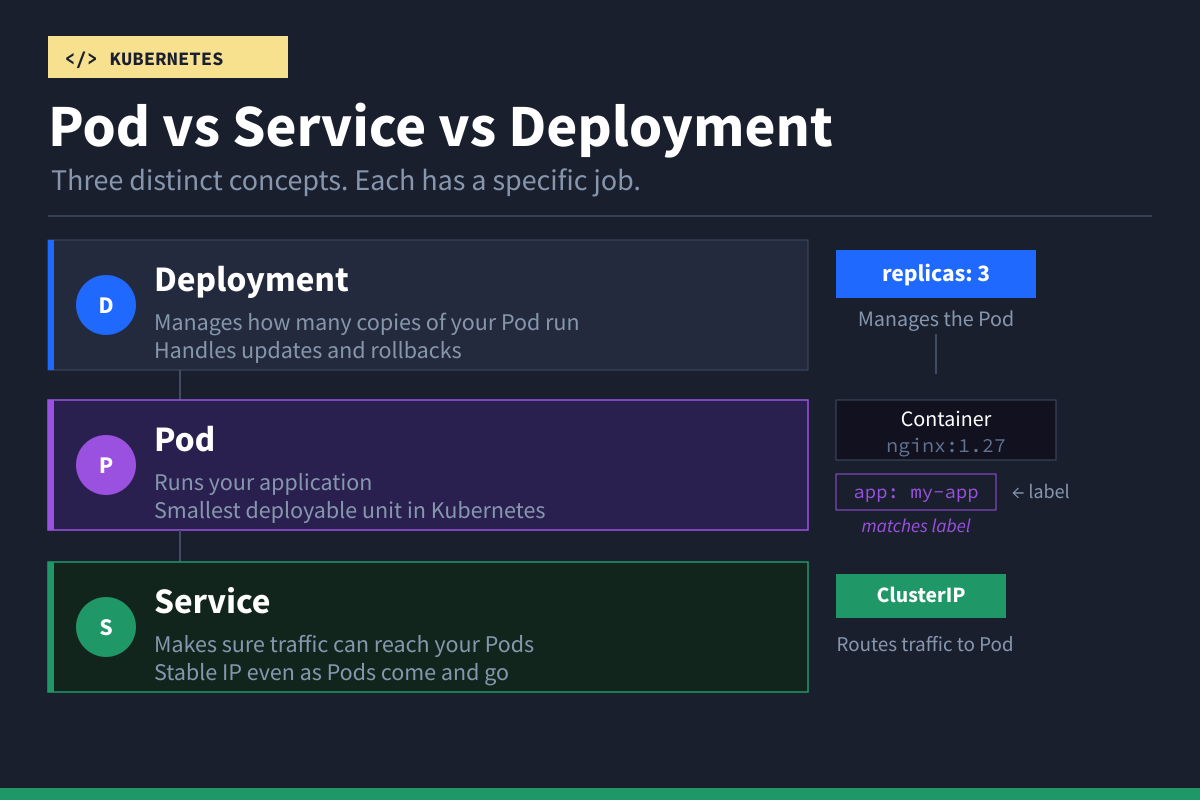
A Pod is the smallest deployable unit; it wraps one or more containers that share networking and storage.
A Deployment manages how many replicas of a Pod run and handles updates and rollbacks.
A Service provides a stable network endpoint that routes traffic to Pods, even as Pods are created and destroyed.
Here's a minimal Pod definition:
apiVersion: v1
kind: Pod
metadata:
  name: my-app
spec:
  containers:
  - name: app
    image: nginx:1.27
    ports:
    - containerPort: 80
And a Deployment that manages three replicas of it:
apiVersion: apps/v1
kind: Deployment
metadata:
  name: my-app
spec:
  replicas: 3
  selector:
    matchLabels:
      app: my-app
  template:
    metadata:
      labels:
        app: my-app
    spec:
      containers:
      - name: app
        image: nginx:1.27
        ports:
        - containerPort: 80
And a Service that exposes those Pods internally:
apiVersion: v1
kind: Service
metadata:
  name: my-app-service
spec:
  selector:
    app: my-app
  ports:
  - port: 80
    targetPort: 80
  type: ClusterIP
The selector in the Service matches Pods with the label app: my-app. Traffic arriving on port 80 is forwarded to port 80 on those Pods.
3. What is a Namespace, and why would you use one?
A Namespace is a way to logically partition resources within a single cluster. You'd use them to separate teams, environments (dev vs. staging), or to apply different resource quotas and access controls.
# Create a namespace
kubectl create namespace dev
# Deploy a pod into that namespace
kubectl run nginx --image=nginx --namespace=dev
# List pods in that namespace
kubectl get pods --namespace=dev
By default, Kubernetes provides the default, kube-node-lease, kube-system, and kube-public Namespaces. Most production clusters create additional ones to organize workloads.
Our tutorial on Kubernetes Services, Rolling Updates, and Namespaces walks through Namespace setup with a realistic data pipeline example.
4. What's the difference between a ConfigMap and a Secret?
Both store configuration data you inject into Pods. A ConfigMap is for non-sensitive data like feature flags or database hostnames. A Secret is intended for sensitive data like passwords and API keys.
Example ConfigMap:
apiVersion: v1
kind: ConfigMap
metadata:
  name: app-config
data:
  database_host: "postgres.production.svc.cluster.local"
  log_level: "info"
Example Secret:
apiVersion: v1
kind: Secret
metadata:
  name: app-secret
type: Opaque
data:
  db_password: cGFzc3dvcmQxMjM=  # base64-encoded
Kubernetes Secrets are base64-encoded by default, not encrypted. Without enabling encryption at rest and proper RBAC controls, Secrets can still be exposed to anyone with sufficient cluster access. However, they are still treated as sensitive resources and offer better access control and handling than ConfigMaps.
Our Kubernetes Configuration and Production Readiness tutorial covers ConfigMaps and Secrets in depth with hands-on examples.
5. What are Labels and Selectors in Kubernetes?
Labels are key/value pairs attached to objects that help organize and select resources. Selectors filter resources based on those labels.
apiVersion: v1
kind: Pod
metadata:
  name: web-pod
  labels:
    app: web
    environment: production
spec:
  containers:
  - name: nginx
    image: nginx:1.27
You can then query for Pods using label selectors:
# Get all production pods
kubectl get pods -l environment=production

# Get all pods for the web app in production
kubectl get pods -l app=web,environment=production
Services, Deployments, and NetworkPolicies all use selectors to target the right set of Pods.
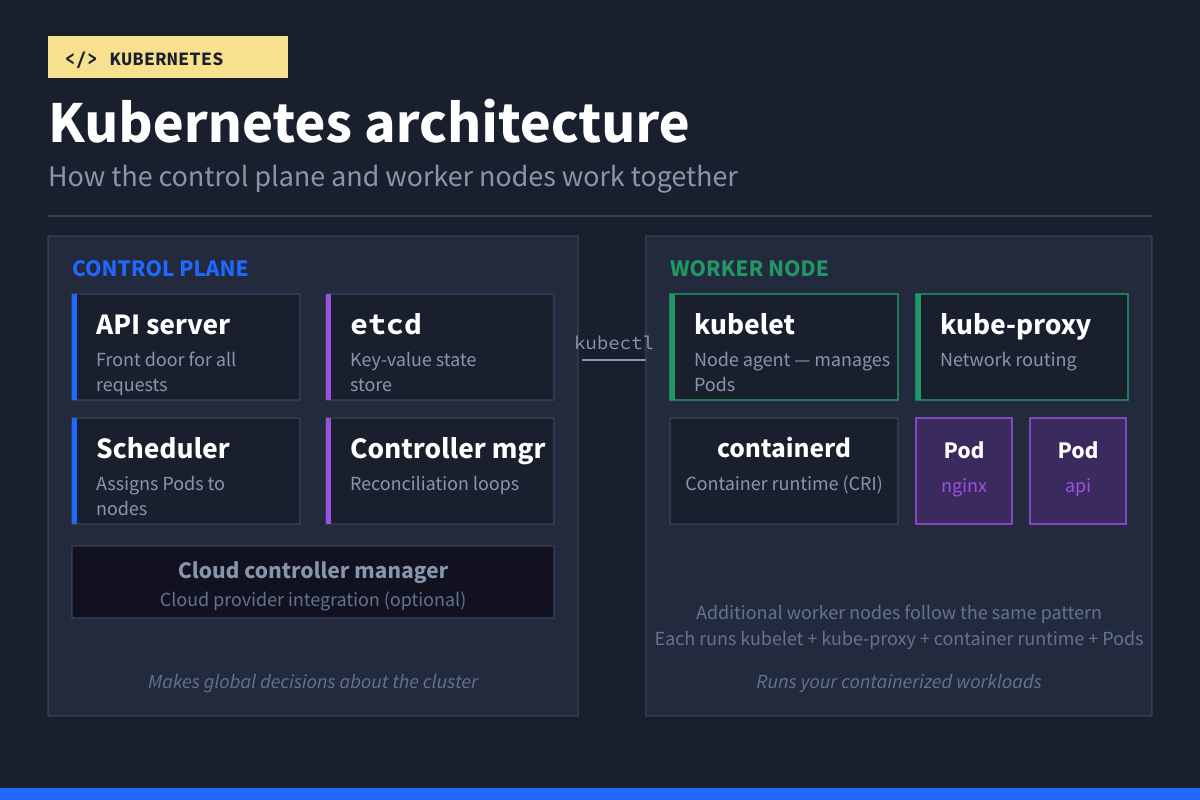
6. Explain the Kubernetes control plane components.
The control plane manages the cluster's state. Each component has a specific role:
- The API server is the front door, every
kubectlcommand and internal request goes through it. etcd is the key-value store that holds all cluster state. - The scheduler assigns newly created Pods to nodes based on resource availability.
- The controller manager runs reconciliation loops that watch cluster state and make corrections, for instance, ensuring the right number of Pod replicas are running.
In cloud-managed clusters (EKS, GKE, AKS), you'll also see the cloud-controller-manager, which integrates with the cloud provider's APIs for load balancers and storage.
You can inspect many control plane-related Pods and cluster system components with:
kubectl get pods -n kube-system7. What is a Deployment, and how do rolling updates work?
A Deployment manages the lifecycle of Pods through ReplicaSets. When you update a Deployment (e.g., changing the image tag), Kubernetes creates a new ReplicaSet, scales it up gradually, and scales down the old one, thereby avoiding downtime.
# Update the image
kubectl set image deployment/my-app app=nginx:1.28

# Watch the rollout progress
kubectl rollout status deployment/my-app

# View rollout history
kubectl rollout history deployment/my-app

# Roll back if something goes wrong
kubectl rollout undo deployment/my-app
You can control the speed using maxSurge and maxUnavailable in the Deployment's strategy section.
For a hands-on walkthrough of rolling updates with a real data pipeline, see our Kubernetes Services and Rolling Updates tutorial.
8. What are Persistent Volumes (PVs) and Persistent Volume Claims (PVCs)?
A PersistentVolume (PV) is the actual storage resource, a piece of disk provisioned either by an admin or dynamically by a StorageClass. A PersistentVolumeClaim (PVC) is a request for storage made by a Pod.
apiVersion: v1
kind: PersistentVolumeClaim
metadata:
  name: app-data
spec:
  accessModes:
    - ReadWriteOnce
  resources:
    requests:
      storage: 10Gi
  storageClassName: standard
And a Pod that mounts it:
apiVersion: v1
kind: Pod
metadata:
  name: app
spec:
  containers:
  - name: app
    image: myapp:1.2
    volumeMounts:
    - name: data
      mountPath: /app/data
  volumes:
  - name: data
    persistentVolumeClaim:
      claimName: app-data
With dynamic provisioning (the norm in production), you don't pre-create PVs. The StorageClass provisions them automatically when a PVC is created.
9. What are the different Service types in Kubernetes?
Kubernetes provides four Service types, each designed for different networking scenarios:
| Type | Scope | Use Case |
|---|---|---|
| ClusterIP | Internal only | Service-to-service within the cluster |
| NodePort | External via node IP | Development, testing |
| LoadBalancer | External via cloud LB | Production internet traffic |
| ExternalName | DNS redirect | Mapping to external service by DNS |
Intermediate Kubernetes Interview Questions
These questions move beyond definitions into networking, security, resource management, and troubleshooting. Understanding these concepts is essential for any role that involves day-to-day Kubernetes operations.
10. How does traffic flow from an external client to a Pod?
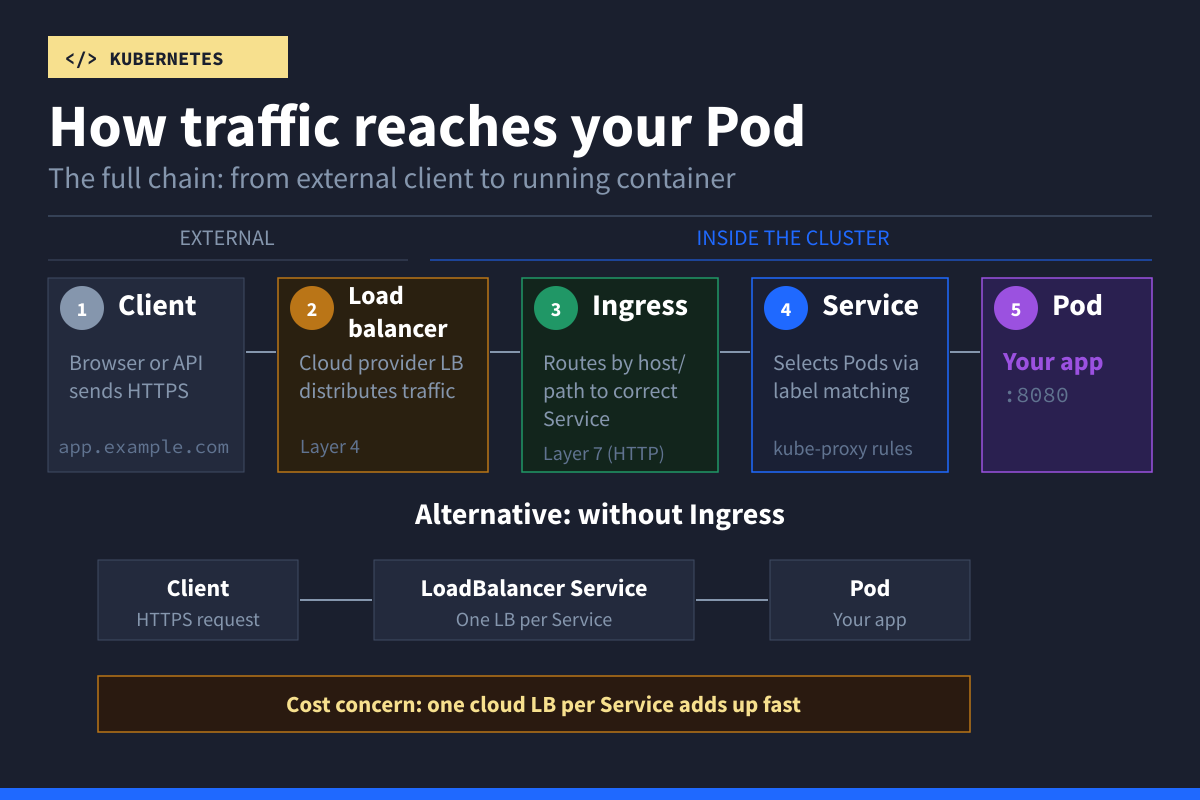
This is an open-ended question interviewers use to gauge your depth of understanding. A solid answer walks through the full chain: the client sends a request to an external load balancer, which forwards it to a node. kube-proxy (using iptables or IPVS rules) routes it to the correct Service, which selects a healthy Pod based on its selector labels.
Alternatively, with an Ingress controller: client → load balancer → Ingress controller Pod → Service → application Pod. The more detail you can provide about each hop, the stronger your answer.
11. What is an Ingress, and how does it differ from a LoadBalancer Service?
A Service of type LoadBalancer operates primarily at Layer 4 (TCP/UDP) and exposes a single Service externally. In cloud environments, it typically provisions one external load balancer per Service, which can become costly at scale.
An Ingress, on the other hand, operates at Layer 7 (HTTP/HTTPS) and provides routing rules (host-based and path-based) to direct traffic to multiple Services through a single entry point.
apiVersion: networking.k8s.io/v1
kind: Ingress
metadata:
  name: my-ingress
spec:
  ingressClassName: nginx
  rules:
  - host: app.example.com
    http:
      paths:
      - path: /
        pathType: Prefix
        backend:
          service:
            name: my-app-service
            port:
              number: 80
Worth mentioning in interviews: Ingress is stable but feature-frozen, and Gateway API is the newer, more expressive successor for Kubernetes traffic management. Its core resources reached GA in Gateway API v1.0 (2023). It provides more expressive routing, better role separation, and support for protocols beyond HTTP.
12. What is the Gateway API, and how is it different from Ingress?
The Gateway API is the successor to Ingress, designed to fix its limitations. While Ingress handles basic HTTP routing, the Gateway API supports TCP, UDP, gRPC, and TLS natively.
The biggest structural difference is role separation. Ingress puts everything in one resource. The Gateway API splits responsibilities across three:
- GatewayClass — defines the infrastructure provider (managed by cluster operators)
- Gateway — defines the listener configuration like ports and TLS (managed by platform teams)
- HTTPRoute — defines the actual routing rules (managed by application developers)
apiVersion: gateway.networking.k8s.io/v1
kind: HTTPRoute
metadata:
  name: my-app-route
spec:
  parentRefs:
  - name: my-gateway
  hostnames:
  - "app.example.com"
  rules:
  - matches:
    - path:
        type: PathPrefix
        value: /api
    backendRefs:
    - name: api-service
      port: 80
  - matches:
    - path:
        type: PathPrefix
        value: /
    backendRefs:
    - name: frontend-service
      port: 80
This separation means a platform team can manage TLS and infrastructure without application developers needing to touch those configs. The core Gateway API resources reached GA in v1.0 (2023), and adoption is growing across major ingress controllers like NGINX, Envoy, and Istio.
13. What is a NetworkPolicy?
A NetworkPolicy controls traffic flow to and from Pods, essentially a firewall at the Pod level. By default, Kubernetes allows all traffic between all Pods. Once you apply a NetworkPolicy, only explicitly allowed traffic passes through.
Here's a policy that allows incoming traffic only from Pods with the label app: frontend:
apiVersion: networking.k8s.io/v1
kind: NetworkPolicy
metadata:
  name: allow-frontend-only
  namespace: production
spec:
  podSelector:
    matchLabels:
      app: backend
  policyTypes:
  - Ingress
  ingress:
  - from:
    - podSelector:
        matchLabels:
          app: frontend
    ports:
    - protocol: TCP
      port: 80
NetworkPolicies are only enforced if the cluster's CNI plugin supports them. Plugins like Calico and Cilium fully support NetworkPolicy, while simpler plugins like kubenet do not, meaning policies will have no effect unless a compatible CNI is used.
14. How does DNS work inside a Kubernetes cluster?
Kubernetes uses CoreDNS (running in kube-system) to provide internal DNS. Each Service gets a DNS name in the format:
<service-name>.<namespace>.svc.cluster.localFor example:
my-app-service.production.svc.cluster.localPods use these DNS names to communicate with Services instead of hardcoding IP addresses.
15. How do you manage RBAC in Kubernetes?
RBAC is built around four resources:
- Roles (namespace-scoped permissions)
- ClusterRoles (cluster-wide permissions)
- RoleBindings (assign Roles or ClusterRoles within a namespace)
- ClusterRoleBindings (assign ClusterRoles across the cluster)
Kubernetes still uses rbac.authorization.k8s.io/v1 for these resources.
Here's a Role that grants read-only access to Pods in a specific Namespace:
apiVersion: rbac.authorization.k8s.io/v1
kind: Role
metadata:
  name: pod-reader
  namespace: dev
rules:
- apiGroups: [""]
  resources: ["pods"]
  verbs: ["get", "watch", "list"]
And a RoleBinding that assigns it to a user:
apiVersion: rbac.authorization.k8s.io/v1
kind: RoleBinding
metadata:
  name: read-pods-binding
  namespace: dev
subjects:
- kind: User
  name: jane
roleRef:
  kind: Role
  name: pod-reader
  apiGroup: rbac.authorization.k8s.io
The principle of least privilege applies: start with no permissions and grant only what's needed.
16. What are resource requests and limits, and why do they matter?
Requests define the minimum resources guaranteed to a container; the scheduler uses these to decide which node has room. Limits define the maximum; the kubelet enforces these via Linux cgroups.
apiVersion: v1
kind: Pod
metadata:
  name: resource-demo
spec:
  containers:
  - name: app
    image: nginx:1.27
    resources:
      requests:
        cpu: "250m"
        memory: "256Mi"
      limits:
        cpu: "500m"
        memory: "512Mi"
If a container exceeds its memory limit, it is terminated with an OOMKilled error. If it exceeds its CPU limit, it is throttled, and the application slows down but is not killed.
Kubernetes defines three QoS classes:
- Guaranteed: requests = limits (for CPU and memory)
- Burstable: requests < limits
- BestEffort: no requests or limits
Our Kubernetes Configuration and Production Readiness tutorial walks through setting resource boundaries to prevent noisy neighbor problems in shared clusters.
17. How does Kubernetes autoscaling work?
Kubernetes provides three types of autoscaling:
- Horizontal Pod Autoscaler (HPA) adjusts the number of Pod replicas based on metrics
- Vertical Pod Autoscaler (VPA) adjusts CPU and memory requests for individual Pods
- Cluster Autoscaler adjusts the number of worker nodes based on demand
You can create an HPA with a single command:
kubectl autoscale deployment <deployment-name> --cpu=50% --min=2 --max=10This keeps average CPU utilization across Pods at 50%, scaling between 2 and 10 replicas. HPA requires metrics-server installed in the cluster.
18. Explain the difference between liveness, readiness, and startup probes.
Kubernetes uses three types of probes to check container health, each with a different response when the check fails:
| Probe | What It Checks | On Failure | When to Use |
|---|---|---|---|
| Liveness | Is the container still running correctly? | Restarts the container | Detect deadlocks or hung processes |
| Readiness | Can the container handle traffic right now? | Removes Pod from Service endpoints | Graceful load handling during startup or heavy load |
| Startup | Has the container finished initializing? | Prevents liveness checks until startup succeeds | Slow-starting apps (JVM, large data loads) |
Here's how you'd configure all three on a Pod:
apiVersion: v1
kind: Pod
metadata:
  name: health-demo
spec:
  containers:
  - name: app
    image: myapp:1.2
    livenessProbe:
      httpGet:
        path: /healthz
        port: 8080
      periodSeconds: 10
    readinessProbe:
      httpGet:
        path: /ready
        port: 8080
      periodSeconds: 5
    startupProbe:
      httpGet:
        path: /healthz
        port: 8080
      failureThreshold: 30
      periodSeconds: 10
The key distinction interviewers want to hear: liveness failures kill the container, readiness failures only remove it from traffic rotation. Confusing the two is a common mistake that can cause cascading outages.
19. What is a StatefulSet, and when do you need one?
A StatefulSet manages Pods that require stable, unique identities and persistent storage, databases, message queues, or other resources where Pods aren't interchangeable. Unlike a Deployment, a StatefulSet gives each Pod a predictable name (postgres-0, postgres-1), creates them in order, and gives each its own PersistentVolumeClaim.
apiVersion: apps/v1
kind: StatefulSet
metadata:
  name: postgres
spec:
  serviceName: postgres
  replicas: 3
  selector:
    matchLabels:
      app: postgres
  template:
    metadata:
      labels:
        app: postgres
    spec:
      containers:
      - name: postgres
        image: postgres:16
        volumeMounts:
        - name: data
          mountPath: /var/lib/postgresql/data
  volumeClaimTemplates:
  - metadata:
      name: data
    spec:
      accessModes: ["ReadWriteOnce"]
      resources:
        requests:
          storage: 20Gi
Each replica gets its own PVC (data-postgres-0, data-postgres-1, etc.) that persists even if the Pod is rescheduled.
20. What are init containers, and when should you use them?
Init containers run before your main application containers and must complete successfully before the app starts. They're useful for setup tasks like waiting for dependencies, running migrations, or generating config.
apiVersion: v1
kind: Pod
metadata:
  name: app-with-init
spec:
  initContainers:
  - name: wait-for-db
    image: busybox
    command: ['sh', '-c', 'until nc -z postgres-service 5432; do echo waiting; sleep 2; done']
  containers:
  - name: app
    image: myapp:1.2
This init container waits until the PostgreSQL service is reachable on port 5432 before the main app starts.
21. What are sidecar containers, and how has Kubernetes support evolved?
Sidecar containers run alongside your main container within the same Pod. Common examples include service mesh proxies (Envoy), log forwarders, and TLS proxies.
As of Kubernetes v1.33, native sidecar containers are a stable feature. You define them as init containers with restartPolicy: Always, which gives Kubernetes proper control over their lifecycle — they start before and stop after your main containers.
apiVersion: v1
kind: Pod
metadata:
  name: app-with-native-sidecar
spec:
  initContainers:
  - name: log-shipper
    image: fluent-bit:latest
    restartPolicy: Always
    volumeMounts:
    - name: shared-logs
      mountPath: /var/log
  containers:
  - name: app
    image: myapp:1.2
    volumeMounts:
    - name: shared-logs
      mountPath: /var/log
  volumes:
  - name: shared-logs
    emptyDir: {}
Kubernetes now handles their lifecycle properly—they start before and stop after your main containers.
22. How do you debug a Pod that isn't starting?
Three commands cover most situations:
# Check Pod status and detailed events
kubectl describe pod <pod-name>

# Check container logs
kubectl logs <pod-name>

# Check logs from a previous crashed container
kubectl logs <pod-name> --previous

# Check cluster events (modern command)
kubectl events
Here's what typical kubectl describe pod <pod-name> output looks like for a failing Pod:

Common statuses and what they mean:
- ImagePullBackOff = image doesn't exist or registry auth failed
- Pending = insufficient resources or no matching nodes
- CrashLoopBackOff = container starts but crashes repeatedly
- OOMKilled = exceeded memory limit
23. When would you use kubectl debug or an ephemeral container instead of kubectl exec?
kubectl exec works when the container has a shell and the debugging tools you need. But many production images are minimal or distroless — they don't include sh, curl, or nslookup.
kubectl debug solves this by attaching an ephemeral container to a running Pod. The ephemeral container shares the Pod's network and process namespace, so you can inspect everything without modifying the original image.
# Attach a debug container to a running Pod
kubectl debug -it <pod-name> --image=busybox --target=app

# Create a copy of the Pod with a debug container (doesn't affect the original)
kubectl debug <pod-name> --copy-to=debug-pod --image=ubuntu --share-processes
Use kubectl exec when the container already has the tools you need. Use kubectl debug when it doesn't, or when you don't want to risk disrupting a running container by installing packages inside it.
24. What happens when you run kubectl apply -f deployment.yaml?
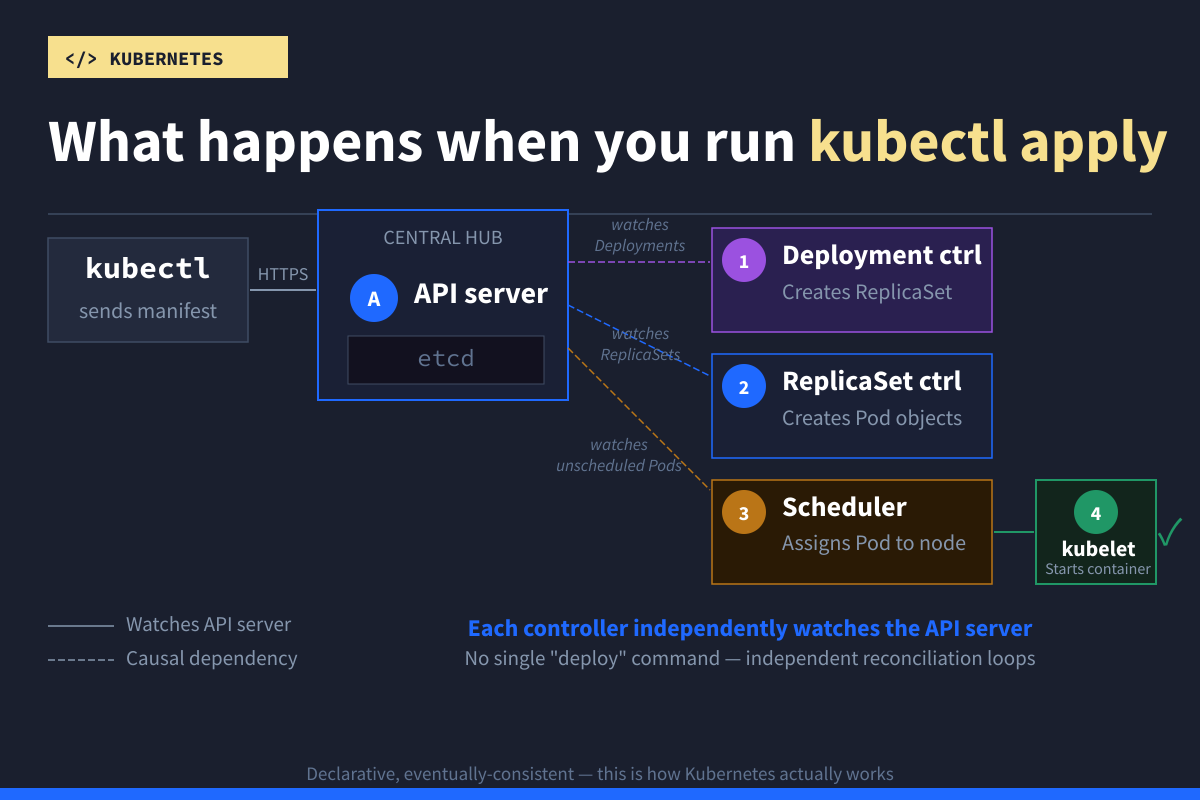
This question reveals how well you understand Kubernetes architecture. Here's the chain:
kubectlsends the manifest to the API server- The API server authenticates, runs admission controllers, validates, and persists to etcd
- The Deployment controller detects the new Deployment and creates a ReplicaSet
- The ReplicaSet controller creates Pod objects
- The scheduler assigns each Pod to a node
- The kubelet on each node pulls the image via containerd and starts the container
Each step is a separate reconciliation loop because Kubernetes doesn't have a single monolithic "deploy" command. That declarative, eventually-consistent model is one of the most important concepts to convey in an interview.
25. What are Taints and Tolerations?
Taints mark nodes to reject Pods. Tolerations let specific Pods override those taints.
# Taint a node — no Pod can schedule here unless it tolerates this
kubectl taint nodes <node-name> workload=gpu:NoSchedule
A Pod that tolerates the taint:
apiVersion: v1
kind: Pod
metadata:
  name: ml-training
spec:
  tolerations:
  - key: "workload"
    operator: "Equal"
    value: "gpu"
    effect: "NoSchedule"
  containers:
  - name: trainer
    image: ml-training:latest
Common use case: you have GPU nodes that should only run machine learning workloads. Taint the GPU nodes, add tolerations to the ML Pods, and other workloads are automatically scheduled elsewhere.
Advanced Kubernetes Interview Questions
These questions come up for senior roles, platform engineers, senior SREs, and infrastructure architects. They probe your ability to make architectural decisions, handle security at scale, and operate complex systems.
26. What replaced PodSecurityPolicy?
PodSecurityPolicy (PSP) was removed in Kubernetes v1.25. It's been replaced by Pod Security Admission (PSA), a built-in admission controller that enforces security standards at the Namespace level.
PSA defines three profiles:
- Privileged (unrestricted)
- Baseline (prevents known privilege escalations)
- Restricted (heavily locked down).
apiVersion: v1
kind: Namespace
metadata:
  name: production
  labels:
    pod-security.kubernetes.io/enforce: restricted
    pod-security.kubernetes.io/warn: restricted
Any Pod that doesn't meet the restricted standard will be rejected in this Namespace.
27. How do you handle secrets securely in Kubernetes?
Kubernetes Secrets are base64-encoded by default, not encrypted. A production-grade approach involves multiple layers.
Enable encryption at rest using an EncryptionConfiguration:
apiVersion: apiserver.config.k8s.io/v1
kind: EncryptionConfiguration
resources:
- resources:
  - secrets
  providers:
  - aescbc:
      keys:
      - name: key1
        secret: <BASE64_ENCODED_KEY>
  - identity: {}
Use an external secrets manager (e.g., Vault, AWS Secrets Manager, GCP Secret Manager) as the source of truth. Prefer mounting Secrets as files rather than environment variables. While values are not shown directly, environment variables are easier to expose through debugging or process inspection.
28. Why does the control plane need an odd number of nodes?
etcd uses the Raft consensus protocol, which requires a majority (quorum) to accept writes. Three nodes tolerate one failure. Five tolerate two. An even number like four provides no additional fault tolerance over three, both need at least three healthy nodes for quorum. That's why production control planes run three or five nodes, never two or four.
29. What's the difference between a container runtime and a container?
A container is an isolated running process created from a container image. A container runtime is the software that creates and manages containers on a node.
Kubernetes uses the Container Runtime Interface (CRI) to talk to runtimes such as containerd and CRI-O. Since Kubernetes v1.24, the built-in dockershim adapter was removed, but Docker-built images still work normally on CRI-compatible runtimes.
If you're new to containers, our Introduction to Docker tutorial covers the fundamentals you need before working with Kubernetes.
30. How would you design a multi-team Kubernetes cluster?
A strong answer covers several layers:
- Namespaces per team
- RBAC to control access within each Namespace
- ResourceQuotas and LimitRanges to prevent one team from consuming all resources
- NetworkPolicies to restrict traffic between Namespaces
apiVersion: v1
kind: ResourceQuota
metadata:
  name: team-a-quota
  namespace: team-a
spec:
  hard:
    requests.cpu: "4"
    requests.memory: "8Gi"
    limits.cpu: "8"
    limits.memory: "16Gi"
    pods: "20"
You should also acknowledge the trade-off: a single large cluster is simpler to operate but harder to isolate, while multiple smaller clusters provide stronger boundaries but increase operational complexity.
31. When might Kubernetes be overkill?
Kubernetes adds significant operational overhead. If you're running a small team with a few simple services, Docker Compose or a managed service like AWS ECS or Google Cloud Run might be a better fit.
Kubernetes shines when you need to manage many services at scale, automate complex deployments, or provide self-service infrastructure for multiple teams.
Not every workload needs Kubernetes, and interviewers ask this to see whether you understand trade-offs.
Our Introduction to Kubernetes tutorial covers this exact decision point with a practical comparison.
32. Explain how GitOps works with Kubernetes.
In GitOps, your desired cluster state lives in a Git repository: Kubernetes manifests, Helm charts, or Kustomize overlays. A GitOps controller (ArgoCD or Flux) running in the cluster continuously reconciles the actual state with what's in Git. Drift gets corrected automatically. Every change has an audit trail, rollbacks are as simple as reverting a commit, and your cluster state is always documented in version control.
33. What are Custom Resource Definitions (CRDs) and operators?
CRDs extend the Kubernetes API with your own resource types. An operator is a controller that watches these custom resources and takes automated action.
apiVersion: apiextensions.k8s.io/v1
kind: CustomResourceDefinition
metadata:
  name: databases.example.com
spec:
  group: example.com
  scope: Namespaced
  names:
    plural: databases
    singular: database
    kind: Database
  versions:
  - name: v1
    served: true
    storage: true
    schema:
      openAPIV3Schema:
        type: object
        properties:
          spec:
            type: object
            properties:
              engine:
                type: string
              version:
                type: string
Once applied, you can manage databases like native Kubernetes resources:
kubectl get databasesA PostgreSQL operator, for example, might handle backups, failover, and scaling based on the state of Database resources. Operators encode operational knowledge into software.
34. How do you approach logging and monitoring in Kubernetes?
For logging, the standard pattern is: applications write to stdout/stderr, a DaemonSet (Fluent Bit or Fluentd) collects logs from every node, and ships them to a centralized platform like Grafana Loki, Elasticsearch, or CloudWatch.
For monitoring, Prometheus and Grafana are the most widely adopted stack. metrics-server provides the resource metrics HPA relies on.
# Check resource usage across Pods
kubectl top pods --sort-by=cpu

# Check node-level resource usage
kubectl top nodes
For distributed tracing across services, Jaeger or Grafana Tempo track request flow.
35. How do you implement high availability in Kubernetes?
High availability requires planning at multiple levels:
- Run multiple control plane nodes (three or five) so the cluster survives node failures
- Enable the Cluster Autoscaler to add/remove worker nodes based on demand
- Use Pod Disruption Budgets to maintain minimum availability during upgrades
- Spread replicas across nodes using anti-affinity rules
apiVersion: policy/v1
kind: PodDisruptionBudget
metadata:
  name: my-app-pdb
spec:
  minAvailable: 2
  selector:
    matchLabels:
      app: my-app
This ensures that at least two Pods remain running during voluntary disruptions, such as node drains.
36. What are topology spread constraints, and when would you use them instead of pod anti-affinity?
Both spread Pods across nodes, but they work differently. Pod anti-affinity uses hard or soft rules to prevent Pods from landing on the same node. It works for simple cases, but doesn't give you control over how evenly Pods are distributed.
Topology spread constraints let you define a maxSkew, which is the maximum allowed difference in Pod count between topology domains (nodes, zones, or regions). This gives you more precise control over distribution.
apiVersion: apps/v1
kind: Deployment
metadata:
  name: web-app
spec:
  replicas: 6
  selector:
    matchLabels:
      app: web
  template:
    metadata:
      labels:
        app: web
    spec:
      topologySpreadConstraints:
      - maxSkew: 1
        topologyKey: topology.kubernetes.io/zone
        whenUnsatisfiable: DoNotSchedule
        labelSelector:
          matchLabels:
            app: web
      containers:
      - name: app
        image: myapp:1.2
This ensures Pods are spread evenly across availability zones, with no zone having more than one extra Pod compared to any other. Use anti-affinity when you just need "don't put two Pods on the same node." Use topology spread constraints when you need even distribution across zones or regions, which matters for production workloads where a zone outage shouldn't take down most of your replicas.
37. What is a Kubernetes mutating admission webhook?
A mutating admission webhook intercepts API requests before objects are persisted to etcd and can modify them. Common uses include injecting sidecar containers, setting default resource limits, and enforcing labeling standards.
This is how service meshes like Istio automatically inject their Envoy proxy sidecar into every Pod without you modifying your Deployment manifests.
Scenario-Based Kubernetes Interview Questions
These open-ended questions are increasingly common, especially for mid-level and senior roles. There's no single correct answer, but interviewers want to see how you structure your thinking and communicate your reasoning.
38. A developer reports their application is returning 503 errors intermittently. How do you debug this?
Walk through systematically:
# 1. Check if Pods are running and healthy
kubectl get pods -l app=<app-label>
kubectl describe pod <pod-name>

# 2. Check if the Service has registered endpoints
kubectl get endpointslices -l kubernetes.io/service-name=<service-name>

# 3. Check readiness probe status — failing probes remove Pods from rotation
kubectl describe pod <pod-name> | grep -A5 "Readiness"

# 4. Check resource usage — OOMKills cause intermittent restarts
kubectl top pods -l app=<app-label>

# 5. Check network policies that might be blocking traffic
kubectl get networkpolicies -n <namespace>
Interviewers care about your methodology here. Start broad (are Pods alive?), narrow down (are they receiving traffic?), then look at edge cases (resource pressure, network policies).
39. Your Deployment fails after an image update. Users are experiencing downtime. What do you do?
First priority is to restore service:
# Roll back immediately
kubectl rollout undo deployment/<deployment-name>

# Verify the rollback
kubectl rollout status deployment/<deployment-name>
Then investigate:
# Check rollout history
kubectl rollout history deployment/<deployment-name>

# Check logs from failing Pods
kubectl logs <pod-name> --previous

# Verify image pull details
kubectl describe pod <pod-name> | grep -A3 "Image"
Common causes include a bad image tag, missing environment variables in the new version, or failing health checks with updated endpoints.
40. We need to migrate PostgreSQL to Kubernetes. What's your approach?
First, question whether it should run on Kubernetes at all. Managed database services (RDS, Cloud SQL) avoid significant operational complexity. If the decision is to proceed, then use a StatefulSet with PersistentVolumeClaims, implement a backup strategy, and strongly consider a Kubernetes operator (CloudNativePG or Zalando PostgreSQL Operator) to handle replication, failover, and backups.
Plan data migration carefully, test in staging, and have a rollback plan.
41. How would you handle a Kubernetes upgrade from v1.28 to v1.30?
Kubernetes supports upgrading one minor version at a time, so this is two steps: v1.28 → v1.29, then v1.29 → v1.30.
For kubeadm-based clusters:
# For each step:

# 1. Review release notes for deprecations

# 2. Backup etcd
ETCDCTL_API=3 etcdctl snapshot save backup.db

# 3. Plan and upgrade control plane
kubeadm upgrade plan
kubeadm upgrade apply v1.29.x

# 4. Upgrade worker nodes one by one
kubectl drain <node-name> --ignore-daemonsets --delete-emptydir-data
# ... upgrade kubelet and kubectl on the node ...
kubectl uncordon <node-name>

# 5. Validate workloads after each step
kubectl get pods --all-namespaces
For managed clusters (EKS, GKE, AKS), the control plane upgrade is handled by the provider, but node upgrades and workload validation follow a similar pattern
42. A Pod is consuming excessive resources and impacting other workloads. What do you do?
Start by identifying which Pod is the problem and whether it has resource limits set:
# Identify the culprit
kubectl top pods --sort-by=memory
kubectl describe pod <pod-name> | grep -A5 "Limits"

# Check if resource limits are set
# If not, add them immediately
The immediate fix is adding resource limits to the offending Pod. Longer term, implement LimitRanges (default limits for Pods in a Namespace), ResourceQuotas (cap total Namespace consumption), and consider taints/tolerations to isolate noisy workloads on dedicated nodes.
43. New Pods are stuck in Pending. The message says insufficient CPU and memory. How do you resolve this?
Pending usually means the scheduler can't find a node with enough resources. Work through this systematically, from confirming the cause to freeing up capacity:
# 1. Confirm the scheduling issue
kubectl describe pod <pod-name>

# 2. Check node resource availability
kubectl describe nodes | grep -A5 "Allocated resources"
kubectl top nodes

# 3. Find resource-heavy Pods
kubectl top pods --all-namespaces --sort-by=cpu

# 4. Scale down non-essential workloads
kubectl scale deployment <low-priority-app> --replicas=0

# 5. Check Cluster Autoscaler (if enabled)
kubectl get pods -n kube-system -l app=cluster-autoscaler
kubectl logs -n kube-system -l app=cluster-autoscaler
44. An application in Kubernetes can't connect to an external database. How do you troubleshoot?
Debug this from inside the Pod, working outward through each layer that could block the connection:
# 1. Test connectivity from inside the Pod
kubectl exec -it <pod-name> -- nc -zv db.example.com 5432

# 2. Check DNS resolution
kubectl exec -it <pod-name> -- nslookup db.example.com

# 3. Check for NetworkPolicies blocking egress traffic
kubectl get networkpolicies -n <namespace>

# 4. Verify database credentials and configuration
kubectl describe pod <pod-name> | grep -A5 "Environment"
If DNS resolution fails, CoreDNS may be misconfigured. If connectivity times out, check for NetworkPolicies or cloud-level firewall rules blocking outbound traffic.
How to Prepare for Your Kubernetes Interview
Reading interview questions is a solid start, but it's not enough on its own. The candidates who perform best are the ones who've spent time actually working with clusters.
Start with the fundamentals. If you can clearly explain Pods, Services, and Deployments, you're already ahead of a large percentage of candidates. Many people list Kubernetes on their resume after completing a tutorial, but haven't retained the basics.
Then get hands-on. Spin up a local cluster using minikube, kind, or k3s and deploy a real application. Write the manifests yourself rather than copying them from a tutorial. Practice the kubectl commands until they feel natural.
Intentionally break things and fix them. Delete a running Pod and watch the Deployment recreate it. Set a memory limit too low and observe the OOMKill. Misconfigure a readiness probe and see how it affects traffic. This kind of experience gives you confidence when answering troubleshooting questions, and it will show during your interview.
For CKA or CKAD certification prep, the concepts are the same, but the exam rewards speed with kubectl. Practice time-boxed exercises.
If you're coming from a development or traditional operations background, expect 2–4 weeks of focused study if you're already comfortable with containers, or 2–3 months if you're learning containers and Kubernetes together.
Our Introduction to Kubernetes course covers deploying applications, configuring Services, performing rolling updates, and adding production safeguards like health checks and resource limits. It's part of our Data Engineer career path if you want structured, hands-on practice alongside this prep.
Are You Ready for the Interview?
Kubernetes interviews test your understanding of systems and your ability to reason through problems, not your capacity to memorize definitions. The candidates who do well can explain why, not just what.
Focus on the fundamentals first. The most common failure point isn't an obscure question about etcd internals, it's being unable to clearly describe the difference between a Pod, a Service, and a Deployment.
Practice with real clusters. Reading builds knowledge, but hands-on troubleshooting builds the confidence that interviewers can immediately sense. You won't know every answer, and that's okay. Showing how you think through unfamiliar problems is more valuable than having a perfect answer for every question.
FAQs
How many Kubernetes interview questions should I prepare for?
Focus on understanding 30–40 core questions deeply rather than memorizing 100 surface-level answers.
If you understand the underlying concepts, you can handle variations of questions you haven't specifically studied.
Do I need CKA certification to get a Kubernetes job?
Not necessarily.
Many companies care more about hands-on experience than certifications.
That said, a CKA can help if you're early in your career or transitioning, it signals baseline competency and demonstrates initiative.
What's the hardest part of a Kubernetes interview?
Scenario-based and troubleshooting questions are usually the hardest.
They require real experience, not just theory.
You can’t bluff through something like debugging a CrashLoopBackOff if you’ve never handled it before.
This is why hands-on practice matters more than memorization.
Should I learn Docker before Kubernetes?
Yes.
Understanding containers, images, and Dockerfiles is a prerequisite.
Kubernetes orchestrates containers, so you need to understand what it’s managing first.
Our Introduction to Docker course covers the fundamentals.
What kubectl commands should I know for an interview?
At minimum, you should be comfortable with:
kubectl get, kubectl describe, kubectl logs, kubectl apply, kubectl exec, kubectl top, and kubectl rollout.
You don’t need to memorize every flag, but you should be able to explain when and why you’d use each command.
How is Kubernetes different from Docker?
Docker builds and runs individual containers.
Kubernetes orchestrates containers at scale, handling scheduling, self-healing, networking, and rolling updates across multiple nodes.
You still use Docker (or similar tools) to build images; Kubernetes manages what happens after that.
Our Introduction to Kubernetes tutorial explains this distinction with a practical comparison.