Dataquest vs DataCamp: Which Data Science Platform Is Right for You?
You're investing time and money in learning data science, so choosing the right platform matters.
Both Dataquest and DataCamp teach you to code in your browser. Both have exercises and projects. But they differ fundamentally in how they prepare you for actual work.
This comparison will help you understand which approach fits your goals.
Portfolio Projects: The Thing That Actually Gets You Hired
Hiring managers care about proof you can solve problems. Your portfolio provides that proof. Course completion certificates from either platform just show you finished the material.
When you apply for data jobs, hiring managers want to see what you can actually do. They want GitHub repositories with real projects. They want to see how you handle messy data, how you communicate insights, how you approach problems. A certificate from any platform matters less than three solid portfolio projects.
Most successful career changers have 3 to 5 portfolio projects showcasing different skills. Data cleaning and analysis. Visualization and storytelling. Maybe some machine learning or recommendation systems. Each project becomes a talking point in interviews.
How Dataquest Builds Your Portfolio
Dataquest includes over 30 guided projects using real, messy datasets. Every project simulates a realistic business scenario. You might analyze Kickstarter campaign data to identify what makes projects successful. Or explore Hacker News post patterns to understand user engagement. Or build a recommendation system analyzing thousands of user ratings.
Here's the critical advantage: all datasets are downloadable.
This means you can recreate these projects in your local environment. You can push them to GitHub with proper documentation. You can show employers exactly what you built, not just claim you learned something. When you're in an interview, and someone asks, "Tell me about a time you worked with messy data," you point to your GitHub and walk them through your actual code.
These aren't toy exercises. One Dataquest project has you working with a dataset of 50,000+ app reviews, cleaning inconsistent entries, handling missing values, and extracting insights. That's the kind of work you'll do on day one of a data job.
Your Dataquest projects become your job application materials while you're learning.
How DataCamp Approaches Projects
DataCamp offers 150+ hands-on projects available on their platform. You complete these projects within the DataCamp environment, working with data and building analyses.
The limitation: you cannot download the datasets.
This means your projects stay within DataCamp's ecosystem. You can describe what you learned and document your approach, but it's harder to show your actual work to potential employers. You can't easily transfer these to GitHub as standalone portfolio pieces.
DataCamp does offer DataLab, an AI-powered notebook environment where you can build analyses. Some users create impressive work in DataLab, and it connects to real databases like Snowflake and BigQuery. But the work remains platform-dependent.
Our verdict: For career changers who need a portfolio to get interviews, Dataquest has a clear advantage here. DataCamp projects work well as learning tools, but many DataCamp users report needing to build independent projects outside the platform to have something substantial to show employers. If portfolio building is your priority, and it should be, Dataquest gives you a significant head start.
How You Actually Learn
Both platforms have browser-based coding environments. Both provide guidance and support. The real difference is in what you're practicing and why.
Dataquest: Practicing Realistic Work Scenarios
When you open a Dataquest lesson, you see a split screen. The explanation and instructions are on the left. Your code editor is on the right.
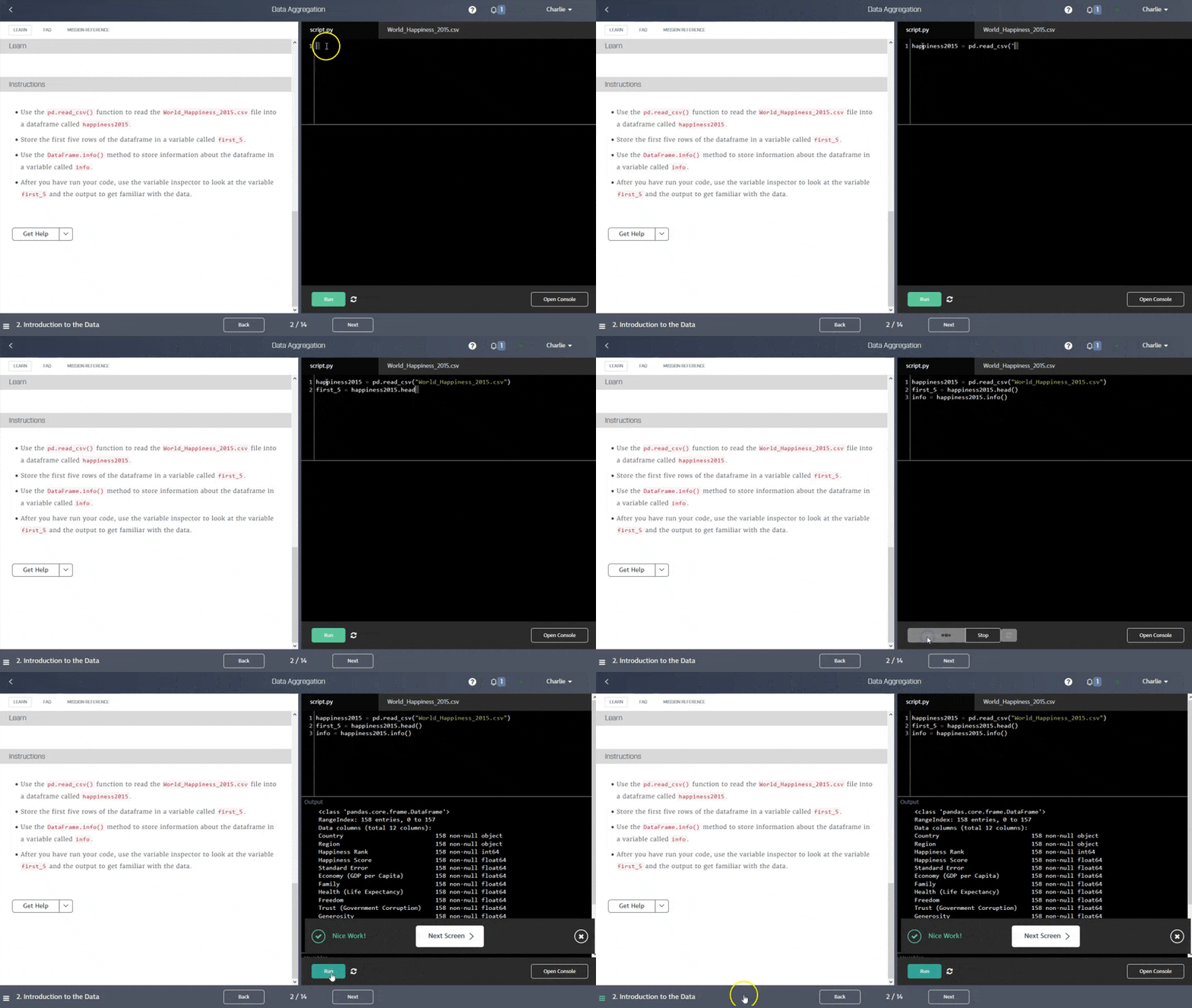
You read a brief explanation with examples, then write code immediately. But what makes it different is that the exercises simulate realistic scenarios from actual data jobs.
You receive clear instructions on the goal and the general approach. Hints are available if you get stuck. The Chandra AI assistant provides context-aware help without giving away answers. There's a Community forum for additional support. You're never abandoned or thrown to the wolves.
You write the complete solution with full guidance throughout the process. The challenge comes from the problem being real, not from a lack of support.
This learning approach helps you build:
- Problem-solving approaches that transfer directly to jobs.
- Debugging skills, because your code won't always work on the first try, just like in real work.
- Confidence tackling unfamiliar problems.
- The ability to break down complex tasks into manageable steps.
- Experience working with messy, realistic data that doesn't behave perfectly.
This means you're solving the kinds of problems you'll face on day one of a data job. Every mistake you make while learning saves you from making it in an interview or during your first week at work.
DataCamp: Teaching Syntax Through Structured Exercises
DataCamp takes a different approach. You watch a short video, typically 3 to 4 minutes, where an expert instructor explains a concept with clear examples and visual demonstrations.
Then you complete an exercise that focuses on applying that specific syntax or function. Often, some code is already provided. You add or modify specific sections to complete the task. The instructions clearly outline exactly what to do at each step.
For example: "Use the mean() method on the df[sales] column to find its average."
You earn XP points for completing exercises. The gamification system rewards progress with streaks and achievements. The structure is optimized for quick wins and steady forward momentum.
This approach genuinely helps beginners overcome intimidation. Video instruction provides visual clarity that many people need. The scaffolding helps you stay on track and avoid getting lost. Quick wins build motivation and confidence.
The trade-off is that exercises can feel more like syntax memorization than problem-solving. There's less emphasis on understanding why you're taking a particular approach. Some users complete exercises without deeply understanding the underlying concepts.
Research across Reddit and review sites consistently surfaces this pattern. One user put it clearly:
The exercises are all fill-in-the-blank. This is not a good teaching method, at least for me. I felt the exercises focused too much on syntax and knowing what functions to fill in, and not enough on explaining why you want to use a function and what kind of trade-offs are there. The career track isn’t super cohesive. Going from one course to the next isn’t smooth and the knowledge you learn from one course doesn’t carry to the next.
DataCamp teaches you what functions do. Dataquest teaches you when and why to use them in realistic contexts. Both are valuable at different stages.
Our verdict: Choose Dataquest if you want realistic problem-solving practice that transfers directly to job work. Choose DataCamp if you prefer structured video instruction and need confidence-building scaffolding.
Content Focus: Career Preparation vs. Broad Exploration
The differences in the course catalog reflect each platform's philosophy.
Dataquest's Focused Career Paths
Dataquest offers 109 courses organized into 7 career paths and 18 skill paths. Every career path is designed around an actual job role:
- Data Analyst in Python
- Data Analyst in R
- Data Scientist in Python
- Data Engineer in Python
- Business Analyst with Tableau
- Business Analyst with Power BI
- Junior Data Analyst
The courses build on each other in a logical progression. There's no fluff or tangential topics. Everything connects directly to your end goal.
The career paths aren't just organized courses. They're blueprints for specific jobs. You learn exactly the skills that role requires, in the order that makes sense for building competence.
For professionals who want targeted upskilling, Dataquest skill paths let you focus on exactly what you need. Want to level up your SQL? There's a path for that. Need machine learning fundamentals? Focused path. Statistics and probability? Covered.
What's included: Python, R, SQL for data work. Libraries like pandas, NumPy for manipulation and analysis. Statistics, probability, and machine learning. Data visualization. Power BI and Tableau for business analytics. Command line, Git, APIs, web scraping. For data engineering: PostgreSQL, data pipelines, and ETL processes.
What's not here: dozens of programming languages, every new technology, broad surveys of tools you might never use. This is intentional. The focus is on core skills that transfer across tools and on depth over breadth.
If you know you want a data career, this focused approach eliminates decision paralysis. No wondering what to learn next. No wasting time on tangential topics. Just a clear path from where you are to being job-ready.
DataCamp's Technology Breadth
DataCamp offers over 610 courses spanning a huge range of technologies. Python, R, SQL, plus Java, Scala, Julia. Cloud platforms including AWS, Azure, Snowflake, and Databricks. Business intelligence tools like Power BI, Tableau, and Looker. DevOps tools including Docker, Kubernetes, Git, and Shell. Emerging technologies like ChatGPT, Generative AI, LangChain, and dbt.
The catalog includes 70+ skill tracks covering nearly everything you might encounter in data and adjacent fields.
This breadth is genuinely impressive and serves specific needs well. If you're a professional exploring new tools for work, you can sample many technologies before committing. Corporate training benefits from having so many options in one place. If you want to stay current with emerging trends, DataCamp adds new courses regularly.
The trade-off is that breadth can mean less depth in core fundamentals. More choices create more decision paralysis about what to learn. With 610 courses, some are inevitably stronger than others. You might learn surface-level understanding across many tools rather than deep competence in the essential ones.
Our verdict: If you know you want a data career and need a clear path from start to job-ready, Dataquest's focused curriculum serves you better. If you're exploring whether data science fits you, or you need exposure to many technologies for your current role, DataCamp's breadth makes more sense.
Pricing as an Investment in Your Career
Let's talk about cost, because this matters when you're making a career change or investing in professional development.
Understanding the Real Investment
These aren't just subscriptions you're comparing. They're investments in a career change or significant professional growth. The real question isn't "which costs less per month?" It's "which gets me job-ready fastest and provides a better return on my investment?"
For career changers, the opportunity cost matters more than the subscription price. If one platform gets you hired three months faster, that's three months of higher salary. That value dwarfs a \$200 per year price difference.
Dataquest: Higher Investment, Faster Outcomes
Dataquest costs \$49 per month or \$399 per year, but often go on sale for up to 50% off. There's also a lifetime option available, typically \$500 to \$700 when on sale. You get a 14-day money-back guarantee, plus a satisfaction guarantee: complete a career path and receive a refund if you're not satisfied with the outcomes.
The free tier includes the first 2 to 3 courses in each career path, so you can genuinely try before committing.
Yes, Dataquest costs more upfront. But consider what you're getting: every dollar includes portfolio-building projects with downloadable datasets. The focused curriculum means less wasted time on topics that won't help you get hired. The realistic exercises build job-ready skills faster.
Career changers using Dataquest report a median salary increase of \$30,000 after completing their programs. Alumni work at Facebook, Uber, Amazon, Deloitte, and Spotify.
Do the math on opportunity cost. If Dataquest's approach gets you hired even three months faster, the value is easily \$15,000 to \$20,000 in additional salary during those months. One successful career change pays for years of subscription.
DataCamp: Lower Cost, Broader Access
DataCamp costs \$28 per month when billed annually, totaling \$336 per year. Students with a .edu email address get 50% off, bringing annual cost down to around \$149. The free tier gives you the first chapter of every course. You also get a 14-day money-back guarantee.
The lower price is genuinely more accessible for budget-conscious learners. The student pricing is excellent for people still in school. There's a lower barrier to entry if you're not sure about your commitment yet.
DataCamp's lower price may mean a longer learning journey. You'll likely need additional time to build an independent portfolio since the projects don't transfer as easily. But if you're exploring rather than committing, or if budget is a serious constraint, the lower cost makes sense.
The best way to think about it is to calculate your target monthly salary in a data role. Multiply that by the number of months you might save by getting hired with better portfolio projects and realistic practice. Compare that number to the difference in subscription prices.
| Dataquest | DataCamp | |
|---|---|---|
| Monthly | \$49 | \$28 (annual billing) |
| Annual | \$399 | \$336 |
| Portfolio projects | Included, downloadable | Limited transferability |
| Time to job-ready | Potentially faster | Requires supplementation |
Our verdict: For serious career changers, Dataquest's portfolio projects and focused curriculum justify the higher cost. For budget-conscious explorers or students, DataCamp's lower price and student discounts provide better accessibility.
Learning Format: Video vs. Text and Where You Study
This consideration comes down to personal preference and lifestyle.
Video Instruction vs. Reading and Doing
DataCamp's video approach genuinely works for many people. Watching a 3 to 4 minute video with expert instructors provides visual demonstrations of concepts. Seeing someone code along helps visual learners understand. You can pause, rewind, and rewatch as needed. Many people retain visual information better than text.
Instructor personality makes learning engaging. For some learners, a video feels less intimidating than dense text explanations and diagrams.
Dataquest uses brief text explanations with examples, then asks you to immediately apply what you read in the code editor. Some learners prefer reading at their own pace. You can skim familiar concepts or deep-read complex ones. It's faster for people who read quickly and don't need video explanations. There’s also a new read-aloud feature on each screen so you can listen instead of reading.
The text format forces active reading/listening and immediate application. Some people find less distraction without video playing.
There's no objectively better format. If you learn better from videos, DataCamp fits your brain. If you prefer reading and immediately doing, Dataquest fits you. Try both free tiers to see what clicks.
Mobile Access vs. Desktop Focus
DataCamp offers full iOS and Android apps. You can access complete courses on your phone, write code during your commute or lunch break, and sync progress across devices. The mobile experience includes an extended keyboard for coding characters.
The gamification system (XP points, streaks, achievements) works particularly well on mobile. DataCamp designed their mobile app specifically for quick learning sessions during commutes, coffee breaks, or any spare moments away from your desk. The bite-sized lessons make it easy to maintain momentum throughout your day.
For busy professionals, this convenience matters. Making use of small pockets of time throughout your day lowers friction for consistent practice.
Dataquest is desktop-only. No mobile app. No offline access.
That said, the desktop focus is intentional, not an oversight. Realistic coding requires a proper workspace. Building portfolio-quality projects needs concentration and screen space. You're practicing the way you'll actually work in a data job.
Professional development deserves a professional setup. A proper keyboard, adequate screen space, the ability to have documentation open alongside your code. Real coding in data jobs happens at desks with multiple monitors, not on phones during commutes.
Our verdict: Video learners who need mobile flexibility should choose DataCamp. Readers who prefer focused desktop sessions should choose Dataquest. Try both free tiers to see which format clicks with you.
AI Assistance: Learning Support vs. Productivity Tool
Both platforms offer AI assistance, but designed for different purposes.
Chandra: Your Learning-Focused Assistant
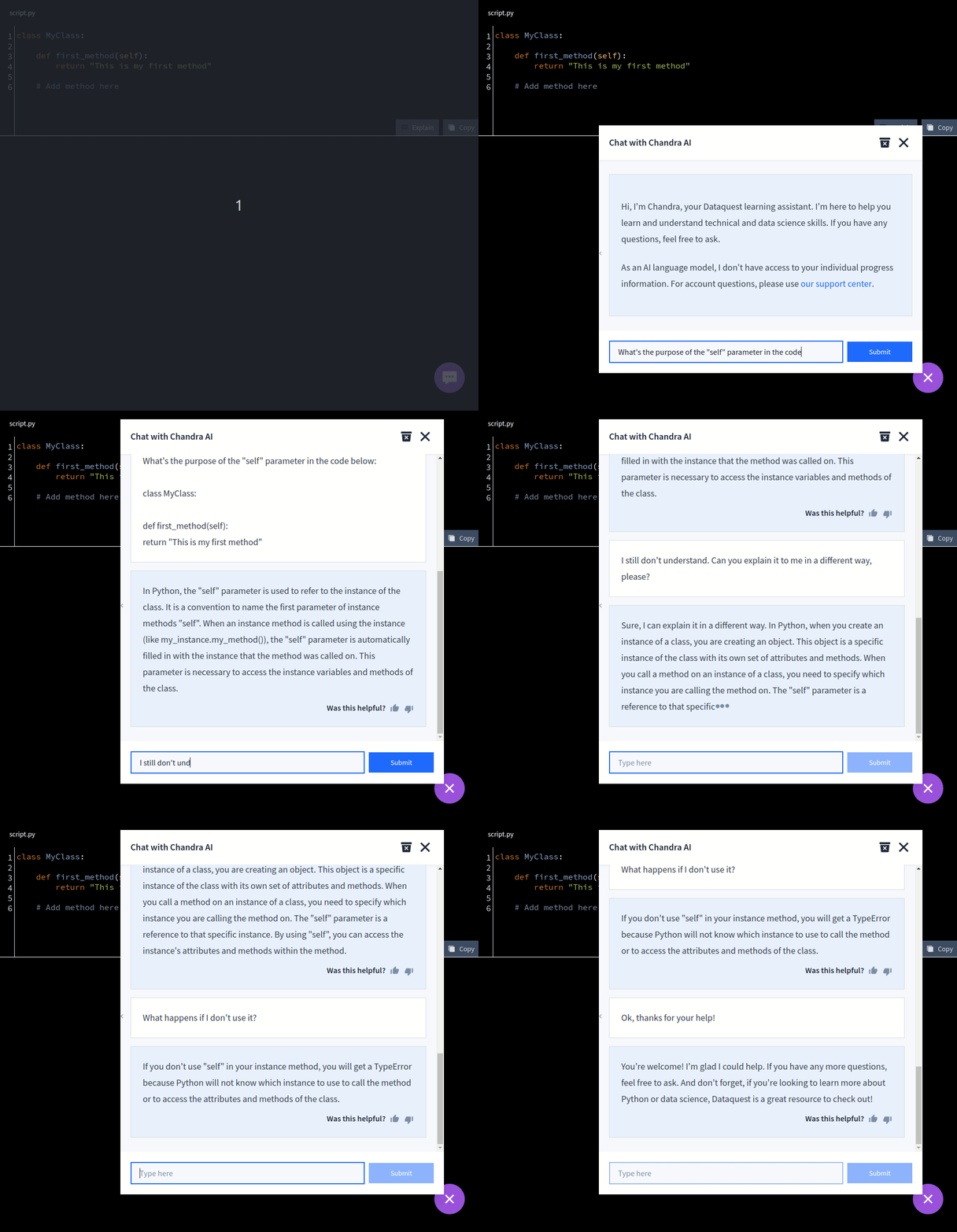
Dataquest's Chandra AI assistant runs on Code Llama with 13 billion parameters, fine-tuned specifically for teaching. It's context-aware, meaning it knows exactly where you are in the curriculum and what you should already understand.
Click "Explain" on any piece of code for a detailed breakdown. Chat naturally about problems you're solving. Ask for guidance when stuck.
Here's what makes Chandra different: it's intentionally calibrated to guide without giving away answers. Think of it as having a patient teaching assistant available 24/7 who helps you think through problems rather than solving them for you.
Chandra understands the pedagogical context. Its responses connect to what you should know at your current stage. It encourages a problem-solving approach rather than just providing solutions. You never feel stuck or alone, but you're still doing the learning work.
Like all AI, Chandra can occasionally hallucinate and has a training cutoff date. It's best used for guidance and explaining concepts, not as a definitive source of answers.
DataLab: The Professional Productivity Tool
DataCamp's DataLab is an OpenAI-powered assistant within a full notebook environment. It writes, updates, fixes, and explains code based on natural language prompts. It connects to real databases including Snowflake and BigQuery. It's a complete data science environment with collaboration features.
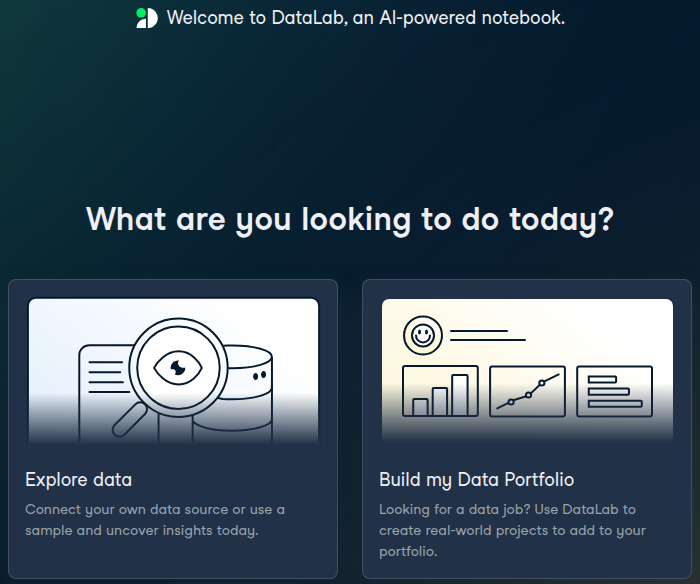
DataLab is more powerful in raw capability. It can do actual work for you, not just teach you. The database connections are valuable for building real analyses.
The trade-off: when AI is this powerful, it can do your thinking for you. There's a risk of not learning underlying concepts because the tool handles complexity. DataLab is better for productivity than learning.
The free tier is limited to 3 workbooks and 15 to 20 AI prompts. Premium unlimited access costs extra.
Our verdict: For learning fundamentals, Chandra's teaching-focused approach builds stronger understanding without doing the work for you. For experienced users needing productivity tools, DataLab offers more powerful capabilities.
What Serious Learners Say About Each Platform
Let's look at what real users report, organized by their goals.
For Career Changers
Career changers using Dataquest consistently report better skill retention. The realistic exercises build confidence for job interviews. Portfolio projects directly lead to interview conversations.
One user explained it clearly:
I like Dataquest.io better. I love the format of text-only lessons. The screen is split with the lesson on the left with an code interpreter on the right. They make you repeat what you learned in each lesson over and over again so that you remember what you did.
Dataquest success stories include career changers moving into data analyst and data scientist roles at companies like Facebook, Uber, Amazon, and Deloitte. The common thread: they built portfolios using Dataquest's downloadable projects, then supplemented them with additional independent work.
The reality check both communities agree on: you need independent projects to demonstrate your skills. But Dataquest's downloadable projects give you a significant head start on building your portfolio. DataCamp users consistently report needing to build separate portfolio projects after completing courses.
For Professionals Upskilling
Both platforms serve upskilling professionals, just differently. DataCamp's breadth suits exploratory learning when you need exposure to many tools. Dataquest's skill paths allow targeted improvement in specific areas.
DataCamp's mobile access provides clear advantages for busy schedules. Being able to practice during commutes or lunch breaks fits professional life better for some people.
For Beginners Exploring
DataCamp's structure helps beginners overcome initial intimidation. Videos make abstract concepts more approachable. The scaffolding in exercises reduces anxiety about getting stuck. Gamification maintains motivation during the difficult early stages.
Many beginners appreciate DataCamp as an answer to "Is data science for me?" The lower price and gentler learning curve make it easier to explore without major commitment.
What the Ratings Tell Us
On Course Report, an education-focused review platform where people seriously research learning platforms:
Dataquest: 4.79 out of 5 (65 reviews)
DataCamp: 4.38 out of 5 (146 reviews)
Course Report attracts learners evaluating platforms for career outcomes, not casual users. These are people investing in education and carefully considering effectiveness.
Dataquest reviewers emphasize career transitions, skill retention, and portfolio quality. DataCamp reviewers praise its accessibility and breadth of content.
Consider which priorities match your goals. If you're serious about career outcomes, the audience rating Dataquest higher is probably similar to you.
Making Your Decision: A Framework
Here's how to think about choosing between these platforms.
Choose Dataquest if you:
- Are serious about career change to data analyst, data scientist, or data engineer
- Need portfolio projects for job applications and interviews
- Want realistic problem-solving practice that simulates actual work
- Have dedicated time for focused desktop learning sessions
- Value depth and job-readiness over broad tool exposure
- Are upskilling for specific career advancement
- Want guided learning through realistic scenarios with full support
- Can invest more upfront for potentially faster career outcomes
- Prefer reading and immediately applying over watching videos
Choose DataCamp if you:
- Are exploring whether data science interests you before committing
- Want exposure to many technologies before specializing
- Learn significantly better from video instruction
- Need mobile learning flexibility for your lifestyle
- Have a limited budget for initial exploration
- Like gamification, quick wins, and progress rewards
- Work in an organization already using it for training
- Want to learn a specific tool quickly for immediate work needs
- Are supplementing with other learning resources and just need introductions
The Combined Approach
Some learners use both platforms strategically. Start with DataCamp for initial exploration and confidence building. Switch to Dataquest when you're ready for serious career preparation. Use DataCamp for breadth in specialty areas like specific cloud platforms or tools. Use Dataquest for depth in core data skills and portfolio building.
The Reality Check
Success requires independent projects and consistent practice beyond any course. Dataquest's portfolio projects give you a significant head start on what employers want to see. DataCamp requires more supplementation with external portfolio work.
Your persistence matters more than your platform choice. But the right platform for your goals makes persistence easier. Choose the one that matches where you're trying to go.
Your Next Step
We've covered the meaningful differences. Portfolio building and realistic practice versus broad exploration and mobile convenience. Career-focused depth versus technology breadth. Desktop focus versus mobile flexibility.
The real question isn't "which is better?" It's "which matches my goal?"
If you're planning a career change into data science, Dataquest's focus on realistic problems and portfolio building aligns with what you need. If you're exploring whether data science interests you or need broad exposure for your current role, DataCamp's accessibility and breadth make sense.
Both platforms offer free tiers. Try actual lessons on each before deciding with your wallet. Pay attention to which approach keeps you genuinely engaged, not just which feels easier. Ask yourself honestly: "Am I learning or just completing exercises?"
Notice which platform makes you want to come back tomorrow.
Getting started matters more than perfect platform choice. Consistency beats perfection every time. The best platform is the one you'll actually use every week, the one that makes you want to keep learning.
If you're reading detailed comparison articles, you're already serious about this. That determination is your biggest asset. It matters more than features, pricing, or course catalogs.
Pick the platform that matches your goal. Commit to the work. Show up consistently.
Your future data career is waiting on the other side of that consistent practice.