What Is RAG? A Complete Guide
Retrieval-augmented generation, or RAG, is a method for grounding a language model's response in external data that it didn't have access to during training. Instead of relying only on what the model learned, you give it a fresh set of facts pulled from a knowledge base right before it generates an answer.
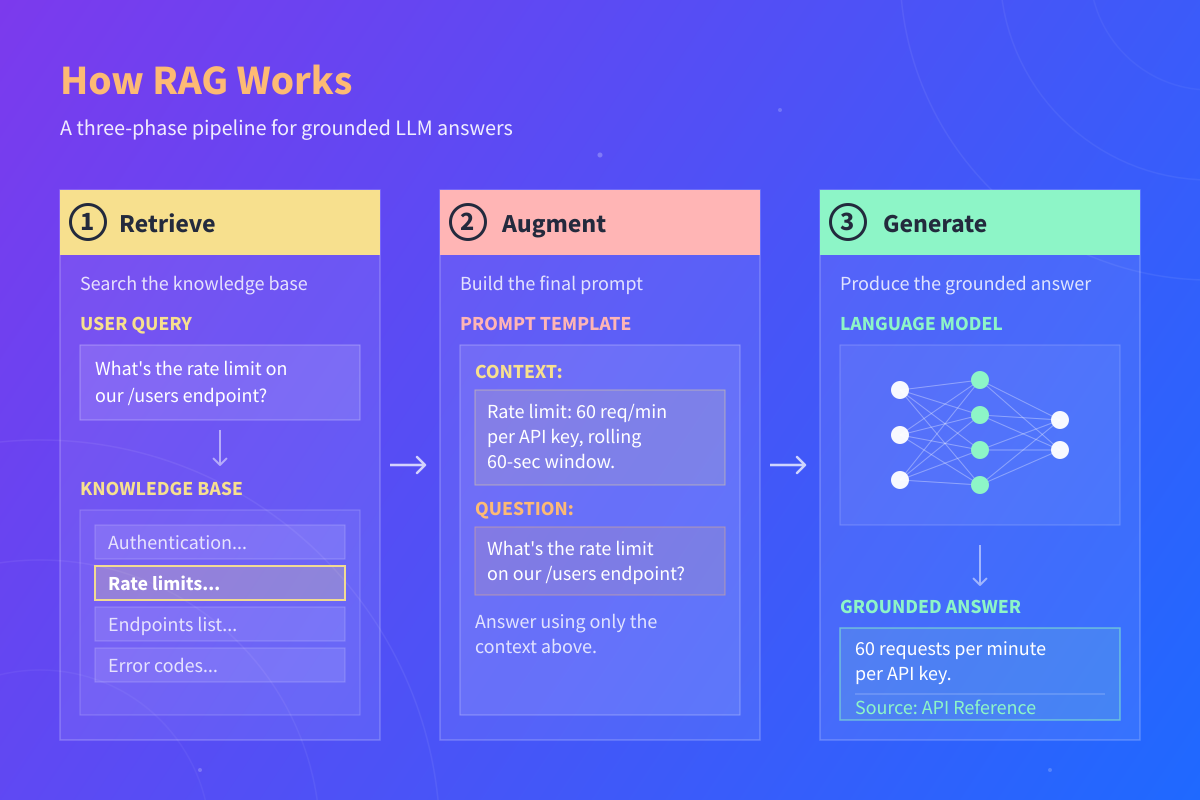
The technique has three phases:
- Retrieve. The system searches a provided knowledge base and pulls out chunks of text relevant to the user's query.
- Augment. Those chunks get combined with the user's question into a single prompt that gives the model context to work from.
- Generate. The language model produces an answer using both the retrieved context and its general language skills.
The idea traces back to a 2020 paper by Patrick Lewis and a team of researchers at Facebook AI Research, University College London, and NYU, which introduced RAG as a general-purpose approach for connecting language models to external knowledge sources. Since then, it's become one of the standard approaches for building AI applications that need to work with private, recent, or domain-specific data.
Why LLMs Need RAG in the First Place
Large language models are trained on vast amounts of text, which gives them broad knowledge and a strong sense of how language works. But they have a few weaknesses that show up quickly once you try to build real AI applications on top of them:
- Their training data has a cutoff date, so they don't know about anything that happened after it.
- They have no access to private information, such as your company's internal documents or your customers' records.
- When they don't know something, they rarely admit it. Instead, they produce a confident-sounding answer that turns out to be invented, a failure mode called hallucination.
- They generate text from their parameters rather than from a specific data source; they can't tell you where an answer came from.
When implemented well, RAG addresses all four problems at once. The retrieved context gives the model current facts, private data to work from, something concrete to stay grounded in, and clear sources the user can verify. That's why RAG is so common in LLM applications, from support chatbots to internal documentation assistants and other systems that need answers grounded in specific sources.
How Retrieval-Augmented Generation Works, Step by Step
A RAG system has two jobs. First, it prepares a searchable knowledge base. Then, it uses that knowledge base to answer questions at runtime.
Step 1. Ingest and Index Your Knowledge Base
Before a RAG system can answer anything, it needs documents to pull from. You start by breaking those documents into smaller pieces called chunks. Chunk size matters. Too small, and a chunk loses context. Too large, and it dilutes what's relevant during retrieval.
Each chunk then passes through an embedding model, which converts it into a vector, basically a list of numbers that captures the chunk's meaning. Those vector embeddings get stored in a vector database like Pinecone, Weaviate, Chroma, or pgvector. The database is optimized for finding similar vectors quickly, which is what makes retrieval fast at scale.
Step 2. Retrieve Relevant Chunks for the User Query
When a user sends a query, the system embeds the question using the same embedding model, then searches the vector database for chunks whose embeddings are closest to the query's embedding. Closest usually means most similar in meaning, which is why this is called semantic search. It's information retrieval, but with meaning instead of just keywords.
Some systems combine semantic search with keyword search (often called hybrid search) to capture cases where the user types specific terms, such as product names or acronyms. The top few results then pass through a reranking model that scores them more carefully before handing them to the next step.
Step 3. Augment the Prompt
The retrieved context gets inserted into a prompt template along with the user's question. A simple template looks like this:
CONTEXT:
<retrieved chunks>

QUESTION:
<user's question>

PROMPT:
Answer the QUESTION using only the CONTEXT above.
If the CONTEXT doesn't contain the answer, say you don't know.
That last instruction matters. It's what instructs the model to stay honest when retrieval comes up empty. Without it, the model will fall back on its training data and happily invent an answer.
Step 4. Generate the Grounded Answer
The augmented prompt goes to the LLM, which produces an answer based on the retrieved context rather than only on what it memorized during training. A well-designed RAG system also returns the source of the retrieved information, so the user can verify the answer themselves.
Walking Through a RAG Query End to End
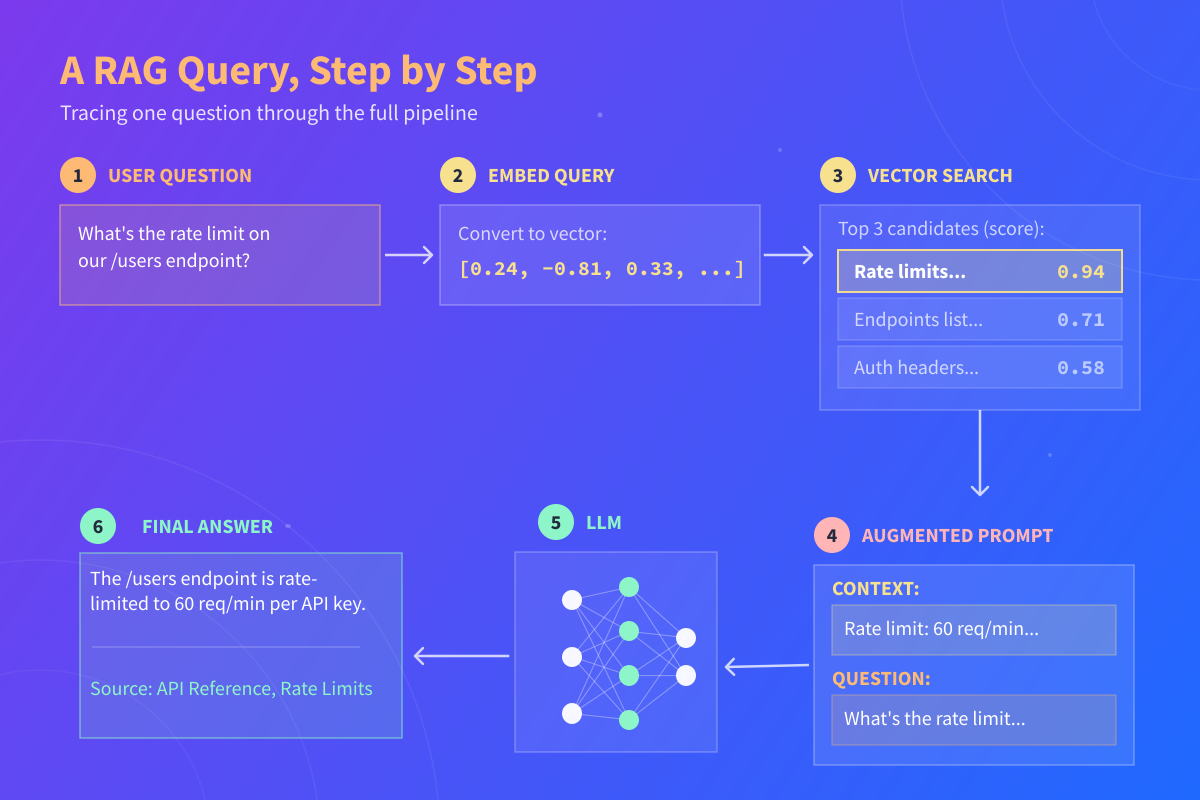
Let's take a look at what the full flow looks like for a single question. Imagine a company has ingested its API reference docs into a vector database so their developers can ask questions in plain language. A developer asks:
The retrieval step. The system embeds the user query and searches the vector database. The top result is a chunk from the API docs (values below are illustrative; real limits vary by API):
Retrieved chunk (API Reference, Rate Limits section):

The /users endpoint is rate-limited to 60 requests per minute
per API key. Exceeding this limit returns a 429 Too Many
Requests response. Rate limits reset on a rolling 60-second
window. Contact the platform team to request a higher limit
for production workloads.
The augmented prompt. That retrieved context gets slotted into the prompt template:
CONTEXT:
The /users endpoint is rate-limited to 60 requests per minute
per API key. Exceeding this limit returns a 429 Too Many
Requests response. Rate limits reset on a rolling 60-second
window.

QUESTION:
What's the rate limit on our /users endpoint?

Answer the question using only the context above.
If the context doesn't contain the answer, say you don't know.
The generated response. The LLM replies:
Notice what the model didn't do. It didn't guess a number. It didn't pull from some vague memory of what typical REST APIs usually allow. It used the exact policy that came back from retrieval and pointed to the source. That's the value of RAG in one query.
When RAG Is the Right Choice (and When It Isn't)
RAG is the right tool when the information your model needs changes often, when it lives in private documents, when users need to verify sources, or when the knowledge base is too large to fit inside a prompt.
It's not always the best choice. If you want the model to learn a specific writing style, tone, or output format, fine-tuning is usually a better fit. If the information you need is small and stable enough to include directly in the prompt every time, long-context prompting can be simpler and cheaper to maintain. For some tasks, you'll use more than one approach together, like fine-tuning a model on your company's tone and using RAG to give it current facts.
Here's a quick comparison of these three approaches:
| RAG | Fine-tuning | Long-context prompting | |
|---|---|---|---|
| Best for | Giving the model facts from an external data source | Teaching the model a style, tone, or format | Small, stable knowledge that fits in every prompt |
| Handles fresh data | Yes, just update the knowledge base | No (requires another fine-tuning job per update) | Yes, but you paste it in each time |
| Handles private data | Yes | Yes, but data is baked into the model | Yes |
| Supports citations | Yes | Not inherently; no live source retrieval | Limited |
| Cost to update | Low (re-index documents) | High (retrain the model) | Low (edit the prompt) |
The useful question isn't "should I use RAG?" It's "what does my model need that it doesn't already have?" If the answer is "facts," RAG is almost always a good place to start.
How to Tell If Your RAG System Is Working
Shipping a RAG system is relatively easy. Making sure it actually answers questions well takes evaluation.
Three metrics cover most of what you need early on:
- Faithfulness measures whether the generated response sticks to the retrieved context rather than inventing details.
- Answer relevance measures whether the response actually addresses the user query.
- Context precision measures whether retrieval surfaced the right chunks in the first place.
Tools like RAGAS and DeepEval automate these checks against a set of test questions and expected answers. Even a small evaluation set of 20 to 50 questions you care about is enough to catch regressions when you change your chunking strategy, swap embedding models, or upgrade your LLM.
Learning to Build with Retrieval-Augmented Generation
RAG sits at the intersection of a few skills. You need some Python, a grasp of embeddings, familiarity with vector databases and vector search, comfort with LLM APIs, and an eye for prompt engineering. None of these are exotic on their own. The interesting work is in how they fit together and in the practical judgment calls (chunk size, retrieval strategy, evaluation setup) that separate a demo from a production system.
The core idea of RAG is straightforward, but the value it provides comes from applying it well. Start with a small knowledge base, build an evaluation set, and keep iterating on retrieval quality. That's the way to go from "cool demo" to an AI system you can trust in production.
FAQs
What is RAG in gen AI?
In generative AI, RAG (retrieval-augmented generation) is a technique that lets a language model pull in outside information before it answers. Instead of relying only on what the model learned during training, the system retrieves relevant chunks of text from a knowledge base and includes them in the prompt. This grounds the response in real, verifiable data and reduces hallucinations.
Is ChatGPT a RAG LLM?
Not by default. ChatGPT is a large language model that generates answers from its training data alone. It becomes a RAG system when you connect it to an external knowledge source, like by enabling browsing, uploading documents in a Custom GPT, or building a custom app on top of the OpenAI API. The underlying model is the same; RAG is the architecture you put around it.
What is the difference between RAG and MCP?
RAG is a technique for grounding an LLM's responses in retrieved data. MCP (Model Context Protocol) is a standard for how AI applications connect to external tools and data sources. They solve different problems and often work together. You might use MCP to give a model access to a knowledge base, then use RAG patterns to retrieve and inject the right information into prompts.
What's the difference between RAG and an LLM?
An LLM is the language model itself: a neural network trained to generate text. RAG is a technique applied to an LLM to give it access to outside information at runtime. So RAG isn't an alternative to using an LLM. It's a way of using one more effectively when you need answers grounded in private, recent, or domain-specific data.
Does RAG eliminate hallucinations?
No, but it significantly reduces them. Even with retrieved context, a model can still hallucinate if the retrieval returns irrelevant chunks, the prompt doesn't constrain the model tightly, or the question goes beyond what the context supports. The right way to think about RAG is as a major reduction in hallucination risk, not a guarantee against it. Solid retrieval, clear prompt instructions, and ongoing evaluation are what bring that risk down further.
Do I need a vector database to use RAG?
Not strictly. For small or simple knowledge bases, you can use keyword search, in-memory similarity search with a library like FAISS, or even a plain SQL full-text index. Vector databases become valuable when you have thousands of documents, need fast semantic search, or want features like metadata filtering and hybrid search. Start simple and add a vector database when your retrieval needs outgrow what you have.